VEED.io is an all-in-one online video editing platform that runs entirely in the browser. It aims to make video creation accessible with no complex software installation or steep learning curve. Users from casual creators to marketing teams can utilize VEED to record, edit, and share videos on any device with internet access.
However, is veed.io safe? Or is it worth it? In this article, we'll break down VEED's pricing plans, key features, and pros and cons, all based on user feedback from reliable sources and our hands-on testing.
Pros and Cons
Pros |
Cons |
|---|---|
Easy, beginner-friendly interface with clean layout and intuitive drag-and-drop editing. |
Free plan limitations, such as watermark, quality, length, etc. |
Robust editing features, including effects, transitions, filters, cropping, multi-track timelines, etc. |
Many features behind paywalls, such as HD export, longer videos, Brand Kit, etc. |
The automatic AI subtitle generator and one-click translations are highly valued. |
Subscription can be pricey for long-term use if not paid annually. |
Web-based & collaborative for easy sharing and collaboration. |
Lag, buffer, and other performance issues with big files or complex projects. |
Rich built-in library of stock videos, music, and templates without external resources. |
Occasional bugs or glitches may result in the loss of progress or the need to redo work. |
AI tools add value, such as clean audio, background noise removal, text-to-speech, etc., streamline tedious tasks. |
Slow or unhelpful customer service; billing practices (auto-renewals, no refund after any use), etc. |
Is VEED.io Safe
VEED.io is a legitimate online video editing platform that generally prioritizes data security and user privacy. It employs access controls, HTTPS encryption, and achieves SOC 2 compliance.
However, due to a misconfigured cloud storage bucket, thousands of user-uploaded videos were exposed in 2019, which included family films and home-made pornography. In addition, some users have reported scam-like billing practices, including unexpected annual charges and ongoing charges after cancellation.
So, overall user reviews are mixed. Many praise VEED's intuitive interface and AI-driven features, but common complaints include performance issues, high pricing or upsells, and dissatisfaction with customer support.
Pricing
VEED.io offers a Free plan and several paid tiers to suit different needs.
- Free ($0): Basic editing tools, 720p max export, 10 min video length, 2 GB storage. Includes auto-subtitles (30 min/mo) but exports have a VEED watermark. Limited stock media and 1 GB upload size cap.
- Lite ($19/month or $144/yr): No watermark, up to 1080p HD exports, 25 min video length. Increases cloud storage to 5 GB. Allows larger file uploads with no size limit. Includes unlimited stock assets, ~12 hours/year of auto-subtitles, 60 min/yr transcription, 360 min/yr text-to-speech, and basic AI tools.
- Pro ($49/month or billed $288/yr): All Lite features plus longer videos (120 min length) and more storage (20 GB). Supports 4K Ultra HD export. Auto-subtitle allowance doubles to ~24 hours/year; text-to-speech up to 12 hr/yr. Adds advanced AI, such as unlimited auto-translate, voice cloning, 60 min/yr AI avatars, 3 hr/yr voice translation. Also includes priority support, full brand kit, and ability to download subtitle files.
- Enterprise (Custom): Unlimited video length, unlimited storage and usage limits tailored to the organization. Includes dedicated team collaboration features: private workspaces, single sign-on security. Advanced branding with custom templates, fonts, and watermarks for consistent corporate identity. All AI features at expanded or no limits to support large-scale content creation. Priority onboarding and account management.
VEED's pricing can be high, especially if you opt for monthly billing on Pro or need an Enterprise plan. While the cost may be justified by the features, it's a limitation for budget-conscious users.
Features
VEED.io offers an impressive toolset, from basic editing functions to advanced AI-powered tools and collaboration capabilities. It bundles features that would normally require several separate apps into one platform.
1. Intuitive Online Editor
VEED provides a drag-and-drop timeline editor that runs in the browser, with a clean and beginner-friendly interface. You can trim, cut, and arrange clips easily, and add text, music, images, effects, and transitions with just a few clicks. No installation is required, and the web app can function for basic tasks.
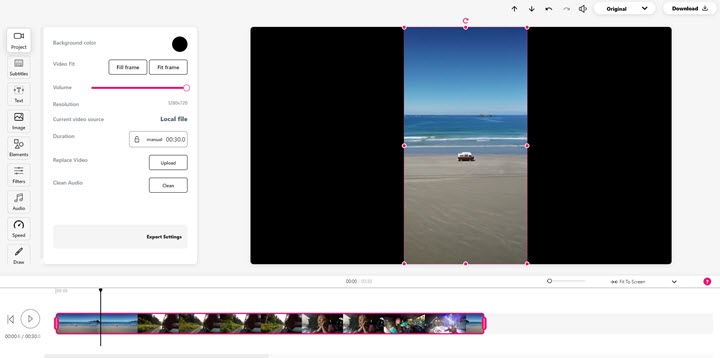
On other hand, VEED is optimized for simplicity by design. This means it lacks some advanced controls found in professional editing software. For example, you have fewer options to fine-tune transitions, no intricate color grading tools, and limited precision for effects parameters.
2. AI-Powered Editing Tools
VEED stands out for its growing suite of AI tools. For example, Magic Cut can automatically pick the best clips from footage, and the Clean Audio filter reduces background noise with one click. There's also Green Screen keying and video background removal, eye contact correction, and even AI avatars that can generate a talking presenter.
But we also found that some of these features aren't perfect yet. The AI eye contact tool could mis-color eyes or look unnatural; The background removal can be hit-or-miss; AI voice overs sometimes sound robotic or unusable.
3. Auto Subtitles & Translation
One of VEED's most popular features is its automatic subtitle generator powered by AI. According to VEED, the AI transcription is ~98% accurate, and the platform even supports voice translation/dubbing with AI voices (in beta) for some languages.

It can transcribe speech in real-time and supports over 100+ languages for transcription and translation. Creators can automatically generate captions, then style and edit them within the editor. VEED also allows one-click subtitle translation into dozens of languages, useful for reaching global audiences. You can export subtitle files or burn captions into the video directly.
4. Text-to-Speech & Voice Cloning
Beyond subtitles, VEED includes text-to-speech tools that can generate voiceovers from text, with a variety of AI voices. In the Pro tier, it even offers voice cloning – the ability to create a custom AI voice that mimics a person's tone for dubbing or narration. These features open up possibilities for creators to add narration or translate content without recording new audio.
5. Screen & Webcam Recording
VEED has a built-in screen recorder and webcam recorder. Users can capture their screen, their webcam, or both simultaneously with the PiP mode, which is ideal for recording tutorials, presentations, gameplay, or reaction videos. The recordings go straight into VEED's editor for trimming or annotation. This integrated approach removes the need for third-party recording software.
6. Branding & Customization
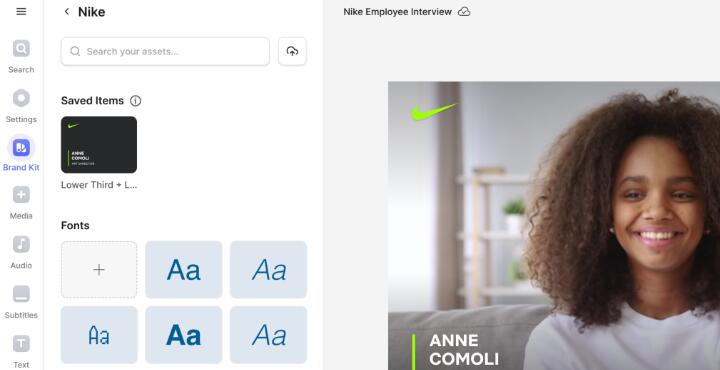
VEED's paid plans include Brand Kit features to maintain consistent branding. Users can upload their logo, set brand colors and fonts, and apply them to video elements easily. Pro and Enterprise plans allow custom watermarks, branded templates, and font uploads. This is especially useful for businesses and social marketers ensuring their videos align with their brand identity.
7. Stock Media Library & Templates
To help polish videos, VEED provides a library of royalty-free stock assets, including video clips, images, sound effects and music tracks, that can be added to projects. Paid plans unlock the full stock library, and Lite and above give unlimited access.
In addition, VEED offers many editable templates for different formats and purposes, so users can start from a designed template and customize it. Templates are available for multiple aspect ratios to cater to YouTube, Instagram, TikTok, etc., and you can easily resize an existing video to different formats for various platforms.
8. Collaboration Tools
Unlike many offline editors, VEED is cloud-based which enables real-time collaboration. Teams can have multiple editors or reviewers on a project. There's a commenter/reviewer mode where stakeholders can leave time-stamped comments on the video. Enterprise plans support separate workspaces for different teams and single sign-on for security. All project files and edits are stored online, avoiding the headache of sending large files back and forth and ensuring everyone sees the latest version.
9. Exporting & Sharing
Once editing is done, VEED can export videos in various resolutions and formats. Paid plans support 1080p or 4K output. There are options to compress videos or convert format. Because VEED is online, you can also share videos via a URL. This is useful for quickly sharing drafts or final videos without forcing viewers to download large files.
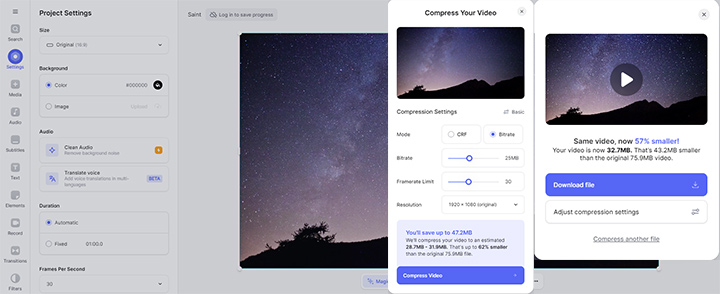
However, The free version of VEED stamps a watermark on all videos. Also, free exports are capped at 720p resolution and 10 minutes in length.
Is It Worth It
VEED.io's limitations center around the trade-offs of a convenient online tool: you get accessibility and speed, but you might face performance hiccups and a less granular feature set compared to pro desktop software.
Use VEED.io If You Are:
- Beginners and Casual Creators: If you are new to video editing, VEED's drag-and-drop interface and templates make it easy to create polished videos without a steep learning curve.
- Content Creators on YouTube, TikTok, and Instagram: Auto-captions, resizing tools, and stock templates help you quickly generate short-form or long-form content optimized for different platforms.
- Social Media Marketers: VEED's templates, brand kit, and collaboration features make it ideal for producing branded promotional clips, ads, or educational videos for campaigns.
- Podcasters: The waveform generator and easy subtitle tools are perfect for turning audio into engaging shareable content.
Avoid VEED.io If You Are:
- Advanced Video Editors and Filmmakers: If you need precise control, such as color grading, advanced transitions, effects, VEED will feel limited compared to pro tools.
- Users on a Tight Budget: The free plan is heavily restricted with watermarks, short video limits, and capped export quality. To use VEED professionally, you'll almost certainly need to pay, which some find expensive.
- Those Handling Large or Complex Projects: VEED can lag or even crash with big files or multi-layered edits. Desktop software handles such workloads more reliably.
- Privacy-Sensitive Users: As a cloud-based platform, VEED requires you to upload media to its servers. Businesses working with confidential or sensitive content may prefer offline solutions.
When to Consider An Alternative
While VEED.io is excellent for quick, browser-based editing, some users may prefer a more powerful desktop solution that avoids the limitations of an online editor. This is where VideoProc Vlogger comes in.
Unlike VEED's free plan, VideoProc Vlogger is completely free and exports without watermarks. This makes it ideal for creators who want professional-looking results without a subscription.
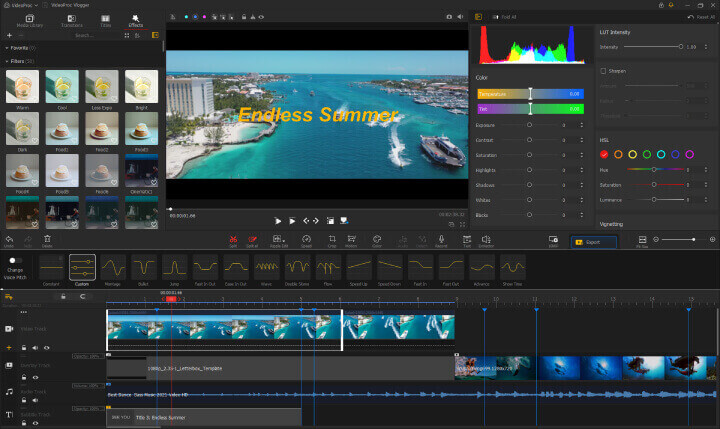
In addition, VideoProc Vlogger offers features beyond VEED's scope, such as motion editing, speed ramping, keyframe control, and more precise adjustments. It's optimized with hardware acceleration, allowing it to process 4K and even high-frame-rate videos without lag. All these tools give creators creative flexibility for cinematic or complex edits.

VideoProc Vlogger - 100% Free VEED.io Alternative
- 100% free video editor with no hidden restrictions, no watermark
- Desktop-based software without file uploads to the cloud
- Fast and high-quality 4K/8K/HDR output with full GPU acceleration
- Easy to use with the simple and intuitive interface
- Advanced features: speed ramping, color grading, LUTs, etc.