Upgraded AI Performance in V8
Video streaming booms these days. While H.264 has been the most commonly used video encoding format for over a decade, the growth of 4K and 8K streaming is driving demand for more efficient codecs. The newer codec, such as AV1, delivers a substantial leap in compression efficiency without requiring licensing fees. All codecs have their own strengths, limitations, and suitable usage scenarios. In this case, choosing the right codec is crucial.
This guide compares AV1 vs H.264, including compression efficiency, speed, licensing, compatibility, and use cases, to help you pick the best option for your next project.
What are AV1 and H.264?
What is H.264?
Released in 2003 by ISO/IEC MPEG and ITU-T's Video Coding Experts Group, H.264, also known as AVC (Advanced Video Coding), is a digital video compression standard that reduces video data while maintaining high quality.
H.264 compresses video by predicting motion between frames and encoding only the differences, then applying a discrete cosine transform (DCT) and quantization. The result is high-quality video at moderate bitrates.
What is AV1?
AV1 is an open, royalty-free codec developed by the Alliance for Open Media (AOMedia) in 2018 as a successor to VP9 and a competitor to H.264 and HEVC. Unlike H.264's patent-pool licensing, AV1 is royalty-free.
AV1 aims to improve compression efficiency, reduce bandwidth requirements and provide a free alternative to proprietary codecs. It uses flexible partitioning and improved motion compensation to deliver similar visual quality at much lower bitrates.
Quick Comparison AV1 vs H.264
| Feature | AV1 | H.264 |
|---|---|---|
Developer & release |
Alliance for Open Media, 2018 |
ISO/IEC MPEG & ITU-T VCEG, 2003 |
Licensing |
Open and royalty-free |
Patent-protected; commercial use requires royalties |
Compression tools |
Flexible block sizes (4x4–128x128), intra/inter prediction, DCT, smart filters like CDEF and Loop Restoration |
Macroblocks (16x16) with motion prediction, DCT, quantization, CABAC/CAVLC entropy coding |
Compression efficiency |
Significantly higher; ~30–50% lower bitrate for similar quality (with research showing up to 80%+ at 8K). Excellent quality at low bitrates. |
Baseline; higher bitrates needed for the same quality. Shows artifacts at low bitrate; less efficient especially for HD/UHD. |
Hardware support |
Growing; supported in recent GPUs, smartphones, smart TVs and browsers. Not yet in most cameras. |
Widespread; compatible with almost all GPUs, mobiles, cameras. |
Encoding complexity |
Very high CPU complexity. Software encodes are much slower than H.264. Real-time encoding requires hardware assist or optimizations. |
Moderate complexity. Fast software encoding; widely supported hardware encoders for real-time applications. |
Decoding support |
Growing hardware decode support. Software decoders available but CPU intensive. Supported in most modern browsers and OS with appropriate hardware. |
Universal hardware decode support across virtually all devices. Very low CPU requirements with hardware; legacy and modern devices all handle H.264. |
Use cases |
Best for streaming and downloadable video where bandwidth saving is critical, such as OTT streaming, social media, UHD content. Good for archival due to high efficiency. Emerging use in real-time for higher quality calls (if hardware available). Not yet common in legacy broadcasts or as an editing format. |
Best for real-time and legacy compatibility, such as video conferencing, and live scenarios requiring broad device support. Still used heavily in broadcast and cable television. Common format for content production exchange and consumer video. Less optimal for cutting-edge streaming due to bitrate overhead. |
Comparing AV1 and H.264
1. Compression efficiency and file size
H.264's Moderate Compression
H.264 compresses video by dividing frames into 16x16 macroblocks, predicting motion across frames and encoding differences. Techniques like DCT, quantization and entropy coding enable it to deliver high-quality video at relatively small file sizes.
Compared with older standards like MPEG-2, H.264 achieves similar quality at roughly half the bitrate. This efficiency made H.264 the most common codec for Blu-ray discs and streaming services such as Netflix, YouTube and Amazon Prime Video.
AV1's Superior Compression
AV1 introduces more flexible superblocks (4x4 up to 128x128 pixels) and more sophisticated prediction modes, which in principle provide better compression efficiency and improve upon H.264.
In practical terms, we see AV1 can achieve the same video quality with much lower bitrates. Facebook's real-world testing shows that the AV1 reference encoder delivered ~50% better compression than x264 main profile, with most videos used in the experiments being SD or HD.
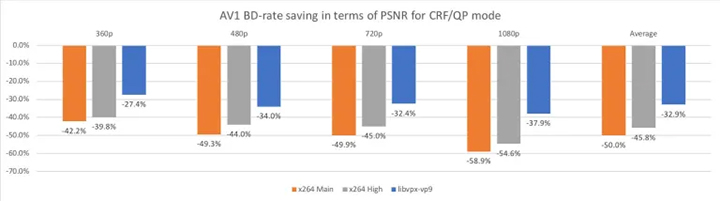
These savings grow with higher resolutions and complex content. According to a 2024 paper from the University of Zilina, AV1 required ~33% less bitrate at Full HD (1080p) and up to ~81% less at 8K resolution, compared to H.264.
For developers and platforms aiming to reduce bandwidth costs without sacrificing quality, AV1's superior compression is its strongest selling point.
2. Encoding speed and complexity
A key trade-off for AV1's efficiency is computational complexity. Encoding AV1 video requires more processing power and takes longer than encoding H.264.
The codec's sophisticated prediction and partitioning algorithms demand significant CPU or GPU resources, which can be challenging for live streaming or real-time applications. In other words, AV1 saves bandwidth and storage by using more advanced algorithms, but these algorithms demand more processing time to encode. In contrast, H.264 is computationally lighter and faster to encode, historically making it more practical for user-generated content and real-time applications on legacy hardware.
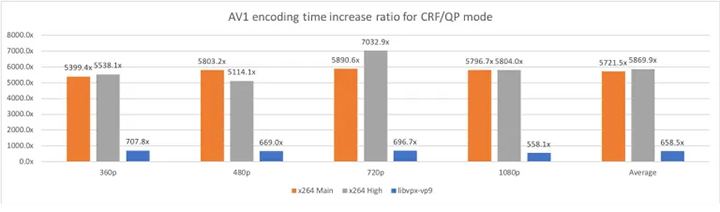
This is also the case in real-world testing. We conducted a small-scale encoding test with 12 videos at 1080p resolution for AV1, H.264, and HEVC. The results show that as the bitrate increases, H.264's advantages over AV1 in speed and CPU utilization become more pronounced. As hardware support for AV1 grows and encoders become more optimized, this gap is narrowing, but it is still a consideration in 2025.
3. Licensing and cost
One of the biggest differences between the two codecs is licensing. H.264 is covered by patents administered by a licensing pool; commercial use typically requires paying royalties to patent holders. Cisco's openH264 project pays royalties to MPEG LA to allow free end-user streaming, underscoring the legal complexity around H.264 licensing.
AV1, on the other hand, was created specifically as a royalty-free codec; companies can use it without paying licensing fees. This makes AV1 attractive for large-scale streaming services or open-source projects that want to avoid the costs and legal uncertainties associated with patented codecs.
4. Hardware and software support
H.264 enjoys near-universal hardware support. Almost all modern smartphones, PCs, TVs and streaming devices include H.264 decoding in silicon, and hardware encoding for H.264 is widely available and mature. The codec is used across Blu-ray, broadcast television standards, and major streaming platforms. This widespread support makes H.264 playback efficient and battery-friendly on virtually any device without additional software.
By contrast, AV1 hardware decoding and encoding is only just emerging. Starting around 2020, many new chips began adding AV1 decoders. Apple's A17 Pro mobile chip and M3/M4 Silicon include AV1 hardware decoding in late 2023. On the software side, Chrome, Firefox, Edge, and other Chromium-based modern browsers all support AV1 video playback when running on capable hardware. Major streaming platforms like YouTube and Netflix now deliver some content in AV1, especially for mobile and bandwidth-constrained scenarios.
When broad device compatibility is essential, H.264 still has the edge.
5. Use cases and applications
Streaming Services
H.264 has been the workhorse codec for streaming for a long time, supported on virtually every client device. However, its lower compression means higher CDN costs and bandwidth usage. For streaming providers, AV1's impact is substantial. It enables delivering 4K, HDR, and even 8K content at lower bitrates, which saves bandwidth costs and improves user experience under bandwidth constraints.
Many streaming services now maintain multi-codec ladders. They still provide H.264 streams for legacy device compatibility, but offer AV1 streams for devices that can play them. Netflix, for instance, began using AV1 for mobile streaming on Android in 2020, reporting about 20% improved compression efficiency over VP9. YouTube can stream to mobile devices in AV1 at higher resolutions within users' data caps. In summary, the trend in OTT streaming is a migration toward AV1 for its bandwidth savings.
Broadcasting
Broadcast and cable television have traditionally been slower to adopt new codecs because of longer device upgrade cycles and standardization processes. H.264 is widely used in HD broadcast. For Ultra-HD broadcasts, some markets moved to HEVC. As of 2025, AV1 is not yet a standard part of most broadcast standards, and no major live TV network is streaming in AV1 at scale today.
Video Editing and Production Workflows
H.264 has been the default choice when it comes to video editing, post-production, and camera workflows. Many consumer and prosumer cameras record video in H.264, editing software all support H.264 import and export. Thanks to hardware acceleration, even 4K H.264 editing is commonplace.
AV1 is still an emerging player. Currently, few (if any) cameras record in AV1, and professional editing tools, such as Adobe Premiere Pro and DaVinci Resolve have limited support for AV1 files.
However, H.264 and AV1 are both lossy codecs. They are not ideal for multi-generation editing because repeated decode and re-encode can degrade quality. Video editing workflows often use ProRes, DNxHD, or other intraframe codecs internally.
Which Codec Should You Choose
For average users, your choice mostly depends on what you want to do with your videos.
Choose H.264 for:
- maximum compatibility across all devices, browsers, and media players.
- fast encoding speeds, such as compressing a video quickly before uploading.
- streaming to platforms or devices that still primarily rely on H.264.
- older hardware or software that doesn't support AV1 decoding.
- smooth playback everywhere without worrying about larger file sizes.
Choose AV1 for:
- smaller file sizes while keeping the same visual quality.
- uploading to platforms like YouTube, Netflix, or Twitch, which already support AV1.
- bandwidth savings, especially for high-resolution video like 4K or 8K.
- archiving or storing lots of videos and saving disk space.
- efficiency without worrying about longer encoding times.
- a royalty-free codec for long-term projects, free of licensing issues.
In a word, the right choice depends on your priorities. For average users, here's the rule of thumb: H.264 will just work for watching videos. If your software or hardware supports it, AV1 is worth trying for uploading or sharing with smaller file sizes.
How to Convert AV1 to H.264 and Vice Versa
Converting AV1 to H.264 is straightforward with a video converter. Besides the open-source, non-GUI-based FFmpeg, VideoProc Converter AI is a reliable choice for average users.

VideoProc Converter AI - Easy Yet Powerful AV1 to H264 Converter
- Support 420+ codecs and formats, including AV1, H.264, HEVC, etc.
- Intuitive interface; 1-click H.264 and AV1 presets for different use cases
- Customizable video codec, bitrate, frame rate, resolution, quality, profile, etc.
- Fast batch conversion with Level-3 Hardware Acceleration
- All-in-one: AI tools, converter, compressor, DVD, downloader, screen recorder.



Steps to convert AV1 to H.264
Here's how to convert between AV1 and H.264.
Step 1. Download and install VideoProc Converter AI to your device. Both Windows and macOS are supported.
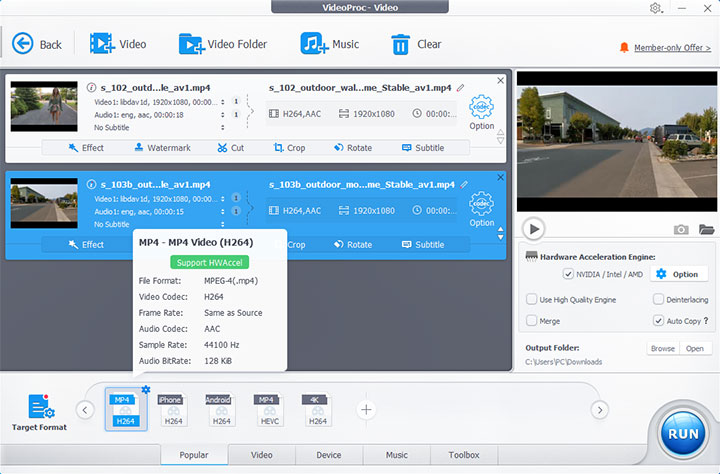
Step 2. Enable Video Converter from the main interface, then drag and drop the videos you want to convert into the program.
Step 3. For AV1 to H.264 conversion, choose MP4 H.264 as the output format at the bottom of the interface. To convert H.264 to AV1, click Target Format, then search and select AV1 as the output format.
Step 4. Adjust video parameters as needed using the Codec Option gear icon (optional).
Step 5. Click the RUN button to start AV1 to H.264 conversion.
Conclusion
Both AV1 and H.264 have their advantages, disadvantages, and suitable use cases. AV1's adoption curve is trending steeply upward for its efficiency and cost benefits. It has transitioned from a risky new codec to a practical and performance-ready codec for modern apps. Meanwhile, H.264 will continue in a fallback role, ensuring compatibility where needed.
We can expect that over the next few years, AV1 will become the default for streaming HD and UHD content on most platforms, and likely the preferred format for new content creation and delivery pipelines that target a wide audience without incurring licensing costs.