Upgraded AI Performance in V8
Before H.264 codec became the internet's video standard-bearer, the online video landscape was chaotic. Users often had to install various plugins just to watch media encoded with different codecs. However, H.264 comes with patent restrictions. Despite VP8 and VP9 being freely offered by Google, they struggled to gain popularity beyond YouTube, potentially because the open format is overseen by Google alone.
Now we have AV1 video codec, a new contender championed by a powerhouse lineup of software giants and hardware leaders, including Apple, Adobe, Google, Microsoft, Nvidia, Netflix, Vimeo, YouTube, Amazon, Intel, AMD, and Cisco. The consortium has since welcomed numerous other influential players like Google and Apple into its fold.
What Is AV1 Codec
AV1, formally known as AOMedia Video 1, stands as an open-source, royalty-free video codec specially crafted for internet-based video transmissions. It is deemed as the successor to VP9, and is developed by the Alliance for Open Media (AOMedia), a collaborative effort founded in 2015.
AV1 codec offers marked improvement in video compression efficiency, boasting up to 50% greater efficiency older formats like H.264 and HEVC. This efficiency translates to a significant file size reduction while maintaining high video quality. It's designed for web use, reducing streaming and storage costs for platforms and improving video quality for users.
AV1 supports 10-bit encoding, enabling high dynamic range (HDR) video playback. This capability enhances the viewing experience by delivering richer colors and greater contrast.
The AV1 compression technology for image results in the AVIF format.
 Further Reading: AV1 vs. H.264 Comprehensive Comparison.
Key Features
Open Source and Royalty-Free
AV1 adopts a royalty-free licensing model, making it more accessible for broader applications. On the other hand, HEVC comes with patent licensing fees and implementation complexities. This has made HEVC less suitable for free and open-source projects due to its licensing issues.
Superior Compression Efficiency
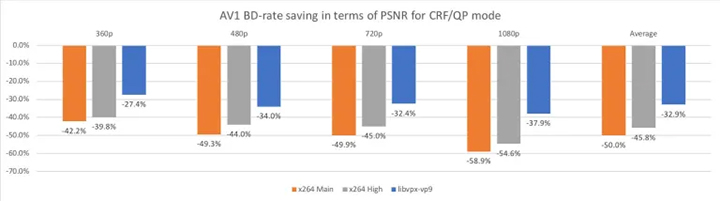
AV1 compresses videos using advanced new technologies, resulting in significantly improved compression efficiency compared to its predecessors. According to tests by Facebook, the AV1 reference encoder achieved 34%, 46.2%, and 50.3% higher data compression than libvpx-vp9, x264 High profile, and x264 Main profile, respectively.
Further Reading: VP9 vs AV1 Comprehensive Comparison.
High-Resolution Support
The codec is optimized for modern display technologies, supporting up to 8K resolution, high dynamic range (HDR), and wide color gamuts.
Good for Streaming
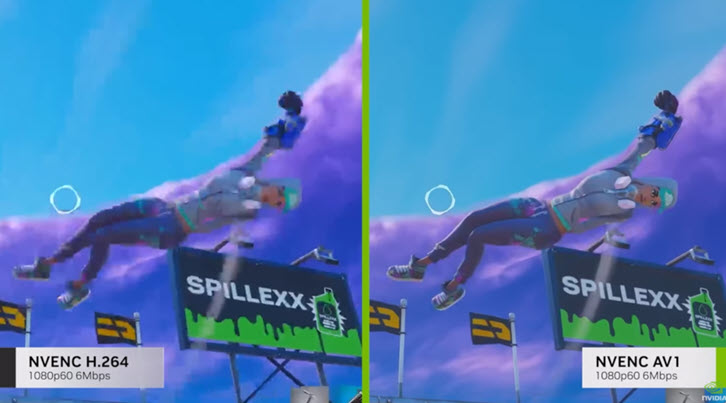
With up to 50% more efficiency and support for high-resolution content, AV1 can reduce buffering time for a better user experience, and deliver the same quality video with half the bandwidth. The previous standard for lives treaming, H.264, usually maxed out with 1080p at 60 fps at the commonly used bitrates of 6-8 Mbps and often produced blocky, grainy images for 4K and higher resolutions.
Hardware Support for AV1 Codec
#1. Hardware Decoding Support
The three major hardware manufacturers readily support AV1 decoding. Intel Arc handles AV1 video decoding with ease; both 4K and 8K playback are quite smooth. NVIDIA RTX 4090/4080 is equipped with dual encoders, and performance is decent. For the AMD RX 6000 Series, the performance is subpar, possibly due to outdated architecture.
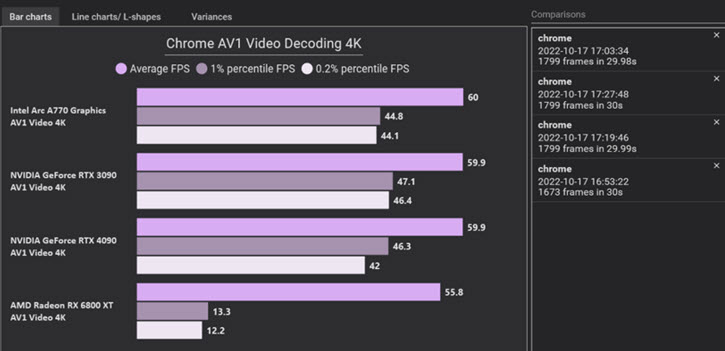
4K Decoding Performance
- Intel: Arc A770 consistently reaches the maximum 60 FPS for video playback.
- Nvidia: RTX 4090 and RTX 3090 also achieve around 59.9 FPS.
- AMD: RX 6800 XT lags behind a bit, averaging only 55.8 FPS.
8K Decoding Performance
- Intel: Arc A770 averages around 59.9 FPS with a minimum of approximately 45 FPS.
- Nvidia: RTX 4090 and RTX 3090 perform well on average but fall short in the 0.1% and 0.2% lowest FPS categories, hitting only about 17 FPS. This results in noticeable stuttering during playback.
- AMD: RX 6800 XT's performance is notably lagging behind, averaging only 22 FPS.
#2. Intel for AV1 Encoding
Intel is the first hardware maker to offer full AV1 support for decoding and encoding. Their "Arc Alchemist" series of GPUs has been officially unveiled as the first hardware encoder for AV1.
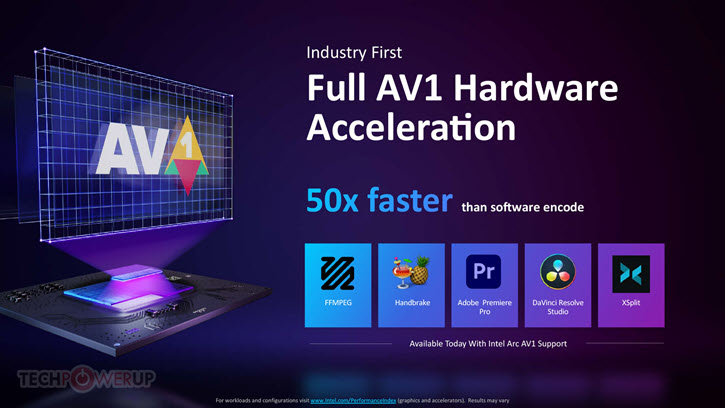
According to Intel, hardware encoding of AV1 on an Arc GPU can be up to 50 times quicker than relying solely on software. Furthermore, Intel asserts that AV1 encoding offers a 20% improvement in efficiency compared to HEVC at equivalent bit rates and is 50% more efficient than H.264.
Further Reading: AV1 vs HEVC Comprehensive Comparison.
How to check whether my Intel hardware supports AV1 encoding and decoding?
Step 1. Indentify your Intel graphics following the official guide.
Step 2. Note down the graphics, and refer to the Intel document on Media Capabilities Supported by Intel Hardware.
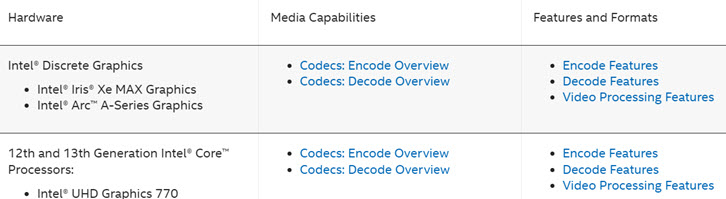
Here is a wiki list of codecs supported by Intel: https://en.wikipedia.org/wiki/Intel_Quick_Sync_Video
#3. Nvidia for AV1 Encoding
GeForce RTX 30 Series GPUs are capable of handling up to 8K HDR streams with a dedicated AV1 hardware decoder, but they don't support AV1 encoding with NVENC, which is Nvidia's hardware video encoder.
For real-time AV1 hardware encoding, all RTX 40 Series GPUs support it, including both desktop and laptop variants. This advancement allows for 40% more efficient encoding on average compared to H.264, making content creation and streaming more efficient and high-quality.
You can learn detailed information about the Nvidia GPU support for AV1 video encoding and decoding at its official page here.
#4. AMD for AV1 Encoding
AMD added support for AV1 encoding on the Radeon RX 7000 series (built on RDNA architecture) and later. AMD's VCN AV1 encoder is the first AV1 hardware encoder that the company has ever put in a consumer GPU. For the AMD RX 6000 series and before, AV1 encoding is not supported, only AV1 encoding.
While AMD's AV1 encoder doesn't quite outshine its rivals, it's a significant improvement over AMD's H.264 encoders, which have lagged behind Nvidia and Intel's offerings.
AV1 Software Implementations
Transcoding and Encoding
- HandBrake: Free video transcoding software; Adds AV1 video encoding via SVT-AV1 and Intel QSV; Supports MP4, MKV, or WebM output containers.
- FFmpeg: Open-source software project; Supports three AV1 video encoders through a command-line interface.
- VideoProc Converter AI: A beginner-friendly commercial video converter that provides hardware-accelerated conversion from and to the AV1 codec, including support for 4K and 8K video. In addition, it features various AI tools to help users enhance video, audio, and image files.
Video Recording and Live Streaming
- OBS: This free open-source video recording and live streaming software has added support for AV1 encoding for Intel, NVIDIA NVENC, and AMD hardware. Gamers with supported devices can now enjoy the realtime AV1 encoding for live streaming.
- Nimble Streamer: A software media server that supports AV1 for both live and video-on-demand (VOD) streaming. It offers AV1 live transcoding using both hardware and software encoders.
Media Players
- VLC: As one of the most popular open-source video player, VLC also catches on with AV1 decoding ability from version 3.0 and onward. For users having problems with AV1 not working in VLC, it is recommended to install libva-nvidia-driver and replace the libva-vdpau-driver.
- Microsoft Movies & TV: AV1 support is not included with Windows by default. The Movies & TV app on Windows can play AV1-encoded videos, but only after you install the free AV1 Video Extension from the Microsoft Store.
Where Is AV1 Currently Used
AV1 has garnered extensive industry support, with major content providers like Netflix, YouTube, and Facebook gradually adopting the AV1 format.
It is used in streaming services, CDNs, video conferencing, broadcasting, and online video platforms to deliver higher-quality video transmission while reducing data usage. Video editing software, such as DaVinci Resolve, has also added support for AV1 encoding.
Platforms and Streaming Services that Support AV1
YouTube: Users can turn on AV1 for YouTube video playback in settings: YouTube account > Playback and Performance > AV1 settings. You can choose among "Auto", "Prefer AV1 for SD" or "Always prefer SD"
If you are curious about whether a YouTube video is streaming in AV1, you can check the Stats for Nerds info by right-clicking on the player.
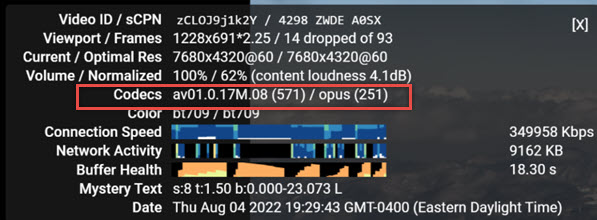
YouTube also supports AV1 broadcasting with the OBS studio 29.1 update, a nice feature that PCworld sees it as the future of GPU streaming.
Twitch: Announced at CES in January 2024, Twitch and Nvidia is working together to bring AV1 to Twitch. Twitch Closed Beta is experimenting with AV1 streaming feature on NVIDIA GeForce RTX 40 Series GPUs and powered by the OBS Studio features. AV1 will enable Twitch viewers to watch at up to 1440p 120 FPS at 8mbps.
How AV1 Compares to Other Codecs
AV1 offers superior compression efficiency and quality compared to older codecs like H.264 (AVC) and HEVC (H.265) but has higher encoding complexity and still-evolving hardware support. When compared to VP9, its open-source predecessor, AV1 is also more efficient, though both are royalty-free. A newer, royalty-bearing codec called VVC (H.266) has demonstrated even better compression than AV1 but has seen slower adoption.
| Metric | H.264 (AVC) | VP9 | HEVC (H.265) | AV1 | VVC (H.266) |
|---|---|---|---|---|---|
Release Year |
2003 |
2013 |
2013 |
2018 |
2020 |
Developer |
MPEG/VCEG |
MPEG/VCEG |
AOMedia |
MPEG/VCEG |
|
Licensing |
Royalty-bearing |
Royalty-free |
Royalty-bearing |
Royalty-free |
Royalty-bearing |
Compression |
Moderate |
High (~50% better than H.264) |
Very High (~50% better than H.264) |
Highest (~30% better than HEVC) |
Superior (~30-50% better than HEVC) |
Quality |
Good at standard definitions |
Good at high resolutions |
Excellent for 4K/8K |
Excellent for 4K/8K, HDR |
Designed for 8K, HDR, 360 videos |
Encoding Speed |
Fast |
Faster |
Faster |
Slower |
Slowest |
Decoding Speed |
Fast |
Fast |
Moderate |
Moderate |
Slowest |
Compatibility |
Very High (Universal) |
High (Web browsers, Android) |
Moderate (Growing hardware) |
Moderate (Growing hardware, browsers) |
Low (Newest, very limited adoption) |
Typical Use Cases |
General purpose, streaming |
YouTube, web-based streaming |
4K streaming, UHD broadcasting |
4K/8K streaming, future-proofing |
Ultra-high resolution, 8K, VR, cloud gaming |
What If Your Device Won't Support AV1
So far we've dived deep into the world of AV1, understanding its ins and outs, and comparing it to other codecs. But what if you've got videos in AV1 that won't play back? There may be other situations where you might want to convert videos to AV1, particularly if your goal is to reduce file size, conserve bandwidth, and ensure high visual quality for modern streaming platforms and future archival purposes.
VideoProc Converter AI is a reliable solution to convert AV1 to other formats and vice versa. This AV1 converter offers fast AV1 conversion with hardware acceleration and a beginner-friendly interface. Technically savvy users can also adjust various video parameters to achieve the desired quality. In addition to video conversion, the program provides a wide range of features for videos and AI enhancements.
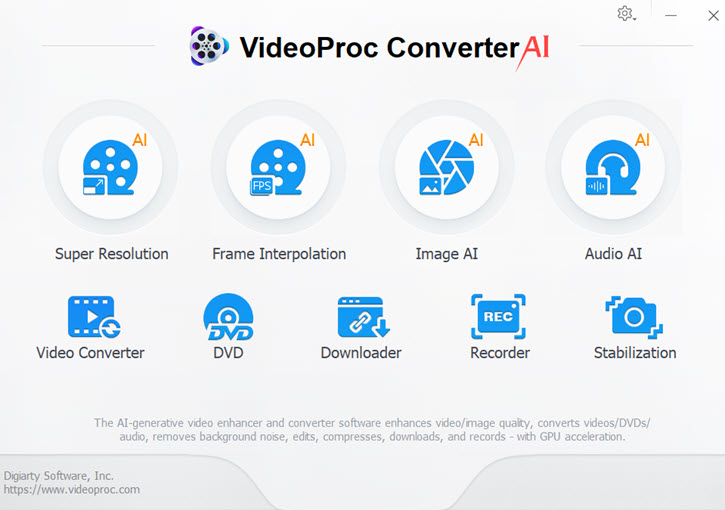

VideoProc Converter – Best Video Converter with AI Enhancer Tools
- Support 420+ formats: AV1, HEVC, MP4, MKV, MOV, AVI, WebM, ISO, VOB, MP3, etc.
- Fast AV1 converter with level-3 hardware acceleration.
- Batch convert video and audio files without sacrificing quality.
- Customizable video codec, bitrate, frame rate, resolution, quality, profile, etc.
- All-in-one: quick editor, video compressor, downloader, recorder, and AI tools.
 Excellent

If you're someone who's constantly working with videos, whether it's for YouTube, professional projects, or just personal use, VideoProc Converter AI is a game-changer. It's packed with features tailored to meet the needs of dealing with various video-related issues and make your digital life easier.
FAQ
What are the main challenges slowing AV1 adoption?
Despite AV1's technical advantages and royalty-free nature, its high encoding costs and hardware incompatibility have slowed its adoption. AV1 requires significantly more processing power than older codecs, resulting in longer encoding times and higher computational costs. Besides, AV1 requires hardware decoding support for a smooth viewing experience. The lack of this on a broad range of legacy devices has slowed adoption.
How to play AV1 files on Windows?
To play AV1 files on Windows, you can either install the official AV1 Video Extension from the Microsoft Store or use a third-party media player with built-in AV1 support.
Which codecs are best for live streaming?
When choosing a codec for live streaming, H.264 offers the broadest compatibility and lowest latency, making it the safest option for reaching the widest audience with minimal delay. HEVC is ideal for high-resolution 4K and 8K content, providing superior quality at lower bitrates, though with slightly higher latency and less universal compatibility. AV1 is the most efficient and future-proof choice, offering the highest compression and royalty-free use. However, it currently has higher latency due to complex encoding and relies on still-developing hardware support in most devices.