VideoProc Converter AI
 New AI features are available



 Listed in
 Tired of blurry, dull, or pixelated photos? Aiarty Image Enhancer steps onto the scene promising a powerful, AI-driven solution to breathe new life into your visuals. This review will delve into the core of Aiarty Image Enhancer, meticulously examining its key features and the intelligent technology that drives its enhancements. We will also provide a clear breakdown of its pricing options and offer a balanced perspective by exploring both the advantages and potential limitations of this AI-driven tool. Ultimately, this article aims to equip you with the information needed to decide if Aiarty Image Enhancer is the key to unlocking the full potential of your image library. Read on!
What Is Aiarty Image Enhancer
Aiarty Image Enhancer represents a significant step forward in visual content optimization, leveraging the power of artificial intelligence to refine and elevate the quality of digital imagery. This sophisticated software solution goes beyond traditional image editing by employing intelligent algorithms that analyze and understand the nuances within each visual. Its primary objective is to take your existing digital assets – be they photographs, graphics, or other visual content suffering from issues like blur, insufficient detail, low resolution, or muted tones – and autonomously transform them into sharper, more detailed, and visually compelling outputs.
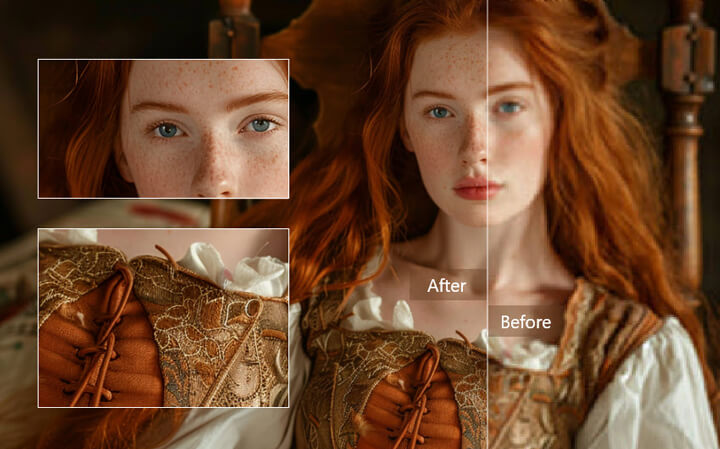
Unlike traditional manual photo editing techniques, Aiarty utilizes AI models trained on extensive image data. This enables it to understand the content of your photos and apply targeted improvements in an automated fashion. The software aims to streamline the image enhancement process, offering a user-friendly experience for anyone looking to elevate the quality of their visual content without requiring extensive technical expertise. In essence, Aiarty Image Enhancer serves as an intelligent tool designed to quickly and effectively bring out the best in your images.
Key Features of Aiarty Image Enhancer
Aiarty Image Enhancer leverages advanced AI models to offer a comprehensive suite of features aimed at significantly improving the quality and detail of your digital images. Key functionalities include:
1. AI-Powered Upscaling (up to 32K):
Aiarty Image Enhancer is equipped with sophisticated AI algorithms that allow you to upscale images up to an impressive 32K resolution. This powerful upscaling capability ensures your images retain crystal-clear detail, making them perfect for high-quality prints and displays. It offers scale presets up to 8x, along with customizable resolution options to meet specific needs. Whether you’re working on large prints or high-resolution displays, Aiarty ensures your images look pristine without pixelation or artifacts.
2. Intelligent Denoising, Advanced Deblurring, and AI Detail Generation
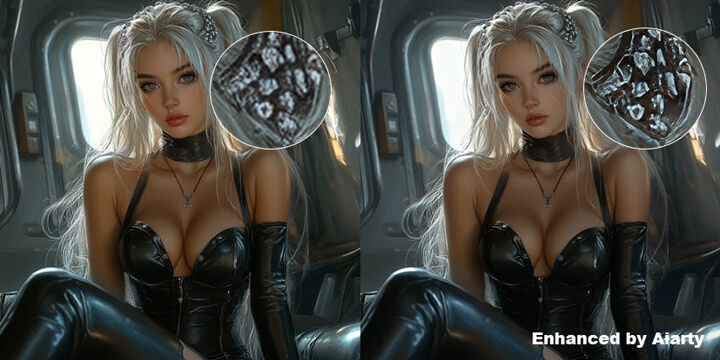
To further refine image quality, Aiarty Image Enhancer incorporates intelligent denoising technology that effectively eliminates various forms of visual noise, including grain and compression artifacts like those commonly found in JPEG files. Beyond noise reduction, the software’s advanced deblurring capabilities go beyond simple sharpening to correct motion blur, lens blur, and out-of-focus issues, resulting in significantly clearer and more defined images. Complementing these features, the AI detail generation function intelligently enhances and even creates realistic details, such as skin texture, hair strands, and intricate patterns, ensuring that upscaled images appear natural and avoid an artificial look.
3. AI Facial Restoration
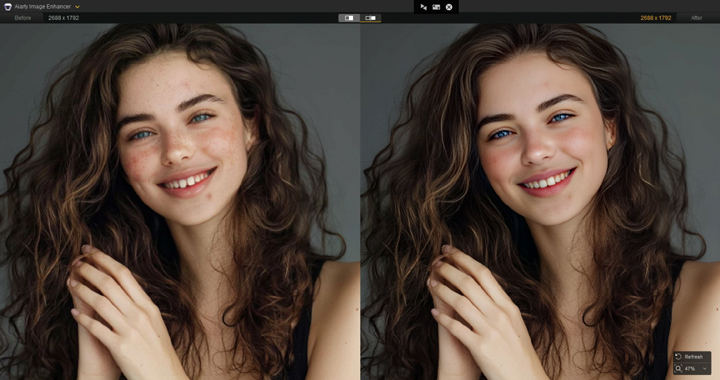
This feature is specifically designed to enhance faces in photographs by refining skin texture, improving facial details, and removing imperfections like blemishes and acne, aiming for a flawless yet authentic look. As one portrait photographer shared, "Aiarty's facial restoration is fantastic; it naturally removes blemishes, making the people in my photos look more vibrant."
4. Specialized AI Models
Aiarty offers multiple AI models tailored for different image types and enhancement needs, providing optimized results for various visual content:
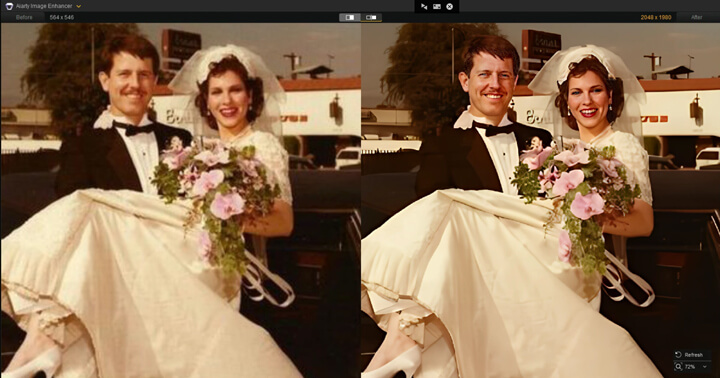
- Real-Photo: Ideal for enhancing and restoring old photos with noise reduction and fine detail improvement, especially for photorealistic images.
- More-Detail GAN: Perfect for enhancing fine textures and increasing image sharpness and clarity, especially for portraits, landscapes, and images requiring intricate details.
- Smooth Diff: Specializes in producing smoother, cleaner images, making it perfect for 2D animations, cartoons, and images with smooth surfaces.
- AIGCsmooth: Combines fine detail enhancement with smoothness, ideal for AI-generated art and stylized images, where both refined textures and polished finishes are desired.
5. 4-in-1 Auto Enhancement and Batch Processing
For users looking for efficiency, Aiarty provides a one-click solution that automatically denoises, deblurs, removes JPEG artifacts, and upscales images. This simple process is perfect for users of all technical levels, allowing them to enhance their images without complex settings. Additionally, Aiarty supports batch processing, enabling users to enhance up to 1,000 images at once, significantly improving workflow efficiency when dealing with large collections.
6. Precise Control Over Enhancement Intensity
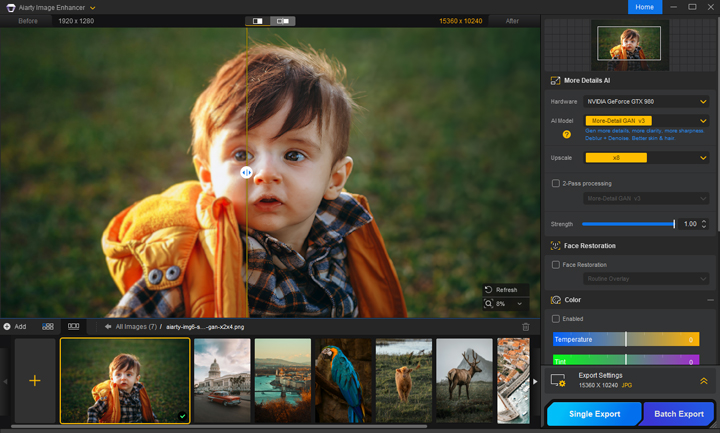
Aiarty Image Enhancer introduces a Strength Slider, allowing users to adjust the intensity of AI enhancements. This new feature offers greater control over sharpening and overall image refinement, enabling you to achieve the perfect balance between crisp detail and natural look. Whether you're working on portraits, product photography, or landscapes, you can now fine-tune the enhancement level to suit your vision.
7. Integrated Color Correction for Streamlined Workflow
The addition of an Integrated Color Correction module within Aiarty Image Enhancer allows users to directly adjust key color parameters, such as temperature, tone, exposure, contrast, and saturation, without leaving the AI workflow. This feature streamlines the editing process, ensuring that your images are consistently vibrant and visually striking, without the need for external color correction tools.
8. Accelerated Performance for Faster Processing
Aiarty Image Enhancer is optimized for rapid processing, significantly reducing the time it takes to load and process images. With advanced performance improvements, even high-resolution images or complex tasks, such as facial detection, are handled smoothly and efficiently, resulting in faster processing times and an enhanced user experience.
Pricing
Aiarty Image Enhancer offers flexible licensing options to cater to different user needs. Here's a breakdown of the pricing structure:
- Yearly Subscription: Typically $85/year, currently $75. Renews annually, cancel anytime. Covers 3 PCs/Macs with updates for the year.
- Lifetime License (One-Time Purchase): Typically $155, currently $99. One-time payment for lifetime use on 3 PCs/Macs with lifetime updates and priority support.
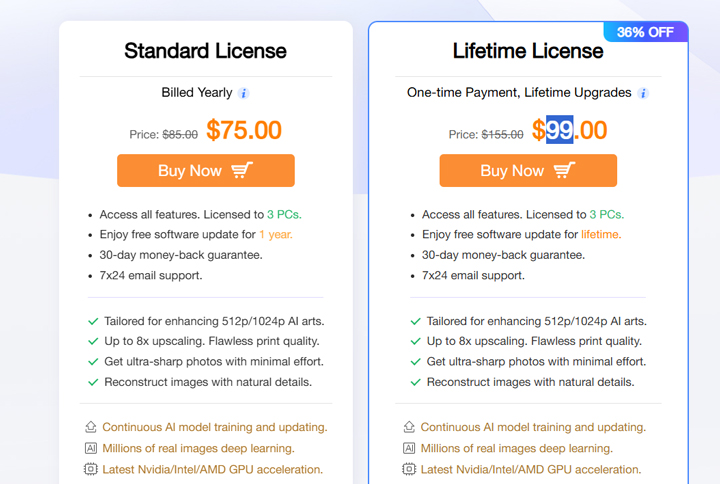
Overall, Aiarty Image Enhancer provides competitive pricing with options for both short-term and long-term use, often with attractive promotional discounts available. The lifetime license offers the best long-term value with continuous updates and priority support.
Pros and Cons of Aiarty Image Enhancer
Pros of Aiarty Image Enhancer
- Powerful AI-Driven Enhancements: Aiarty utilizes advanced AI models capable of effectively upscaling resolution, denoising, deblurring, and generating realistic details. This often leads to significant improvements in image quality compared to traditional methods.
- Versatile Application: The software is designed to enhance various types of images, including AI-generated art, low-quality photos, compressed JPEGs, and even old or damaged photographs.
- Specialized AI Models: Aiarty offers multiple AI models tailored for specific image types and enhancement goals, allowing for more targeted and potentially better results.
- User-Friendly Interface: Many reviews highlight the intuitive and easy-to-navigate interface, making it accessible for both beginners and experienced users without requiring extensive technical skills.
- Batch Processing: The ability to process multiple images simultaneously significantly speeds up workflow when dealing with large collections of visuals.
- Facial Restoration: Dedicated AI for face enhancement can refine skin texture, improve details, and remove blemishes for more flattering portraits.
- Precise Control Over Enhancement Intensity: The Strength Slider lets users fine-tune AI enhancement intensity, achieving sharp details while maintaining a natural look.
- Integrated Color Correction: Adjust temperature, tone, exposure, contrast, and saturation directly within the AI workflow for a streamlined editing process and consistent results.
- Offline Operation: Processing images locally on your computer ensures privacy and eliminates the need for a constant internet connection.
- Money-Back Guarantee and Free Trial: The 30-day money-back guarantee and the availability of a free trial allow users to test the software risk-free before committing to a purchase.
Cons of Aiarty Image Enhancer
- Optimized for GPU acceleration - CPU-only processing may result in noticeably reduced speed.
- Includes color correction features designed for manual fine-tuning - not a one-click auto fix.
- High-resolution (16K/32K) upscaling is performance-intensive
Before and After Showcase
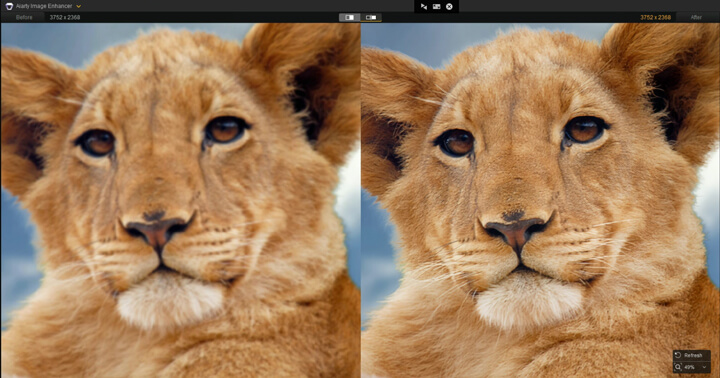
See Aiarty Image Enhancer in action. The following before-and-after examples clearly demonstrate the software's ability to tackle common image quality issues, and the results really speak for themselves.
1. Face Restoration
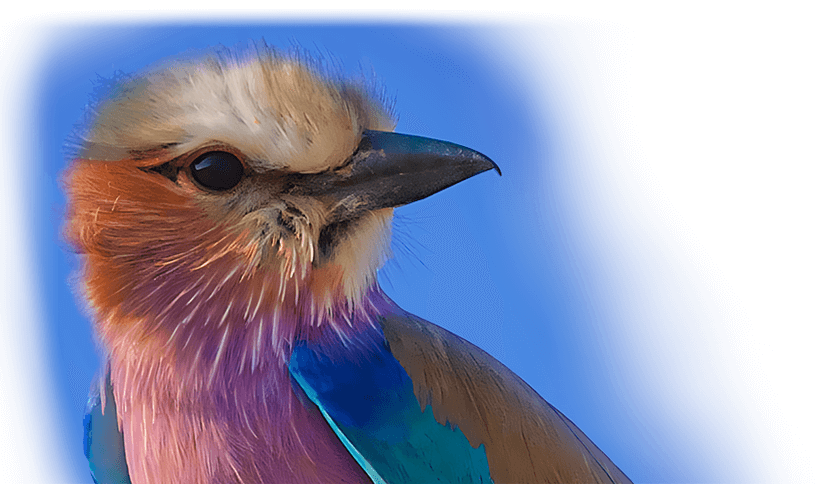
2. Animal Feather Enhancement
3. Detail Generation
The Best Aiarty Image Enhancer Alternative - VideoProc
While Aiarty Image Enhancer provides a dedicated and often effective solution for AI-powered image enhancement, some users may find value in a tool that extends beyond still images, offering a broader range of media processing capabilities. For those seeking powerful AI image improvement integrated with other useful features like video conversion, basic editing, and media downloading, VideoProc Converter AI presents a compelling alternative.
For users looking beyond dedicated image enhancement software, VideoProc Converter AI offers a powerful and integrated solution that combines AI-driven image upscaling with a comprehensive suite of video and media processing tools. This all-in-one software combines intelligent AI image/video upscaling and enhancement with robust video conversion, editing, downloading, and screen recording capabilities.
- AI-powered image enhancement: Intelligently improve the resolution and clarity of your images, bringing out finer details, reducing noise, and even adding realistic colors to your black and white photos using advanced AI algorithms.
- AI-powered video enhancement: Utilize advanced AI to increase the resolution of your videos, reduce noise, stabilize shaky footage, and improve overall video quality for a clearer and more professional look.
- Comprehensive Media Processing: Convert between a wide range of video and audio formats, perform essential editing tasks (cut, merge, crop, effects, etc.), easily download videos and music from online platforms, and even record your screen – all within one application.
- User-Friendly Interface: Navigate a clean and intuitive interface designed for ease of use, even with its extensive feature set.
- All-in-One Solution: Reduce the need for multiple separate applications by having a robust set of media tools conveniently integrated into one platform.
- Potentially More Cost-Effective: Often available at a more budget-friendly price point compared to dedicated image enhancement software, offering significant value for its wide range of features.

VideoProc Converter AI vs Aiarty Image Enhancer
Aiarty Image Enhancer is primarily a dedicated tool focused on AI-powered image enhancement. It excels in AI image upscaling, detail generation, and facial restoration, offering multiple specialized AI models tailored for various image types. While it provides strong image enhancement capabilities and supports batch processing for images, it does not offer video processing or image colorization. Aiarty Image Enhancer operates offline and is priced at $75 per year or a one-time payment of $99. It is designed for users who are primarily interested in advanced AI image enhancement.
VideoProc Converter AI, on the other hand, is a more versatile media processing tool that includes AI image and video enhancement capabilities. It also offers AI image upscaling, enhancement (including denoise, deblur, and colorization), and facial restoration. A key differentiator is its comprehensive video processing functionality, which is absent in Aiarty Image Enhancer. VideoProc Converter AI provides more general AI enhancement for both images and videos. Like Aiarty, it supports batch processing for images and operates offline. Its pricing is a one-time payment of $65.95, making it a more budget-friendly option. VideoProc Converter AI is aimed at users who require a versatile tool for video, audio, and image processing, with AI capabilities integrated across these functions.
See the comparison table below:
| Feature | VideoProc Converter AI | Aiarty Image Enhancer |
|---|---|---|
Primary Focus |
Versatile Media Processing with AI Image/Video Enhancement |
Dedicated AI Image Enhancement |
AI Image Upscaling |
Yes |
Yes |
AI Image Enhancement |
Also offers AI image enhancement (denoise, deblur, upscaling, colorization mentioned) |
Strong emphasis on detail generation, facial restoration, specialized models |
Specialized AI Models |
More general AI enhancement for images and video |
Multiple tailored for different image types |
Batch Processing (Images) |
Yes |
Yes |
Facial Restoration |
Yes |
Yes |
Image Colorization |
Yes |
No |
Offline Operation |
Yes |
Yes |
Pricing Model |
$65.95 One-time payment |
$75/year; $99 One-time payment |
Target User |
Users needing a versatile tool for video, audio, and image processing with AI |
Users primarily focused on advanced AI image enhancement |
When it comes to handling your images, both software are quite similar: they support the same input formats, their output formats and resolutions are comparable, and the enhancing/restoring results are roughly equivalent. While Aiarty Image Enhancer focuses solely on AI image enhancement, VideoProc Converter AI offers a more versatile approach by integrating powerful image upscaling with a comprehensive suite of video and media processing capabilities. If you're seeking to enhance your images within a broader media toolkit, VideoProc Converter AI is a strong alternative to consider.