VideoProc Converter
 New AI features are available

 Listed in
 In the rapidly evolving creative landscape of artificial intelligence, few tools have captured the imagination of creators quite like Midjourney. It has gained popularity since its open beta launch in July 2022. Using advanced AI models, anyone can produce high-quality, artistic images through simple text prompts.
In this Midjourney review, we'll explore Midjourney's capabilities, interface, pricing, strengths, limitations, and practical applications. Whether you are a professional seeking to enhance your creative workflow or simply intrigued by AI's artistic potential, this guide will help you navigate Midjourney's expansive possibilities and limitations.
Midjourney Quick Facts
Before diving into deep details, here are some quick basic facts about Midjourney.
Particulars |
Details |
|---|---|
Type |
Generative AI model for text-to-image generation |
Initial release |
July 12, 2022 |
Latest Version |
Midjourney V7 (alpha released April 4, 2025) |
Core Technology |
Diffusion models + Large Language Models |
Key Features |
Text-to-image generation, upscaling, variations, style references, draft mode, personalization |
Monthly Visitors |
Approximately 3-4 million active users monthly |
Community |
Largest Discord server worldwide; active subreddit with over 1.2 million members |
Pricing Model |
Subscription-based (Basic $10/mo to Mega $120/mo) |
Pricing: Is Midjourney Free
Midjourney operates on a subscription-based model with no free tier (except during occasional promotional periods). The platform offers four distinct subscription plans to accommodate different usage needs and budgets.
Plans |
Basic |
Standard |
Pro |
Mega |
|---|---|---|---|---|
Monthly Price |
$10 |
$30 |
$60 |
$120 |
Annual Price (per month) |
$8 |
$24 |
$48 |
$96 |
Fast GPU Time |
3.3 hours |
15 hours |
30 hours |
60 hours |
Relaxed Mode |
No |
Unlimited |
Unlimited |
Unlimited |
Stealth Mode |
No |
No |
Yes |
Yes |
Concurrent Jobs |
3 jobs, 10 in queue |
3 jobs, 10 in queue |
12 fast jobs, 3 relaxed, 10 in queue |
12 fast jobs, 3 relaxed, 10 in queue |
Each plan includes access to the Midjourney member gallery and Discord community, along with general and commercial usage terms. The key differentiators between plans are the amount of Fast GPU time (which determines how quickly your images are generated), access to Relaxed Mode (which allows unlimited image generation but with longer wait times), Stealth Mode (which keeps your images private), and the number of concurrent jobs you can run.
Usability and Interface
Midjourney offers two primary interfaces for users: the Discord bot and the web interface.
Historically, Midjourney has been primarily accessed through Discord. The Discord interface offers a community-oriented experience. You can see others' creations, share ideas, and learn from the community. However, this approach can be overwhelming for newcomers unfamiliar with Discord's chat-based environment.
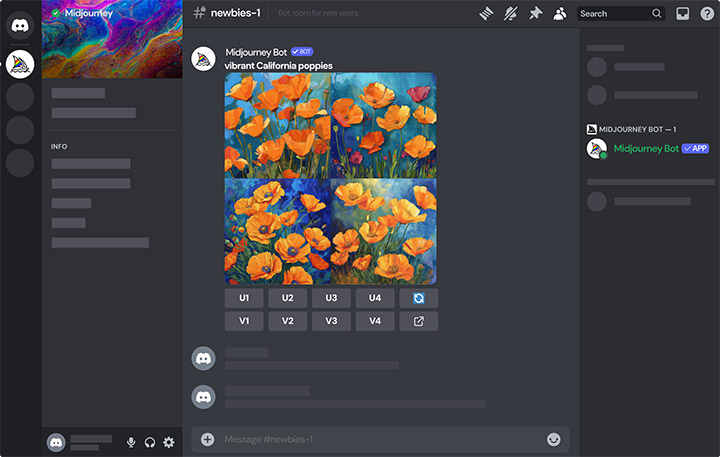
In response to user feedback and growing competition, Midjourney introduced a web interface in 2024, which was further enhanced with the release of version 6.1. The web interface offers:
- A more intuitive user experience with the Imagine Bar for entering prompts
- Organized workspace with Create, Explore, and Archive tabs
- Advanced editing tools including Smart Selection, retexture options, and layer systems
- Improved image management and organization features
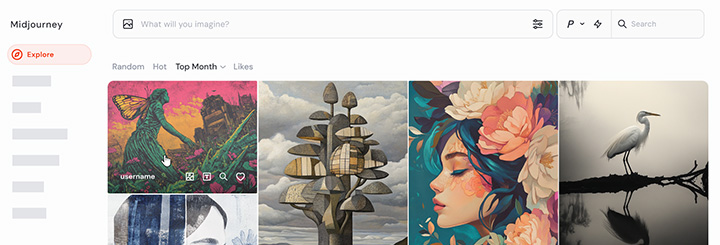
The web interface syncs conversations between Discord channels and web rooms, enhancing collaboration across both platforms. This addition has made Midjourney more accessible to users who found Discord confusing or overwhelming.
How to Use Midjourney
Getting started with Midjourney involves a few key steps, whether you're using the Discord bot or the web interface. Here's how to use Midjourney on the web:
- Visit midjourney.com, create an account, and select a subscription plan.
- Go to the Create page.
- Type your prompt describing what you want to see in the Imagine bar at the top of the page.
- Press Enter or click the send button to start the generation process.
- Once your images appear, you can select ones you like for further refinement.
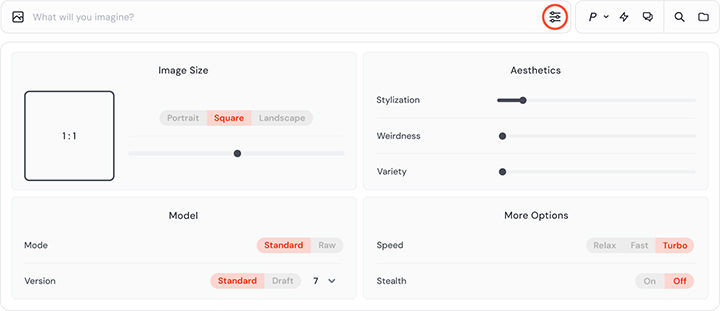
The Imagine bar features several tools. Here's what you can do with these settings:
- Images Panel: upload or choose an image in your library as a prompt reference
- Settings Panel: change aspect ratio, model (version, Raw Mode, Draft Mode), aesthetics (Stylization, Weirdness, Variety), GPU speed, Stealth Mode, etc.
- Personalization: select a personalization profile to apply to your prompt
- Draft Mode: prototype images at half the GPU cost and faster speeds
- Search Box: search all the prompts in your creation history
- Folders: organize and manage your Midjourney creations
The quality of your results depends significantly on how well you craft your prompts. Unlike negative prompts with Stable Diffusion, the prompts you use in Midjourney should be more focused on what you want to see. You can also add parameters at the end of your prompt to customize how your images turn out.
Key Features Test & Review
Image Generation
The core functionality of Midjourney is transforming text descriptions into visual content. The system excels at creating vibrant, detailed images across various styles, from photorealistic to abstract, fantasy, sci-fi, and artistic interpretations. With Version 7, text understanding has improved significantly, allowing for more accurate interpretation of complex prompts.
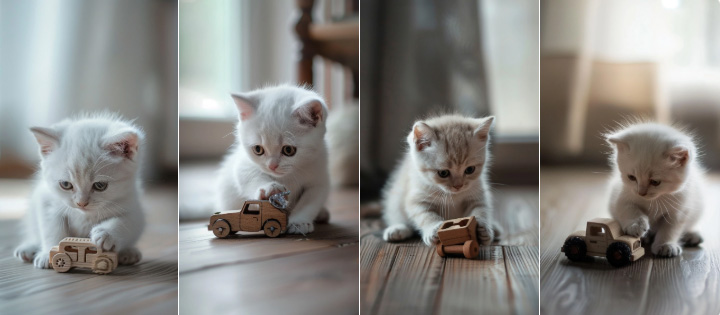
Prompt: A small pure white short-haired kitten sitting on a modern wooden floor, gently holding a broken wooden toy car in his tiny paws. The kitten has soft golden eyes and facial features that clearly resemble his strong father Atlas. He looks down with a sad, vulnerable expression, his ears slightly drooping. Natural daylight comes from the window, realistic fur texture, cinematic shallow depth of field, ultra photorealistic, --ar 9:16 --v 7
In addition to the text-to-image generation, Midjourney allows users to upload reference images to guide the style or content of their creations.
- Style Reference: extract and apply the aesthetic qualities of a reference image
- Character Reference: maintain consistent character appearances across multiple images
- Image Weight: control how much influence a reference image has on the final output
Image Customization and Refinement
After generating initial images, Midjourney provides several tools to refine and customize your results:
- Upscaling: Enhance resolution and detail of selected images
- Variations: Generate alternative versions based on a selected image
- Vary (Region): Modify specific areas of an image while keeping the rest unchanged
- Remix: Adjust parameters of an existing image to create new variations
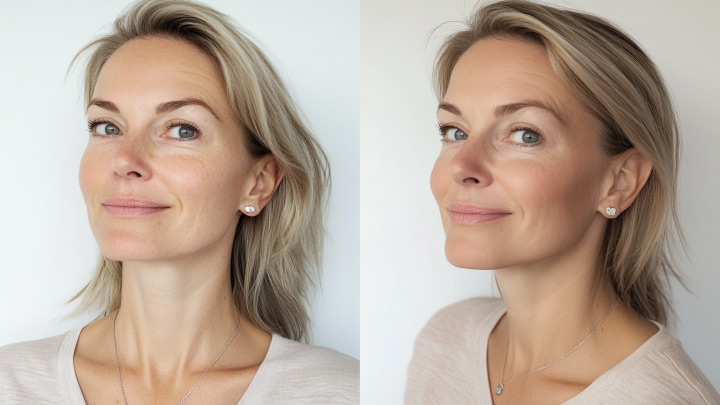
Prompt: Ultra-realistic portrait of the same 35+ year old European woman 2 photo selfies without physical contact, take selfies, gently pull the necklace on the neck.
Left ('Before'): - Fine wrinkles under eyes, forehead, nasolabial folds - Dull skin, mild puffiness, tired expression
Right ('After'): - Smoother skin, reduced wrinkles, natural glow - Lifted jawline, refreshed expression --ar 16:9 --v 6.1
Personalization
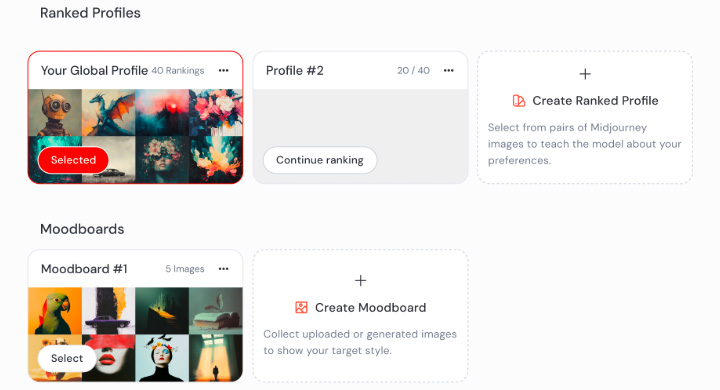
Version 7 introduced personalization as a default feature, which learns your style preferences after rating approximately 200 images. This helps Midjourney better understand your aesthetic preferences and deliver more tailored results.
V1 Video Model
Midjourney just released its first video generation model to the public on June 19, 2025. For now, this image-to-video model is only accessible through its website, not Discord.
It's easy to use. It works by taking an existing image, either one generated within Midjourney or uploaded externally, and animating it into a 5-second video sequence. Here are some parameters you can control during the process:
- Auto makes your image move randomly.
- Manual allows text prompt to influence the animation style or content.
- Low Motion creates subtle movements such as gentle camera motions or slow character movements.
- High Motion introduces more dynamic and cinematic motion but may produce glitchy or less realistic results.
- GPU speed generates videos in Fast or Relax Mode (Pro and Mega plans only).
- Stealth Mode manages who sees your creations on the Midjourney website.
- Video Raw reduces the extra creative flair that Midjourney usually adds.
The output videos are only five seconds long at 480p resolution with a 24 fps frame rate. With the Extend Auto or Extend Manual features, you can choose to extend them by four seconds up to four times, to a maximum of 21 seconds. As for the resolution, there's no built-in upscaling for videos currently.
So overall, the launch of V1 puts Midjourney in competition with other big names, but it doesn't seem to have the upper hand at the moment. OpenAI's Sora offers higher resolution and does straight text-to-video, while Runway Gen 4 provides more precise control and better world consistency. Also, V1 skips audio, while Veo 3 pulls off well. Still, it's an early-stage release worth trying and expect improvements over time.
Community
The community-oriented approach through Discord creates a collaborative environment where users can learn from each other and find inspiration. The Explore page on the web interface similarly showcases diverse creations to spark creativity.
Disadvantages of Midjourney
No Free Tier
The lack of a free tier (except during promotional periods) creates a significant barrier to entry for casual users or those wanting to test the platform before committing. Lower-tier plans limit Fast GPU Time (e.g., 3.3 hours for Basic), leading to slower generation in Relax Mode. This can frustrate users with high-volume needs.
Technical Issues
We see Midjourney doesn't always accurately follow detailed prompts, especially when trying to achieve very specific outcomes. The system tends to interpret prompts creatively rather than literally. These prompt fidelity issues can be frustrating when precise results are needed. Midjourney also has difficulty with accurate text rendering within images, making it less suitable for designs requiring specific text elements.
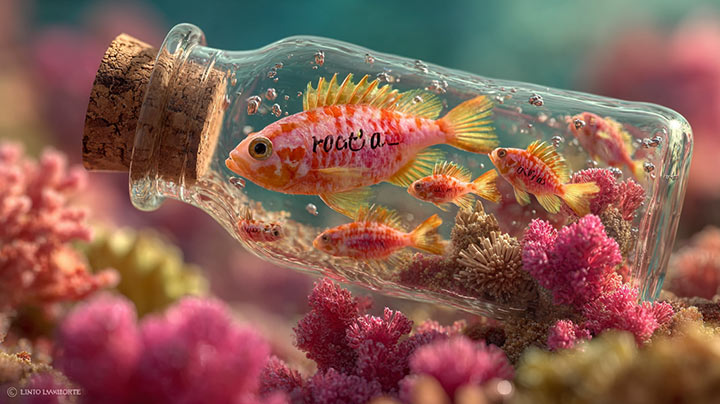
Prompt: Colored underwater photograph of curious fish swimming around a glass bottle with a visible rolled-up letter inside, set on a vibrant coral reef. Dynamic composition, vivid background, cinematic lighting, Leica camera, 200mm, anamorphic, telephoto lens, ultra wide screen, aerial shot
Many users express frustration with Midjourney's inconsistent content moderation, which sometimes flags innocuous prompts while occasionally allowing questionable content through. Terms like "woman" or certain poses can trigger filters unpredictably.
Despite improvements in Version 7, anatomical challenges are still a problem. Midjourney still struggles with details like anatomical features, particularly hands, teeth, and complex poses. Background faces in crowded scenes also remain problematic.
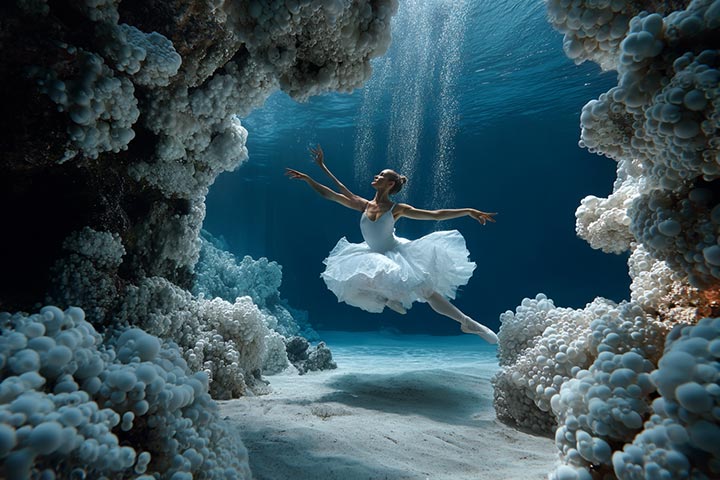
Prompt: Ballerinas made of air bubbles in a coral reef theater underwater hyper realistic
Legal and Ethical Considerations
Midjourney grants users ownership of images they generate, allowing for commercial use (with some limitations for high-revenue companies). However, the legal landscape around AI-generated art remains complex and evolving.
In June 2025, Universal Pictures and Disney filed a copyright infringement lawsuit against Midjourney, describing it as "a bottomless pit of plagiarism" and alleging unauthorized use of copyrighted materials in training their AI system. This ongoing litigation highlights the uncertain legal status of AI-generated content.
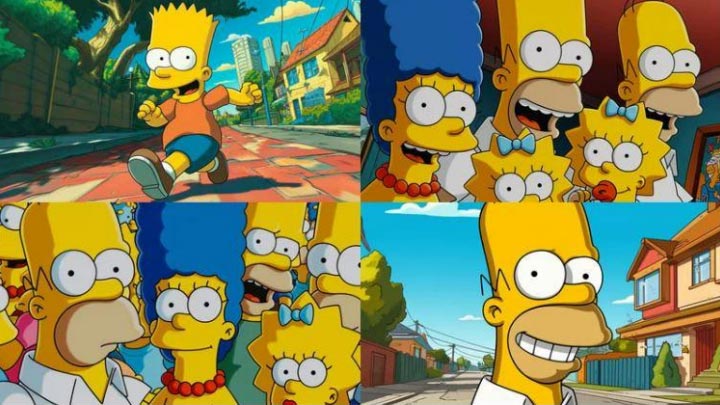
Prompt: popular 90's animated cartoon with yellow skin --v 6.0 --ar 16:9 --style raw
Research has suggested that Midjourney's outputs can reflect biases present in its training data. Studies have found unequal results in aspects like gender, skin color, and location even with neutral prompts. The system has also been criticized for generating images based on national stereotypes.
Upscale Midjourney Results
Midjourney's default resolution is 1024x1024 pixels, which may be insufficient for high-quality printing or large-format displays. While Midjourney offers built-in upscalers, many users find that third-party tools can provide superior results for high-resolution applications.
VideoProc Converter AI stands out as an excellent solution for enhancing and upscaling images from Midjourney and other AI image generators.
Key Features of VideoProc Converter AI for Image Enhancement
- AI Image Upscaler: Increase resolution up to 10K without losing quality, perfect for preparing Midjourney images for printing or large displays.
- Multiple AI Models: Choose from different AI models optimized for various types of content.
- Face Restoration: Enhance and improve facial details in portraits generated by Midjourney.
- Batch Processing: Efficiently upscale multiple Midjourney images at once.
- GPU Acceleration: Leverages your computer's GPU for faster processing, with dynamic memory adjustment to ensure smooth operation even on modest hardware. No GPU time consumption.

How to Upscale Midjourney Images with VideoProc Converter AI
- Get VideoProc Converter AI from their official website.
- Navigate to the Image AI module from the main interface.
- Import your Midjourney images you want to enhance.
- Choose your desired resolution and AI model.
- Run the enhancement process and save your high-resolution images.
For print applications, VideoProc Converter AI can help achieve the 300 DPI quality standard required for professional printing, with recommended resolutions based on print size (e.g., 3600px for a 12-inch print).
Midjourney Alternative
While Midjourney offers impressive capabilities, several alternatives might better suit specific needs or preferences.
- ChatGPT Image Generator, powered by GPT-4o, offers superior prompt fidelity and better text rendering. It’s accessible to all users, though free accounts have daily limits. Best for users who prioritize accuracy over artistic interpretation, those already using ChatGPT.
- Stable Diffusion, an open-source model, runs locally and generates high-quality images with image inpainting and outpainting capabilities. Limitations include a steeper learning curve and requirements of decent hardware for local installation.
- Adobe Firefly, integrated with Adobe Creative Cloud, focuses on commercial safety with strong text rendering. Best for professional designers already in the Adobe ecosystem, commercial applications requiring copyright safety.
Final Verdict
Midjourney remains at the forefront of AI image generation, particularly excelling in artistic quality, vibrant aesthetics, and creative interpretation. Version 7 represents a significant advancement in the technology, with improved prompt understanding, texture rendering, and detail coherence.
However, the platform has its limitations, such as inconsistent prompt fidelity, content moderation issues, and anatomical challenges, which means it's not the perfect solution for every use case. The lack of a free tier also presents a barrier to casual experimentation.
For those who prioritize artistic quality and are willing to embrace some unpredictability in the creative process, Midjourney offers an unparalleled tool for visual exploration and creation. When combined with enhancement tools like VideoProc Converter AI for upscaling, the results can be truly remarkable and suitable for professional applications.