Upgraded AI Performance in V8
 Listed in
 AnyDVD was a Windows-based program developed by SlySoft Software Company, tailored to remove digital restrictions on DVDs, HD DVDs, and Blu-ray Discs. However, the program ceased operations in June 2024 following the shutdown of its developer, RedFox. The original company, SlySoft, was forced to close in February 2016 due to legal pressure from copyright enforcement organizations.
Fortunately, we have multiple mature alternatives available today, ranging from completely free open-source solutions to feature-rich commercial software. The choice depends on your specific needs: budget constraints, platform requirements, protection types, output formats, and technical proficiency. Therefore, we've carefully framed up this roundup of the best AnyDVD Alternatives for your reference.
Disclaimer: We do not advocate ripping copyright-protected discs for any commercial purpose.

#1. VideoProc Converter AI
- Platforms: Windows, Mac
- Output formats: ISO, VIDEO_TS, MKV, MP4, MOV, AVI, WMV, MP3, etc.
- Ease of use rating: 5/5 (1 = Difficult, 5 = Easy)
- Pricing: Free trial; Lifetime license from $39.95 on sale
VideoProc Converter AI is likely one of the simplest AnyDVD alternatives to use right out of the box, which doesn't require any additional libraries. The program features a modern, GPU-accelerated DVD ripper for digitizing DVDs, VIDEO_TS folders, and ISO image files on the fly, ranging from homemade DVDs to commercial DVDs that are protected by the latest encryption schemes, such as ARccOS, CSS, UOPs, APS, etc.
On the output side, VideoProc Converter AI offers maximum flexibility in how you want to back up or convert your DVDs, either as a 1:1 lossless copy or as a compressed video file in various formats suitable for different devices. You can convert your DVD to MP4, MOV, HEVC, AV1, and 420+ formats in one go.
With support for NVIDIA NVENC, Intel Quicksync, and AMD AMF hardware encoders, VideoProc can back up DVDs in just 5 minutes. Plus, you can activate Safe Mode to avoid conversion issues like frame drops, audio/video sync problems, or pixelation. It also allows you to remove unwanted subtitles or audio tracks and deinterlace videos.


📌 Key Features of VideoProc Converter AI
- Dycrypt Sony ARccOS, CSS, UOPs, APS, RCE, and more advanced techs on the fly
- Rip DVD and 1:1 backup to digital copies: ISO, VOB, Video_TS, MKV…
- Convert DVD to MP4, MKV, MOV, AVI, MP3, and other formats
- Up to 47x faster speed with low CPU usage, powered by the full GPU acceleration tech
- All-in-one: AI-enhance video/image/audio, convert, compress, edit, record, and download
👍 Strengths
- Most extensive format support
- Flexible digitization options: lossless 1:1 copying or format conversion
- Smart automatic DVD decryption on the fly
- Level-3 hardware acceleration; safe mode; all-in-one multimedia solution beyond just decryption
⚠️ Limitations
- No Linux version
- Lack of support for IFO files and Blu-ray discs
🥇 Best for: Users who want a fast and easy-to-use AnyDVD alternative with decryption, format flexibility, and multimedia capabilities
#2. HandBrake
- Platforms: Windows, Mac, Linux
- Output formats: MKV, MP4, and WebM
- Ease of use rating: 3/5 (1 = Difficult, 5 = Easy)
- Pricing: Free
HandBrake is a robust open-source video transcoder that can serve as an alternative to AnyDVD. By default, you're allowed to rip DVDs, ISO image files, Blu-ray Discs without DRM protection. The downside is that HandBrake does not defeat copy-right protection since the open-source software library, libdvdcss, has been removed from HandBrake.
Actually, there are ways that you can get around. You can use third-party DVD decryption software or install libdvdcss software library on your computer to restore the ability to rip DVDs with digital restriction and convert them for MP4, MOV, iPhone, iPod, Apple TV, Android, etc.
Though HandBrake can defeat the CSS scheme with the help of libdvdcss software library, it still does not support the decryption of Sony ARccOS Protection and Disney DVD Copy Protection DVDs.
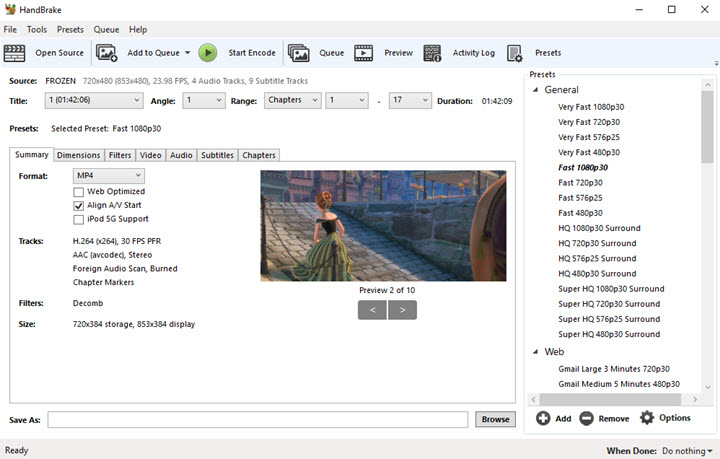
📌 Key Features
- Convert DVD titles to formats such as MP4, MKV, and WebM using codecs like H.264, H.265, and AV1
- Offer rich controls for resolution, bitrate, quality, and audio tracks, along with filters like deinterlace, denoise, etc.
- Support batch processing and queueing for large libraries
- Read and transcode many CSS-protected DVDs by guessing encryption keys with libdvdcss installed
👍 Strengths
- Completely free and open-source blu-ray ripper
- Cross-platform support for Windows, macOS, and Linux
- Rich presets for various devices and platforms
⚠️ Limitations
- Not a full decryption engine and requires manual setup
- Force to re-encode
- Very high CPU usage
🥇 Best for: advanced, budget-conscious users who want a open-source AnyDVD alternative for transcoding and are comfortable manually adding libdvdcss and adjusting settings
#3. MakeMKV
- Platforms: Windows, macOS, Linux
- Output formats: MKV
- Ease of use rating: 4/5 (1 = Difficult, 5 = Easy)
- Pricing: Free while in beta; Lifetime license for $60
MakeMKV is a professional commercial DVD and Blu-ray ripper that can run on Windows, macOS, and Linux. Though its user interface may seem to be a bit obsolete, it's a robust ripper that can easily defeat AACS and BD+ encryption schemes without third-party software.
Once your DVD or Blu-ray Disc is imported, it will be ready to grab everything on the disc and store them in an MKV file. All the information will be well-preserved, including audio track, subtitle track, meta-information. Unfortunately, MakeMKV doesn't support hardware acceleration. Therefore, it will take time to rip an entire disc.
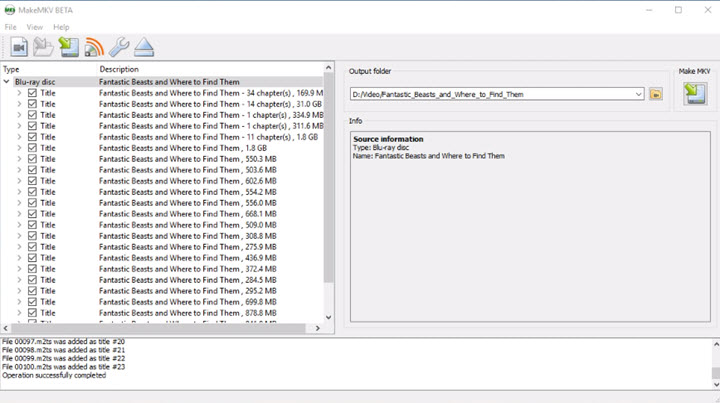
📌 Key Features
- Support DVDs, Blu-rays, and AVCHD content
- Remove AACS and BD+ Blu-ray protections
- Remuxe content into MKV files without re-encoding
- Preserve original video, multiple audio tracks, chapters, and subtitles
👍 Strengths
- Lossless quality preservation with no compression or transcoding
- Completely free option for DVD ripping indefinitely
- Strong community support and forum activity, actively maintained
⚠️ Limitations
- MKV output format only; require additional transcoding for other formats
- Beta key expiration can interrupt workflow
- Limited editing capabilities, huge output MKV files
🥇 Best for: users who want lossless AnyDVD alternative for both DVD and Blu-ray backups with cross-platform support
#4. Xreveal
- Platforms: Windows
- Output formats: ISO files, folders
- Ease of use rating: 3/5 (1 = Difficult, 5 = Easy)
- Pricing: Free trial; Lifetime license for $45
Xreveal represents the philosophically closest AnyDVD alternative. These two programs share a similar interface, the same background driver-based architecture, and matching workflow paradigm. The difference is that Xreveal is a Windows-only solution. At approximately 1MB, Xreveal runs with minimal system impact, but this also eliminates it entirely for Mac users.
Xreveal's free version includes complete DVD and Blu-ray decryption, region code removal, and ISO/folder ripping capabilities. However, all of this is based on the requirement that you need to source the KEYDB.cfg file separately from internet sources and manually configure it. Furthermore, challenges may arise when dealing with advanced protection measures, such as Disney X-Project or complex Sony ARccOS variants.
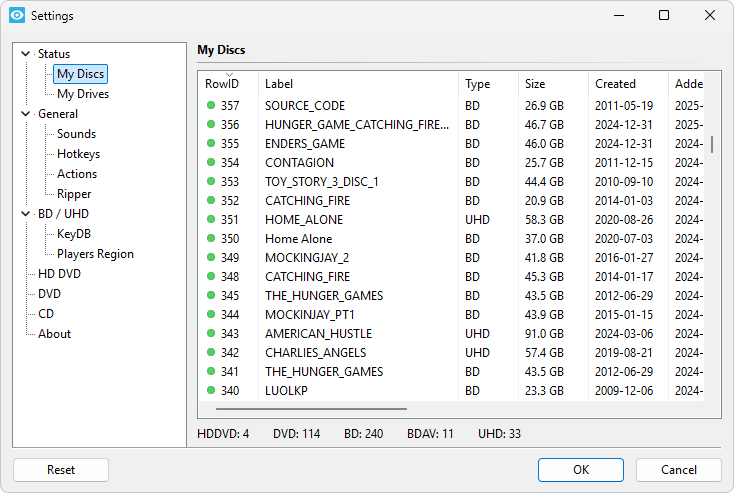
📌 Key Features
- Support both DVD and Blu-ray media
- Work automatically in the background
- Remove user prohibitions, region code from DVD/BD/UHD
- Backup disc as ISO or folder
👍 Strengths
- Lightweight for background operation without storing decrypted data unless explicitly requested
- Free fully-functional version with DVD and Blu-ray decryption
- Regular active development
⚠️ Limitations
- Windows-only; Try-before-you-buy pricing model with no refund policy
- Require manual KEYDB.cfg configuration
- Possible system driver conflicts
- Less comprehensive DRM support
- Limited output formats (ISO or folder), cannot convert DVD to MP4, MKV, etc.
🥇 Best for: Windows users who specifically want a lightweight, real-time decrypter that behaves almost exactly like AnyDVD
#5. VLC
- Platforms: Windows, macOS, Linux
- Output formats: MKV, MP4, AVI, etc.
- Ease of use rating: 4/5 (1 = Difficult, 5 = Easy)
- Pricing: Free
VLC is another free and open source AnyDVD alternative that supports the playback and ripping of encrypted DVDs, Blu-ray Discs, CDs, VCDs on Windows, Linux, and macOS with the help of the libdvdcss DVD decryption library.
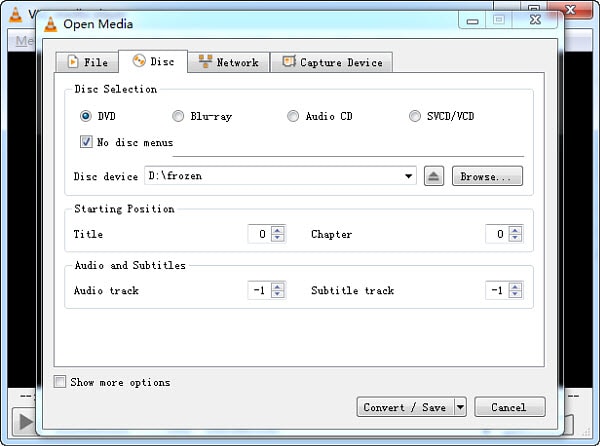
When it comes to ripping DVDs in VLC, you have a few video settings you can tweak. You're allowed to enable or disable the disc menus, copy a particular DVD title, chapter, audio track, and subtitle track, which is highly customizable.
After that, you will need to choose a type of codec and container format you would like to use to encode your digital copy. By default, VLC will select a format of MP4@H.264@MP3. Of course, you can configure an encoding format by yourself by heading to the Profile section. At last, you need to reset an output directory before you start ripping.
📌 Key Features
- Built-in support for playing many region‑locked and CSS‑protected DVDs
- Record or convert playing DVD streams to basic formats
- Extract basic titles or chapters when protections are minimal
- Cross-platform and widely available
👍 Strengths
- Open-source, no ads, and one of the most popular media players
- Lightweight rip capability with integrated libdvdcss
- Wide output formats available
⚠️ Limitations
- Cannot properly rip protected DVDs on its own
- Unreliable for complex structures
- Very limited control and speed
🥇 Best for: users who want a free AnyDVD Alternative for simple or unencrypted DVD ripping
How to Rip Copy-protected DVDs With VideoProc Converter AI
Step 1: Insert Your DVDs and Launch VideoProc Converter AI
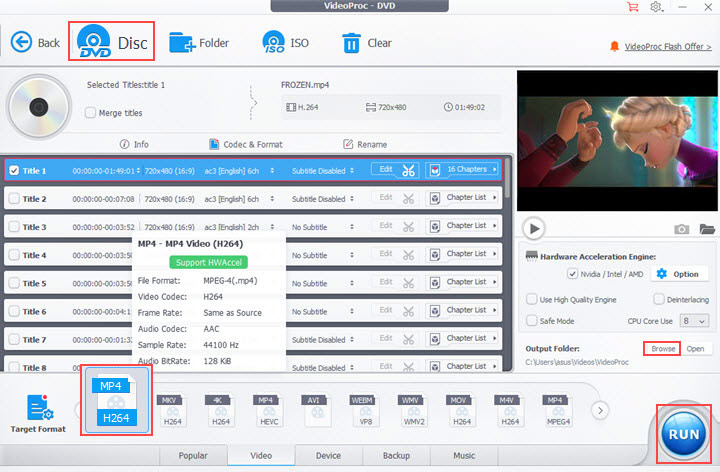
Input your Disc into the drive at the get-go. Then, fire up VideoProc Converter AI on your computer and select DVD on the main screen. You will hit the Disc button in the upper area to import your DVD to the software. You're also allowed to import a DVD folder or DVD ISO image from your hard drive.
Step 2: Choose an Output Format
Once your DVD is fully loaded, head to Target Format > DVD Backup, then select an output format and a backup solution you need. Or you can simply choose to copy a part of DVD titles on the main panel. It's recommended to choose the MP4/MOV @H.264 format that is internationally used.
Step 3: Export Your Digital Copies
To guarantee the best video quality and conversion speed, put the checkmarks on Use High Quality Engine, Safe Mode, and Hardware Acceleration Engine. At last, define a location for your output file. Now, click on the RUN button to start copying your DVD. You can find your digital copies at your chosen location as long as the conversion is complete.
Conclusion
For most, the free and open source HandBrake and VLC can do just fine for ripping DVDs. They can defeat the Content Scramble System (CSS) scheme by using the libdvdcss software. If you want to rip DVDs or ISO files, go for the commercial and professional software like VideoProc Converter AI. If you want to rip digital copies from Blu-ray Discs, you can count on MakeMKV.