Download Online Videos & AI Upscale to HD/4K!
Music lovers flock to SoundCloud for everything from bedroom-produced demos to official releases. The platform is great for discovery, but if you want to listen offline or curate a personal library, the official download options are very limited. SoundCloud only lets you download tracks when the uploader enables a Download button or if you have a Go+ subscription. And even then, the files remain locked inside the mobile app. No wonder many listeners turn to third-party downloaders to save full playlists as MP3 files.
That's why I made this tested and compared list. Through hands-on testing, I found these SoundCloud playlist downloaders consistently performed well and together cover most common use cases. They therefore form this balanced shortlist.
VideoProc Converter AI
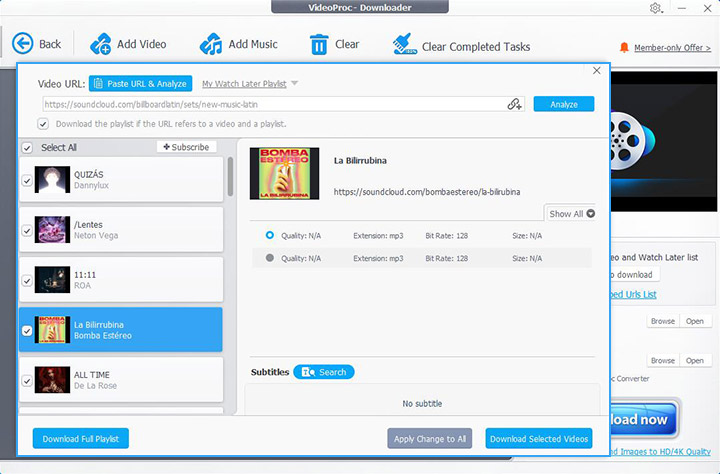
For people wanting a robust solution on their computer, VideoProc Converter AI is one of the most capable downloaders. The desktop program includes a built-in downloader that supports 1-click fetching playlists or single tracks from SoundCloud, and save them as audio files in MP3 or other formats you choose. It allows high-bitrate output up to 320kbps if the source permits.
In addition to SoundCloud, VideoProc Converter AI supports 1000+ websites and can batch download videos or music, including entire playlists and channels. Running locally and ad-free, this desktop software is generally faster and more stable, especially suitable for large downloads.

How to download a SoundCloud playlist with VideoProc Converter AI
- Download VideoProc Converter AI and open the Downloader module.
- Navigate to the SoundCloud playlist you want and copy its URL.
- Click Add Music > Paste URL and Analyze. The software analyzes the playlist and shows available qualities.
- Pick the bitrate and format you prefer. When needed, you can apply the settings to all tracks using the Apply Change to All option.
- Click Download Selected Videos > Download now to save the entire playlist.
Pros
- Fastest, most stable, and highest success rate among all tested programs
- High-quality output up to the original upload's maximum
- Compatible with 1000+ websites, SoundCloud, YouTube, Vimeo, TikTok, etc.
- Preserve ID3 tags like title and artist; Grab videos, music, playlists, channels, etc.
- Multi-purpose: conversion, simple edits, DVD backup, AI tools like vocal separation, etc.
Cons
- Software to install, less convenient for one-off or infrequent downloads
- Freemium pricing. The free version is limited to downloading from 10+ sites.
SoundCloudAud
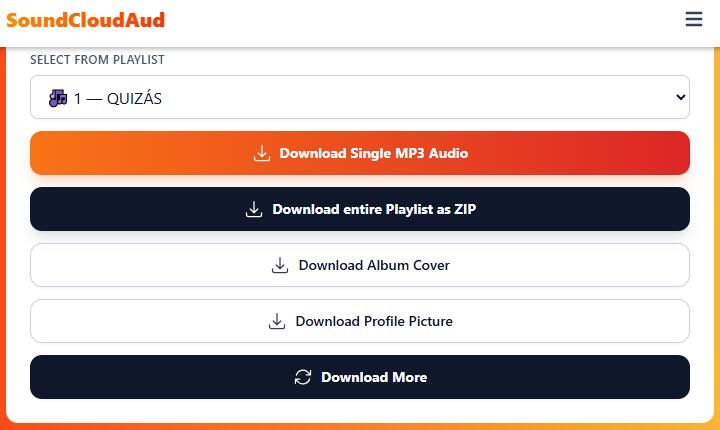
For those who don't want to install anything, SoundCloudAud is a web-based SoundCloud to MP3 playlist downloader. It runs in any modern browser on PC, Mac, Android or iOS. All you need to do is paste a playlist URL, wait a minute, and you'll get downloadable MP3 tracks. As simple as any online downloader. And conveniently, SoundCloudAud includes a playlist to ZIP option for easy downloading. You don't need to click on each file to save.
The simplicity does come with a few trade-offs. SoundCloudAud is likely supported by ads. While using the service, you might encounter pop-up ads or redirects. It doesn't give you quality options, and sometimes certain ID3 tag info might not carry over perfectly. Anyway, SoundCloudAud is unparalleled in terms of maximum simplicity for quick one-off tasks.
How SoundCloudAud works
- Open your web browser and navigate to soundcloudaud.com.
- Copy the playlist URL from SoundCloud.
- Paste the SoundCloud playlist URL into the input box.
- Click Download and wait for the site to generate links.
- Choose to download tracks individually or as a ZIP.
Pros
- No installation, no login, and free
- Work in any web browser and on any device
- Convenient SoundCloud Playlist downloader to ZIP
Cons
- Possible downtime or slower processing for large playlists
- Ads on the site, potential pop-ups and redirects
- Lack of detailed format and quality options
- Occasional downtime and metadata inconsistencies
Addoncrop Browser Extension
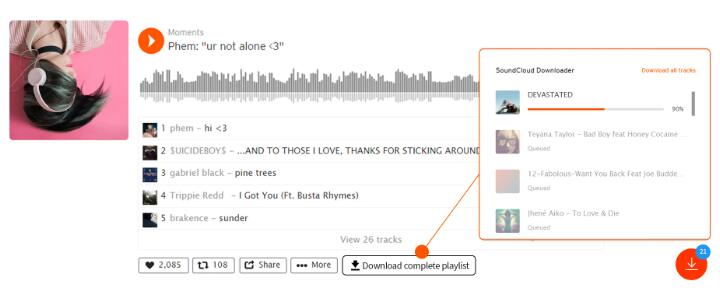
I'd say browser extensions offer a middle ground, requiring installation but not requiring copying URLs or using external sites. The extension adds a download button next to playlists within the SoundCloud pages, so you can save the entire playlist without leaving the site.
Addoncrop's SoundCloud Music Downloader is a popular example. It integrates into Chrome, Firefox, Edge, Opera, Brave and other Chromium-based browsers. Notably, you have to install it from its website using a helper called CrossPilot due to policies. Despite the extra installation steps, it's a convenient solution once set up. And to some extent, it doesn't completely eliminate the hassle of downloading individual tracks; you still need to manually select the save location for each track.
How to use Addoncrop to download SoundCloud playlists
- Visit Addoncrop's website for the SoundCloud Music Downloader page.
- Add CrossPilot if prompted and then install the SoundCloud downloader.
- Open SoundCloud and find the playlist you wish to download.
- Click the Download button near the playlist title or underneath it.
- Specify the file path to save each song one by one to your computer.
Pros
- Seamless playlist downloads without leaving the site
- Cross-browser support
- All downloads are in MP3 format with ID3 tags, including album covers.
Cons
- Not an official store extension, may collect personal data and inject unwanted ads
- Limited to 128 kbps MP3 quality
- You'll still need to manually select the save location for each track.
SoundCloud Playlist Downloader Android
On Android, there have occasionally been third-party apps claiming to download SoundCloud songs, but many get removed from the Play Store due to policy violations. On iOS, such apps are even more restricted.
Generally, using the mobile browser with an online tool is the simplest mobile solution. If you have an Android device that supports browser extensions, you could even try installing the Addoncrop extension on mobile, but this is an advanced workaround and not guaranteed stable. For most users, if you need songs on your phone, the easiest path is to download on a computer with VideoProc Converter AI then transfer the MP3s to your mobile device; or use SoundCloud's official offline feature if you have a subscription.
Final Thoughts
That's all for the SoundCloud playlist downloader. The best one depends on your needs and comfort level. VideoProc Converter AI offers high quality and reliability but requires installation. Addoncrop's extension is convenient inside the browser yet comes with privacy trade-offs and lower bitrates. SoundCloudAud and similar websites are accessible from any device, though their performance and metadata handling can vary.
Whichever method you choose, keep a backup option in mind, because third-party services can break when SoundCloud updates its platform. Therefore, their stability and update speed should also be considered. But anyway, always respect copyright and the terms of service. By picking the right tool and using it ethically, you can build a personal library of your favorite SoundCloud tracks and enjoy them anywhere.