
Summary: Wondering where to get a 4K Video Downloader license code? Or you're just trying to figure out why your 4K Video Downloader key isn't working? The mix-up with the new 'Plus' version is pretty confusing. In this post, I’ll show you how to find your license code and get everything reactivated properly. And if you're still having trouble, I've shared a great 4K Video Downloader alternative at the end that might work better for you.
4K Video Downloader Plus has established itself as one of the most reliable programs for downloading video content from the internet. However, while it's free version offers a great introduction to the software's core features, it comes with significant limitations, such as restricted download quality, playlist size, and channel saving.
To access all features of 4K Video Downloader Plus, you'll need to activate the software with a 4K Video Downloader Plus license key. In this post, I'll guide you through how to access your 4K Video Downloader (Plus) license key, activate it, reactivate it, and more.
What Is 4K Video Downloader License Key
A 4K Video Downloader license key is a unique, encrypted code issued to users who purchase the full version of the 4K Video Downloader software. It serves as the proof of purchase and provides the user with access to the software's paid features, enabling a more powerful and unrestricted experience. This key is tied to the software's account-based activation system. That being said, it must be linked to your user account or device in order to function. When you enter the license key into the software, it validates your purchase with the 4K Video Downloader server, confirming that you've unlocked the premium features.
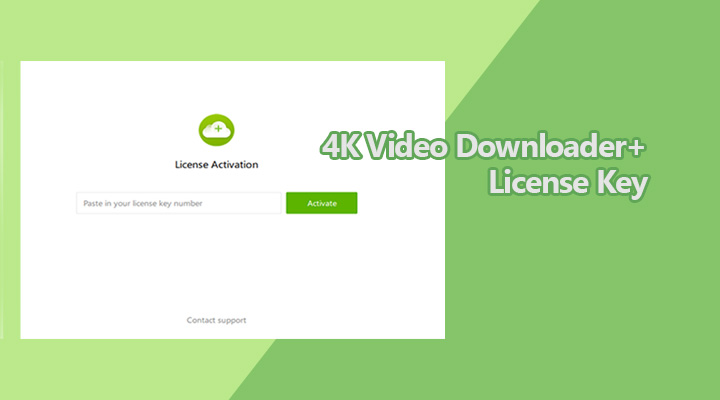
Note: The 4K Video Downloader license key is an essential part of the software's digital rights management (DRM) system. This system ensures that only authorized users can access the full suite of features, protecting both the developers' intellectual property and the users from potential misuse.
License Key: 4K Video Downloader vs 4K Video Downloader Plus
When it comes to activating 4K Video Downloader, it's important to understand that the license keys for the two versions are not interchangeable.
- A 4K Video Downloader license key can only activate 4K Video Downloader.
- A 4K Video Downloader Plus license key can only activate 4K Video Downloader Plus.
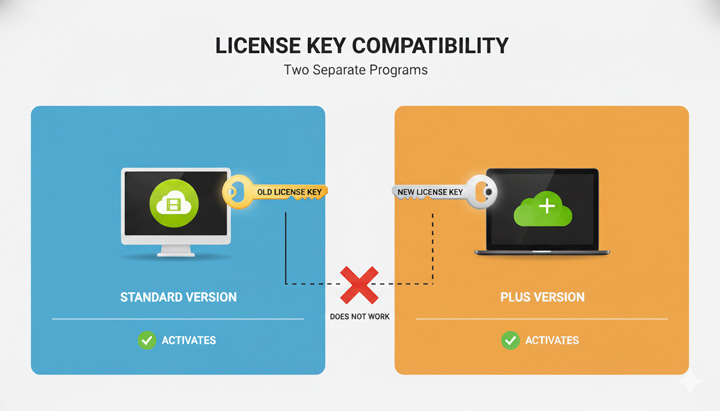
The reason lies in the software's development history. 4K Video Downloader was built on an older code base that eventually limited its ability to support new features.
To introduce in-app Browser and more advanced functionalities, its developer had to completely rebuild the software and that brings the all-new 4K Video Downloader Plus. Although the names are similar, they are actually two different programs.
Why You Should Understand This:
Frustration often arises because 4K Video Downloader and 4K Video Downloader Plus are treated as two entirely separate applications, meaning the "Lifetime License" purchased for one does not grant access to the other. While your existing 4K Video Downloader license key remains valid, it is strictly tied to the specific 4K Video Downloader you bought, which is why it is rejected when you attempt to use it to activate the distinct 4K Video Downloader Plus application.
How to Access 4K Video Downloader (Plus) License Key
4K Video Downloader is not available on store any more. Now, you can only purchase 4K Video Downloader Plus. Accessing your 4K Video Downloader Plus license key is straightforward if you follow the official steps. Here's how:
Step 1. Visit the Official Purchase Page
Open the official purchase page of 4K Video Downloader Plus.
Step 2. Choose Your Subscription Plan
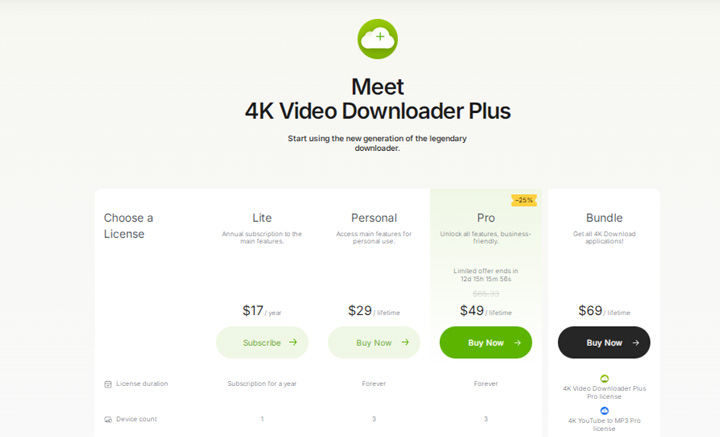
Compare the subscription plan and click on the Buy Now button of the plan you need.
- 4K Video Downloader Plus Lite: 17USD/year
- 4K Video Downloader Plus Personal: 29USD/lifetime
- 4K Video Downloader Plus Pro: 49USD/year
- 4K Video Downloader Bundles: 69USD/lifetime
Step 3. Enter Your Information
Enter the needed information, such as your credit card and email address. Hit Purchase to compete the purchase of 4K Video Downloader Plus.
Step 4. Receive the License Key
The 4K Video Downloader Plus license key is sent to your registered email address. Search your inbox (and spam/junk folders) for keywords like "4K Download", "license", or "serial" to find it.
If you didn't receive the mail, visit the license retrieval page . Enter the purchase email address to retrieve your license key and enter your purchase email address. The license will be resent to the email right away.
License Key Issues & How to Fix Them
1. Didn't Receive the Mail
If you've purchased a premium license for 4K Video Downloader Plus but haven't received the email with your license key, try the following steps:
- Check your spam/junk folder: the email with your 4K Video Downloader Plus license key may have ended up there.
- Verify the correct email inbox: make sure you're checking the email address you used to make the purchase, or the one linked to your PayPal/account.
- Contact support: Still can't find the key, reach out to 4K Download support. Provide your purchase email and order number so they can verify your purchase and resend your license key.
2. The Email Is No Longer Unavailable
Suppose your email is no longer active, reach out directly to the 4K Download support team. Just provide the information below, the support team can manually verify your purchase and reissue a valid license key.
- Purchase email address
- Order ID or Transaction Number
- Approximate date of purchase
- Payment method
- Screenshot of the receipt (if available)
How to Activate with 4K Video Downloader Plus License Key
Once you have received your 4K Video Downloader Plus license key, follow these steps to activate the software. The process is very similar if you're activating the Classic 4K Video Downloader with its license key.
Step 1. Install and Launch the Software
After downloading and installing 4K Video Downloader Plus, open the program.
Step 2. Access the Activation Section
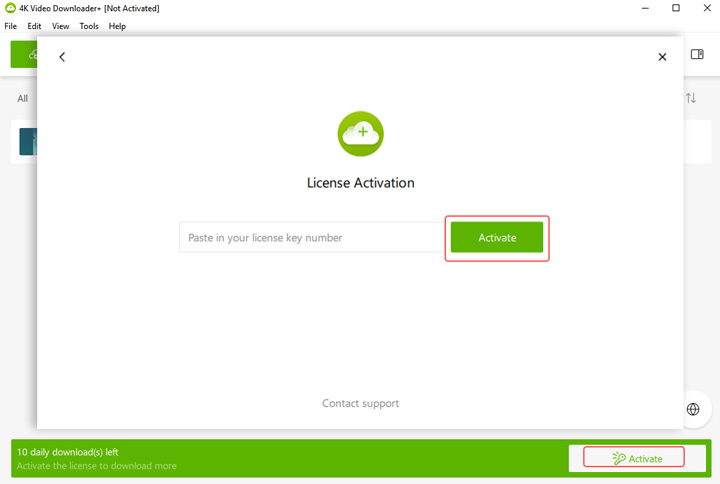
Look for the Activate License option in the lower corner of the interface and click on it.
Step 3. Enter Your License Key
Type or paste your 4K Video Downloader Plus license key into the field and confirm. Once it's successfully entered, your account will be activated, and you'll have full access to all features, ready to download videos and audio in the original quality.
Troubleshooting Activation & License Issues
Even with a simple copy-and-paste process, users sometimes run into problems activating 4K Video Downloader or 4K Video Downloader Plus. Knowing how to handle these issues will save you time and get you back to downloading quickly.
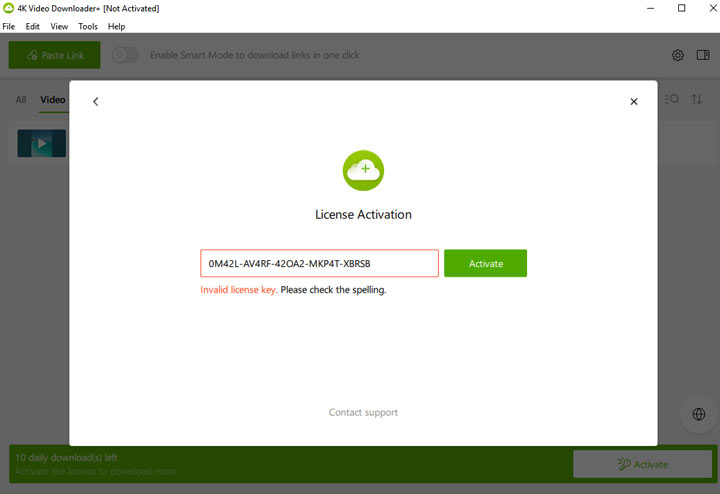
1. "Invalid Key" Error
The most common problem occurs when the software rejects your license key and shows an "Invalid Key" message.
Possible cause 1: Typo errors. Extra spaces before or after the key can make it invalid. Clear the input field and carefully paste the key again.
Possible cause 2: Version mismatch. Make sure you are using the correct key for your version. A 4K Video Downloader license key cannot activate the Plus version, and vice versa.
2. License Key Suddenly Stopped Working
If your key worked before but now shows errors like "License already in use" or "Activation limit reached", it's likely because the license is limited to a certain number of devices. To fix this, log into your account on the official 4K Download website and deactivate the 4K Video Downloader license key on an old or unused device. Once deactivated, you can activate the key on your new computer without purchasing a new license.
3. Confusion Over Lifetime or Legacy Licenses
If you purchased a lifetime license for 4K Video Downloader, you might expect to use the same key for 4K Video Downloader Plus. However, that won't work. 4K Video Downloader and 4K Video Downloader Plus are two completely separate programs, so your old license key only works with 4K Video Downloader. What to do:
- Use your existing 4K Video Downloader license key to activate 4K Video Downloader.
- To use 4K Video Downloader Plus, purchase a new license and activate the Plus version with the key you receive.
4. Activation Errors When Moving to a New Computer
Some users encounter activation issues when trying to use the license on a new device. This happens if the license is tied to a limited number of devices.
Step 1. Open 4K Video Downloader Plus on the old machine.
Step 2. Go to Help > License Information (or settings). Click Deactivate License or Log Out.
Step 3. On your new computer, follow the standard 4K Video Downloader Plus activation steps.
Switch to the Best 4K Video Downloader Plus Alternative
Many users find 4K Video Downloader Plus less than ideal, especially if they already purchased a lifetime license for the original 4K Video Downloader. The older video downloader doesn't receive new features, and upgrading to 4K Video Downloader Plus requires buying an entirely separate license. On top of that, 4K Video Downloader Plus primarily focuses on downloading videos and costs $29, which may feel limiting given the price.
At a similar price point, many 4K Video Downloader alternatives offer much more. For example, VideoProc Converter AI provides not just video downloading from 1,000+ sites, but also unlimited simultaneous downloads, no restrictions on video length, and a suite of AI media enhancement features. You can upscale videos to 4K, restore image quality up to 10K resolution, enhance audio by removing background noise, and more.
Get VideoProc Converter AI for free to download, convert, record, and AI-enhance your media!

4K Video Converter Plus vs VideoProc Converter AI
| Feature | 4K Video Downloader Plus | VideoProc Converter AI |
|---|---|---|
Price |
$65.33/lifetime |
$65.95/lifetime |
Supported Sites |
15 sites (source) |
1,000+ sites (YTB, TikTok, and Instagram...) |
Simultaneous Downloads |
3 (7 for Pro plan) |
Unlimited |
Video Resolution |
4K, 8K |
4K, 8K |
Audio Extraction |
|
|
AI Video Enhancement |
|
|
AI Image Enhancement |
|
|
AI Audio Enhancement |
|
|
Screen Recording |
|
|
Media Processing |
|
|
Price |
$17–$49/year or limited lifetime plans |
$39.99 lifetime (more features included) |

 Not supported