
Looking for a reliable 4K Video Downloader alternative? Whether you want to save videos from YouTube, Instagram, Facebook, Twitter, Vimeo, or Dailymotion, or download stock footage and screensavers in original 4K quality, sometimes you need a tool that's more reliable and versatile. So we made this list of some tested 4K Video Downloader alternatives, covering dedicated desktop downloaders, browser extensions, online tools, etc. If you are interested, you can also check our selection criteria at the end of this page.

Why You Need A 4K Video Downloader Alternative
4K Video Downloader is popular, but it has several limitations. Its interface is ad-heavy, it only supports 17 sites, which is quite limited, and it lacks extra tools that many users might expect. Even worse, technical glitches pop up from time to time, which makes it important to have a dependable alternative ready. Recently, many users have reported that the download process gets stuck at the "Retrieving information" stage and doesn't progress any further.
⛔ "I got the problem too. "can't find valid format" error. Going to have a backlog. Bit Chute is still working though" - @RDan55 from reddit.com
⛔ "Stuck at 'Retrieving information'. Totally updated, signed in and out, etc. Appears to just be YouTube...anyone else? " - @MikeSchlossberg from reddit.com
Having a capable 4K Video Downloader alternative ensures you won't get stuck when these issues arise. In fact, you might also be pleasantly surprised by what other downloaders offer – many provide enhanced features, with multi-language subtitle options, 1-click playlist downloading, 4K, 8K resolution options and more.
1. VideoProc Converter AI
- Best desktop 4k video downloader alternative
- Pricing: Free
- Supported System: Windows, Mac
- Clean Installation: Yes
💡 Recently, many users reported that 4K Video Downloader Plus had trouble downloading videos from YouTube, returning errors like "can't find valid format" or "can't parse this link". I tried some videos with VideoProc Converter AI and found it could successfully download videos from YouTube and almost every site I tested.
4K Video Downloader only handles video downloads and comes with some drawbacks: an ad-heavy interface, limited site support, and occasional download issues. VideoProc Converter AI, in contract, handles downloads reliably and adds extra features such as format conversion, video enhancement, and support for more platforms. It keeps up with updates on platforms like YouTube, Vimeo, and Dailymotion, so downloads continue to work smoothly. Just keep the software updated, and the support page is available if you need help.
Inside the Downloader panel, you can add any link, and VideoProc Converter AI will automatically detect the video for download. That means you can grab embedded videos, download from Vimeo, TikTok, and other UGC platforms, or even save streaming videos. It also detects all available versions of the source video, including resolution (up to 4K), formats, frame rates, file sizes, language tracks, and subtitles. This makes it easy to get exactly the version you want, in the original quality. Here are some of its highlight features you will love:
VideoProc - Best Alternative to 4K Video Downloader
- Support 1000+ sites: TikTok, Vimeo, Facebook, YouTube, Instagram, and more.
- Download in original quality or upscale low-quality videos to 4K with AI.
- Choose from various resolutions (4K/1080p) and formats (MP4/M3U8) when available.
- All-in-one: AI-enhance media; download music/subtitles; edit/record/convert, etc.
- Stable with frequently updated and optimized media downloading engine

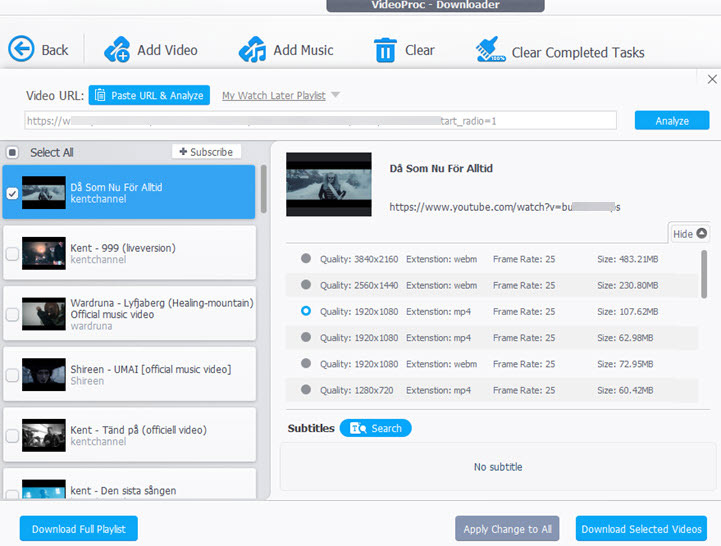
Recommended by PCWorld, Tech Advisor, Techradar and other leading tech publications, VideoProc Converter AI is a trustworthy alternative to 4K Video Downloader (Plus), with a clean installation, no ads, and no bundleware.
 Excellent
2. Video DownloadHelper
- Best browser extension as 4k video downloader alternative
- Pricing: Free
- Supported System: Windows, Mac, Linux, Google Chrome, Firefox
- Clean Installation: Yes

If you are looking for a lightweight alternative to 4K Video Downloader, Video DownloadHelper is a nice option. Instead of requiring you to download and install the download on a computer, this downloader is a Google Chrome Extension (which also works on Firefox).
Popular sites are supported in this extension, including but not limited to Facebook, Dailymotion, Vimeo, Udemy, and video hosting sites.
The only downside is, as a bare bone extension, it less convenient to pause or resume downloading. It will make you feel less secure when downloading large 4K videos. Getting "Stuck at 99%" would be a nightmare for everyone waiting so long for a movie.
Video DownloaderHelper has a peer-help-peer forum, created with Google Groups. If you have problems using the extension, or a certain URL is not working, you can always seek help in the forum.
3. JDownloader 2
- Best 4k video downloader alternative free
- Pricing: free, open-source, option to upgrade to the Premium account for extra features
- Supported System: Windows, Mac, Linux, iOS, Android and Windows Phone
- Clean Installation: the installer contains adware while the portable version (JAR file) is ad-free.
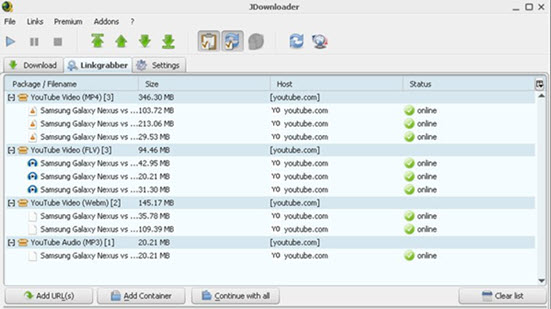
If you love the batch downloading feature of 4K video downloader, you will love JDownloader 2. As one of the best open-source downloading managers, JDownloader 2 proves itself to be a nice alternative to 4K video downloader in terms of mass downloading.
It automates the processing by detecting URLs from the clipboard and analyzing all the available videos from that link. With the CAPTCHA tool and link grabber, JDownloader 2 can pass the verification of "I'm not a robot" to bulk save videos on certain sites. You can also set up bandwidth limitations or pause downloads. These features come in handy when you are multi-tasking on the computer.
With this tool, you can save 4K videos, 360 videos, HD videos, music and even images to enjoy offline. Just note that its interface can be somewhat intimidating for the non-geek and the official installation contains adware. If you prefer a clean installation, you can download the JAR File – a portable version – under the Other section on the official Download Page.
JDownloader 2 has an active forum where you can ask questions and join in discussions. There are sub-forums in English, German, Polish, Spanish, Turkish, and French languages.
Currently, this 4K video downloader alternative doesn't support saving Vimeo videos and Instagram posts.
4. ClipGrab
- Best open source 4k video downloader alternative
- Pricing: Free, Open-source
- Supported System: Windows, Mac and Linux
- Clean Installation: yes, but downloading from third-party resources may result-in ad pop-ups
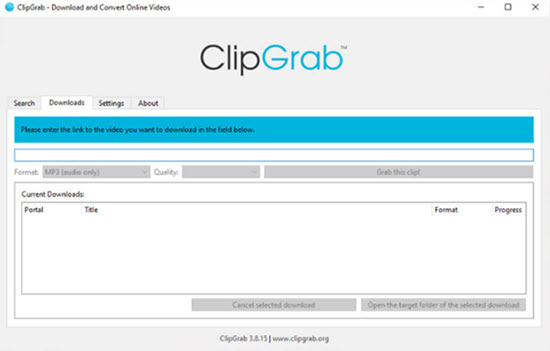
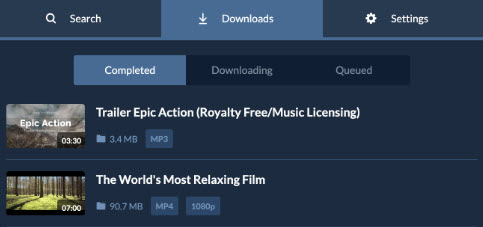
If you prefer integrated searches inside the downloader, then ClipGrab shall fulfill your requirement as the alternative to 4K video downloader. Its user interface is simple and clean to navigate, with four tabs: Search, Downloads, Settings and about. Just as other alternatives, ClipGrab is baked with clipboard monitoring that will automatically analyze any link you just copied.
After crawling the downloadable videos and other content on a single page, ClipGrab will demonstrate you multiple parallel streams, so that you can choose which resolution or file format to save. Generally, you can download from 144p to 1080p and 4K videos when it's available from the server. Besides MP4, you can also save WMV, MP3, OGG, Theora, or convert the downloaded video to the preferred format, both for videos and audio tracks.
The only downside is, ClipGrab only shows 12 searches per time. To save more videos or music, you need to manually enter the URLs, which could be time-consuming, especially for videos in playlists and channels. Some users reported there are ad pop-ups without consent, which may be caused by installing the software from unreliable resources. Make sure to download ClipGrab from its official page.
5. SnapDownloader
- Best paid 4k video downloader alternative
- Pricing: free for 48 hours, then starting from $7.99/month
- Supported System: Windows, Mac.
- Clean Installation: Yes
SnapDownloader is a lightweight alternative to 4K video downloader, with a sleek and tidy interface that appeals to many users. Once installed on your Windows or Mac computers, you can copy and paste links in SnapDownloader to get started. It will crawl and list out available videos with thumbnails, estimated download size, format, and resolutions.
Partial download, scheduling, and one-click mode are highlighted features of SnapDownloader.
When you love part of the video online, you can designate the start and end time for SnapDownloader to save part of the video only, so that it's quicker than pulling off all the content in one shot. The scheduling feature allows you to set up a future date and time for the tool to initiate the downloading. The one-click mode will apply the same settings - MP4 720p, for instance - for all the future downloading tasks.
For users unhappy with the limited support of subtitles in 4K video downloader, this best alternative can save subtitles in more than 50 languages, when it's available in the source video. There are also bonus options to add custom metadata to the videos. This app supports Dailymotion, Twitter, Facebook, and many other popular sites.
Probably the only drawback of the 4K video downloader alternative is its pricing policy. It goes with a subscription-based plan, which starts at $7.99 per month, $29.99 per year for 1 computer, or $39.99 lifetime. Users can enjoy free downloading in the first 48 hours.
Side-by-Side Comparison of 4K Video Downloader Alternatives
| Alternative to 4K Video Downloader | Pricing | System | Installer Size | Clean Installation |
|---|---|---|---|---|
🥇 VideoProc Converter AI |
Free |
Windows, Mac |
49MB |
No bundleware |
🥈 Video DownloadHelper |
Free |
Browser extension |
N/A |
Yes |
🥉 JDownloader 2 |
Free, premium |
Windows, Mac, Linux, mobileOS |
95.1 MB |
Depends on installer version |
ClipGrab |
Free, open-source |
Windows, Mac, Linux |
70 MB |
Possible Ad pop-ups |
SnapDownloader |
48h free trial |
Windows, Mac |
95.04MB |
No bundleware |
Note: The downloader feature in VideoProc Converter AI is completely free to use. Other features such as editing, recording, converting videos are free to use for videos less than 5 minutes. If you only need full features related to video downloading, VideoProc Converter AI to truly free and easy to use. No ads, no bundleware.
Click the buttons below to securely download VideoProc Converter AI for Windows or Mac computers:
Disclaimer: Please make sure you are entitled to download the content with the permission from the copyright owner.
Selection Criteria
Below are the aspects to consider when selecting the best 4K video downloader alternative. Tools that meet all or most of the criteria stay high on the list.
- Supported websites: tools that support numerous websites will make your workflow quick and easy.
- Supported videos: besides parsing the direct video URL, it would be nice if the tool can also download embedded videos, blob videos, playlists, channels, private videos, etc.
- Video quality and format options: it's nice to list out all the available resolutions and file format, so that you can select the desired specifications such as 4K, 1080p, video to audio-only, etc.
- Download speed: faster speed will sure enhance your downloading experience.
- Ease of use: look for an intuitive and user-friendly interface.
- Clean installation: some free tools come with adware or malware that you may want to avoid.
- Extra features that will enhance user experience: proxy settings, toolbox to edit videos, download only the audio from the video URL, and so on.
FAQ
What is the best alternative to 4K video downloader?
VideoProc Converter AI is often considered as the best overall 4K video downloader alternative due to its all-in-one video processing capabilities, which include downloading, converting, editing, enhancing, and more, all with a user-friendly interface. It supports accelerated speed and original resolution like 1080p, 4K or 8K.
Is there a free version of 4K video downloader?
Yes, 4K Video Downloader has a free version. The free version supports some features in the paid program with the following most notable differences: daily download limit, playlist and channel download restrictions, no bulk subtitle downloads, limited simultaneous downloads, and advertisements.