VideoProc Converter
 New AI features are available

 Listed in
 Topaz just announced Astra as the world's first creative video upscaler on June 11, 2025. It's currently in early access and you can apply through the Topaz Labs website.
Six months have passed now. How is Topaz Astra performing? Is it worth it? Let's take a look.
What is Topaz Astra
Topaz Astra is a cloud-based application designed to upscale videos, particularly AI-generated content, to 4K resolution while enhancing quality and finer details.
Unlike traditional upscalers that force a choice between fidelity and detail, Astra introduces a novel approach by allowing users to adjust the balance between these aspects. Powered by Topaz Labs' Starlight AI models, Astra separates storytelling from detail enhancement, enabling creators to refine their vision without losing the original intent. This makes it particularly valuable for AI filmmakers and traditional videographers working with tools like Runway, Kling, or Veo.
Usability and Interface
Astra operates as a web-based application, accessible via astra.app. From the official site, its interface is roughly as follows:
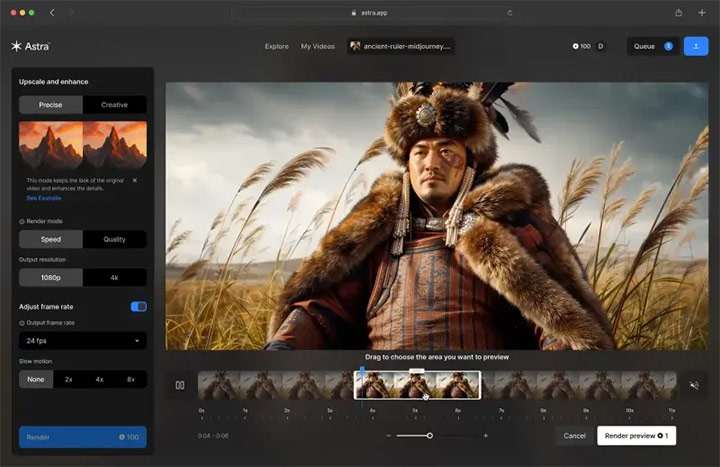
On the left side of the main interface is the settings panel. The main section of the interface is dominated by a large video preview window, allowing users to see real-time changes and compare different enhancement modes. Below the preview window lies the timeline commonly seen in video editing software.
Pricing
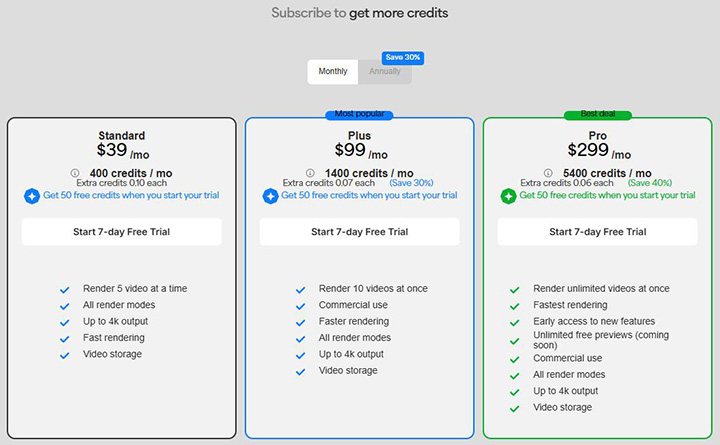
Astra operates on a credit-based subscription system where usage depends on video duration, resolution, and chosen mode.
- Standard Plan: $39/mo or $328/yr, includes 400 credits/mo, supports 5 videos at a time.
- Plus Plan: $99/mo or $832/yr, includes 1400 credits/mo, supports 10 videos at a time.
- Pro Plan: $299/mo or $2512/yr, includes 5400 credits/mo, offers fastest speed and unlimited concurrent videos.
Moreover, additional credits beyond the monthly allowance cost $0.10 per credit for Standard, $0.07 per credit for Plus, and $0.06 per credit for Pro plans.
For credit usage, you can choose a model after uploading your video. Different modes and models have different pricing. I uploaded a five-second video for testing, and the following shows the credit usage when I only selected video upscaling:
Mode |
Model |
Output Resolution |
Preview Credits |
Render Credits |
|---|---|---|---|---|
Creative |
Starlight Creative |
1080P |
3 |
7 |
4K |
4 |
11 |
||
Precise |
Starlight Quality |
1080P |
3 |
7 |
4K |
4 |
11 |
||
Precise |
Starlight Speed |
1080P |
1 |
3 |
4K |
2 |
5 |
||
Precise |
Proteus |
1080P |
2 |
2 |
4K |
2 |
4 |
||
Precise |
Starlight Mini |
1080P |
1 |
3 |
4K |
2 |
5 |
||
Precise |
Rhea |
1080P |
2 |
4 |
4K |
2 |
4 |
||
Precise |
Nyx |
1080P |
2 |
2 |
4K |
2 |
2 |
||
Precise |
Iris |
1080P |
2 |
2 |
4K |
2 |
4 |
Translating all this data to video duration, it means that if you pay $39 per month for a Standard Plan, you can process ~266 seconds of 1080p or 160 seconds of 4K video with the Creative Mode; or up to 800 seconds of 1080p or ~333 seconds of 4K video with Starlight models under the Precise Mode. I wouldn't say this is cheap, even considering Video AI starts around $33 per month with an annual commitment.
Key Features and Innovations
Astra's feature set is tailored to enhance video quality and creative control. Its dual-mode approach represents its most innovative aspect, offering two distinct philosophies for video enhancement.
Creative Mode
Creative Mode reimagines and enhances details of the original video, effectively generating new visual information that wasn't present in the source material. This mode offers two strength options (now three):
- Subtle: Adds gentle details while maintaining the general character of the original footage
- Bold: Takes more creative liberties, potentially transforming the footage more dramatically
- Medium: Likely offers a level of creativity between Subtle and Bold (the new one)
It's particularly effective for AI-generated videos that may lack fine details, though it may introduce artifacts or hallucinated details when used on older or heavily degraded footage.
Precise Mode
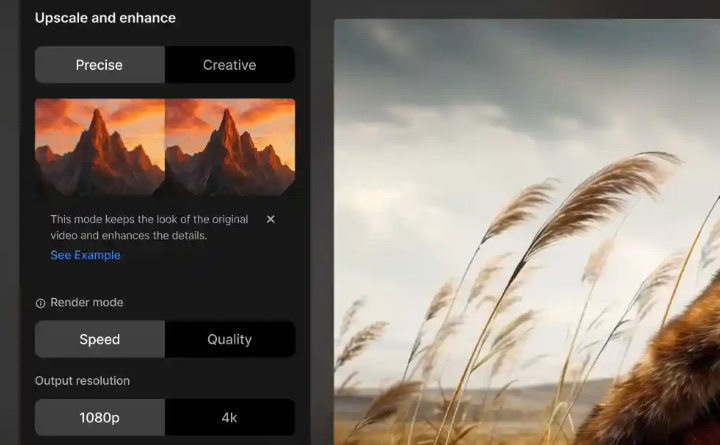
Precise Mode focuses on restoring and enhancing details while preserving the original look of the footage. This mode previously only had Speed and Quality as two options, but now you can choose from a total of seven options, including Starlight Mini, Proteus, Rhea, Nyx, and Iris.
- Starlight Speed: For quality restoration optimized for speed and cost-efficiency.
- Starlight Quality: For highest quality restoration, details, and professional look.
- Starlight Mini: For scenes with fast movement, restoring low-res old footages.
The distinction between these modes represents a fundamental shift in approach to video enhancement, moving beyond simple upscaling to offer creative reimagining as a legitimate enhancement option.
Frame Interpolation and Slow Motion
Beyond resolution enhancement, Astra offers powerful frame interpolation capabilities that can:
- Increase frame rates up to 120fps for smoother motion
- Create 2x, 3x, 4x, 6x, 8x, 10x, 12x, or 16x slow-motion effects through AI-powered frame generation
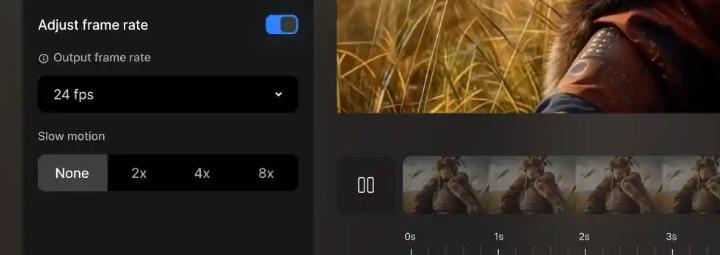
This functionality leverages advanced AI to analyze motion between existing frames and generate new intermediate frames that maintain visual consistency. The result is smoother playback and cinematic slow-motion effects that would typically require specialized high-speed cameras to capture natively.
Hands-On Testing
Since Topaz advertises Astra as Creative Video Upscaling for AI Videos
, I decided to test its Creative Mode with an AI-generated video from its official webpage. You can find the original video here. I used VideoProc Converter AI to cut it into a five-second clip without re-encoding, and no other changes were made.
Creative Mode
There was a lot of waiting involved. Creative Subtle mode took 268 seconds to render a 2-second 1080p preview of this 24 fps 720p video, while the same settings took 277 seconds in Creative Medium and 332 seconds in Creative Bold.
Below is a screenshot of the outputs.
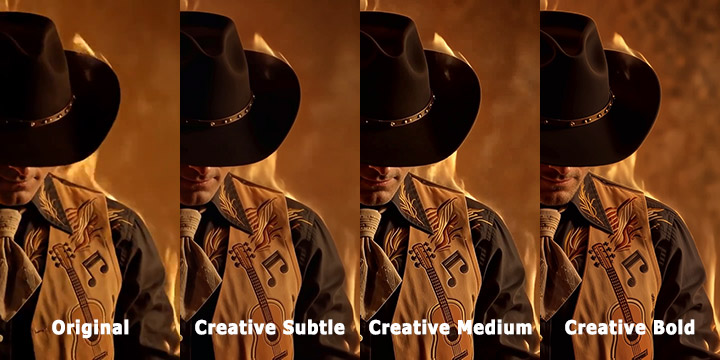
As you can see, the four images get progressively sharper and clearer from left to right, especially in the embroidered patterns on the vest. The edges of the hat and the folds of the tie also become crisper. In Medium mode, the shadows under the hat stay smooth yet detailed, with no oversmoothed patches or chromatic artifacts. Bold mode definitely brings out even more detail, especially in the facial hair. But it also introduces obvious halos around the silhouette and an artificially sharpened, fire-colored haze in the upper right.
Precise Mode
I then upscaled the same clip with the Precise Mode. The Starlight Quality model took 298 seconds, while the Starlight Speed model took 141 seconds, which is indeed faster. See the outputs below.
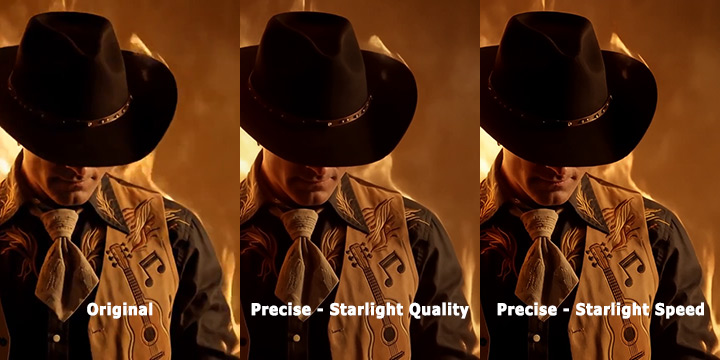
The Starlight Quality model improves clarity without making bold changes. It reduced the noise, giving the glow a refined and almost airbrushed appearance. But it lost some of the natural chaos of the flames, and the overall image takes on a slightly digital softness. The Starlight Speed model surprisingly shows noticeably sharper edges across the hat, vest, and embroidered graphics. However, some areas begin to look slightly reconstructed, creating a hint of artificiality.
Limitations
Astra's strengths lie in its innovative upscaling technology and flexibility. You can choose either Creative or Precise mode for different project types. Now, there are more available models for more uses, such as Proteus or Rhea from its Video AI. It's a web-only product, so you don't need any GPU hardware. However, we can also see these limitations in practical use.
Video Length and Format Restrictions
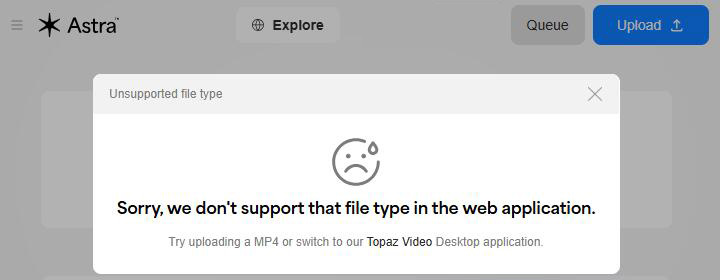
Astra limits video length by frame count rather than by duration, as most people assume. Creative Mode caps you at 450 frames, whereas Precise Mode allows up to 9000 frames. Additionally, according to @daniel_1188's reply in a community post, Astra appears to restrict color sampling to 4:2:0.
As for the format, Astra currently accepts only MP4 videos. When I tried uploading an old home MOV file shot on my phone, this is what happened:
Performance on Real Footage
The tool performs less effectively on natural, real-world video compared to AI-generated content. For photorealistic restoration, you may need other dedicated models.
Occasional Artifacts and Failures
Indeed, Astra delivers on its promise of video upscaling to 4K. Despite its innovative technology, Project Starlight is not magic. Like many other AI video generators, Astra still cannot avoid issues with limbs or other details. Its understanding of motion and physics isn't fully reliable, and therefore, results can defy physical logic.
For example, here's an official showcase from Topaz. In the center of the image, the umbrella did not make any contact with the woman's hands. In the following seconds, a man on the right side just walked straight through the street lamp. In addition, Astra has difficulty with accurate text rendering. The text in the background can hardly be called text.
High Resource Demands and Pricing
In a behind-the-scenes video, Eric Yang, CEO of Topaz Labs, explained that the reason why Astra is web-only is because the model is "just way too large and slow and expensive."
He's right about this. The pricing we covered earlier speaks for itself, and the render times from our tests clearly reflect those heavy resource requirements.
Immediately Available Alternative: VideoProc Converter AI
For those seeking an immediately available alternative with robust video processing capabilities, VideoProc Converter AI is a compelling option. This all-in-one software, available for Windows and Mac, leverages AI and GPU acceleration to deliver fast, high-quality video enhancements. Its key features include:
- Super Resolution: Enhances videos to 4K resolution and images to 10K resolution, ideal for low-quality or AI-generated footage.
- Frame Interpolation: Increases frame rates for smoother motion, similar to Astra's capabilities.
- Video Stabilization: Corrects shaky footage from GoPro, drones, or smartphones.
- Noise Reduction: Removes background noise from audio or video files using deep learning technology.
- Comprehensive Toolkit: Supports conversion across 420+ formats, compression, downloading, and screen recording.
Unlike Astra, VideoProc Converter AI is fully available for download and use, offering local processing for users prioritizing privacy or offline workflows. Its versatility and immediate accessibility make it an excellent choice for video enthusiasts and professionals seeking a reliable solution.

Topaz Astra vs VideoProc Converter AI
Here's a side-by-side comparison of Topaz Astra and VideoProc Converter AI to help you quickly gauge the strengths and specializations.
Feature |
Topaz Astra |
VideoProc Converter AI |
|---|---|---|
Best For |
Creative AI upscaling, experimental filmmakers |
Versatile, everyday video and image enhancement |
Processing Location |
Cloud-based (web-only) |
Local (Windows & Mac) |
Key Modes |
Creative & Precise enhancement modes |
Super Resolution (up to 4K), image upscaling (10K) |
Frame Interpolation |
Yes, up to 120fps for smooth slow motion |
Yes, 2X, 3X, 4X, 5X FPS or slow motion |
Format Support |
MP4 only |
Extensive video/audio/image formats |
Bonus Features |
Innovative detail enhancement, AI-driven workflow |
AI Stabilization, format conversion, video compression |
Privacy |
Data processed in the cloud |
Fully offline (local processing, enhanced privacy) |
Downsides |
High resource demands, slow processing, high price tag |
Fewer artistic/creative modes |
Conclusion
Topaz Astra is poised to redefine video upscaling with its innovative AI-driven approach, offering creators unprecedented control over their projects. While its early access status and web-only format present some challenges, the initial user feedback and feature set suggest a bright future.
For those needing a more established tool, VideoProc Converter AI provides a robust, immediately accessible alternative with comparable upscaling and editing capabilities.
FAQ
1. Is Topaz Astra free?
Topaz Astra is not free; it runs on a paid, credit-based cloud model with monthly or annual subscriptions, such as Standard, Plus, and Pro tiers. Some Topaz desktop bundles include a limited monthly allowance of Astra cloud credits, but full, ongoing use still requires a paid plan rather than a permanent free tier.
2. Can Topaz Astra be downloaded for local use?
Topaz Astra cannot currently be downloaded for local, offline use. It's a browser-based cloud service only. Users who want local processing must instead use Topaz Video AI, which runs on a desktop with GPU hardware and accesses related models like Starlight locally.
3. Topaz Astra vs Starlight
Astra is a web app built around Starlight and related models, adding Creative and Precise modes, simplified controls, and fast cloud processing for AI or stylized footage. Starlight itself is a model family focused on high-fidelity, photorealistic restoration, typically used inside Topaz Video AI, with slower but more precise results and higher resource demands.