Download Online Videos & AI Upscale to HD/4K!
You may be asking yourself this question at a critical time. A project is due, or a deadline is coming up. We want to help identify what may be limiting the functionality of your 4K Video Downloader. The 4K Video Downloader is a program that allows you to save videos from YouTube and other websites.
From the perspective of an experienced troubleshooting professional, there are a few general obstacles that can limit the accessibility of a product. There may also be product-specific requirements that may be causing difficulty. This article lists some possible reasons why 4K Video Downloader not working and how to fix it.
Why 4K Video Downloader Not Working
There are some important features to know about the 4K Video Downloader to help identify what may be limiting the functionality. Some general obstacles that can cause difficulties are:
- Internet connection or proxy settings
- Unsupported video site
- The video's accessibility
- Faults or glitches in 4K Video Downloader
- Failure to keep up with changes on the platform side, such as YouTube updates.
Based on our analysis of community feedback, if you were able to use 4K Video Downloader before but it suddenly stopped working recently, the most likely reason is a software issue. Given the frequent platform changes, such as those on YouTube, 4K Video Downloader may not have made targeted updates to keep up, leading to failures in link parsing or video downloads. If this is your case, there's usually no other option but to wait for a bug fix or software update. Alternatively, if you have urgent downloads to complete, you can consider using alternatives to 4K Video Downloader.
🤔 Tired of receiving "can't parse this link" messages or frequent 403 Forbidden errors? Want a more stable and reliable way to download high-quality videos? Try VideoProc Converter AI
- Frequent updates ensure stable and smooth downloads.
- Batch high-quality downloads from 1000+ websites, up to 8K.
- No daily downloads limit, even in the free version.

How to Fix 4K Video Downloader Not Working
Basically, the 4K Video Downloader issues may fall into two categories: can't parse link error and blocked video problems. The overall solutions can be divided into the following attempts.
1. Update the Software
Outdated versions might not be able to parse new video URLs. Ensure you are using the latest version as updates often address compatibility issues, especially those caused by platform changes.
2. Check Your Internet Connection
Check your internet speed. There are a number of useful sites for determining download and upload speeds. One that could potentially help is this Speedtest by Ookla, which can help identify if your internet speed is up to the task of downloading any 4K Video Download content.
You can test your internet speed by selecting the "Go" button in the center of the website page.
3. Ensure Supported Video Site
4K Video Downloader works with a specific list of platforms. Verify the video you are trying to download is hosted on one of these sites.
4. Verify the Video's Accessibility
You'll want to ensure the link is correct and accessible through a browser. In additon, 4K Video Downloader can only access publicly available videos, so make sure the video isn't set to private or restricted.
5. Log in to YouTube inside the app
Go to Preferences > Authorization > Log in with your YouTube account. This bypasses age-gate and Premium-token blocks for 90 % of videos. If you are already logged in, try to log out and back in again to refresh the connection.
6. Change Firewall, Antivirus, and Proxy Settings
These security programs might interfere with the downloader. Temporarily disable them to see if it resolves the issue. Also, proxy settings matter. If facing geographical restrictions, configure a proxy in the downloader's settings.
7. Solve Common Browser Hurdles
If you have the required speed, but don't see the file downloaded, try clearing the cache of your favorite browser. A cache is a form of file storage that when full, can limit the quality or capability of download options.
You can learn how to clear your browser cache from a number of sites, but let's go through the steps for a common browser, such as Google Chrome.
- Go to Settings
- Select "Clear Browsing Data"
- Make sure it is set to clear browsing history, cookies, and cached images and files
- Select the time range of "All Time"
- Select "Clear Data"
This may take some time, but this is a major contributor to being unable to download content, and it is super easy to address. If you are using another browser, some helpful guides can be found elsewhere, including the support pages for each browser. For example, Clearing Cache on Safari or Clearing Cache on Firefox.
8. Change Download Path
Sometimes, insufficient space or permission restrictions in the current output folder can cause issues. A 4K video file can be quite large, and you are taking something from the source on the internet and downloading it to your own device. You will want to make sure that you have the space available for any such video. Check your file storage, and make sure that you've got the space available. It may help to change the download directory in the app's preferences.
9. Allow the Program Permission
Another thing that can limit the functionality of the 4K Video Downloader is the administrator role. Many devices limit who can download particular items on the device. If you aren't the administrator on the device, find who is, or enable the process by selecting "Run as administrator."
10. Consider An Alternative
If 4K Video Downloader continues to not work, you may want to explore alternative video downloaders, as not all software keeps up with platform updates.
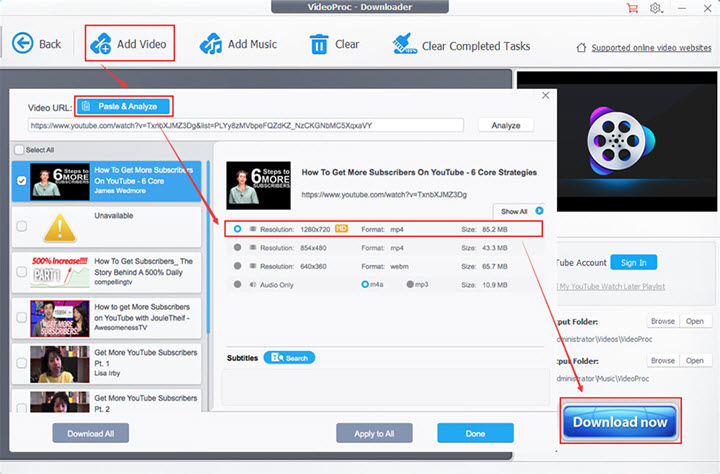
VideoProc Converter AI is a potential option for its stability, flexibility, and ease of use. It features a constantly updated download module to let you save content from 1000+ sites without hassle. In addition, it supports video playlist or channel download in batch. You can choose the quality, tracks, or resolutions as you want, be it 1080p or 4K. Here are some reasons why VideoProc Converter AI may be one of the best downloaders:

VideoProc Converter AI - Reliable and Stable Video Downloader
- Download video, music, and subtitle files from 1000+ sites
- Batch download playlists, channels, streams, videos from multiple sites
- Support saving videos in their original quality, be it 1080p, 4K, or 8K
- Save or convert to MP4, MOV, MP3, etc.; Multi-language audio and subtitle tracks
- All-in-one: Convert, compress, and record (DRM-protected) videos, AI enhance videos


Where to Go From Here
Now you should be able to use the 4K Video Downloader as intended. You are ready to download your content. So the next time you ask "Why is my video downloader not working," you can view this guide on troubleshooting the situation.
4K Video Downloader not working typically falls into two broad categories: issues with parsing the video link or with restrictions on the video source, and external factors such as network conditions or software status. When this happens, first verify the network connection and the target video's public accessibility, and ensure that antivirus or firewall settings are not blocking the software. Restarting the computer, updating to the latest version, and changing the download directory may also address this problem. If these methods don't work, try using a different downloader, such as VideoProc Converter AI, which offers a free trial.
FAQ
Why is my 4K Video Downloader not working?
Your 4K Video Downloader is likely failing due to software glitches or faults, or external factors such as network conditions or the video's accessibility. In addition, the problem could also be due to the platform rolling out anti-download protection that the software failed to update to comply with.
Does the 4K Video Downloader still work?
Yes, 4K Video Downloader still works, but the original version no longer receives official support since February 1st, 2025. It's effectively dead for new YouTube videos. The company has released a new 4K Video Downloader+, which has a new codebase and more features, and it's the one that is fully supported and actively updated.