VideoProc Converter AI
 New AI features are available




 Listed in
 Dealing with videos that don't look their best? If you're exploring options like Aiseesoft Video Enhancer, this review dives into whether it can truly help.
In today's world, creating and sharing videos is a huge part of how we communicate, whether for fun, work, or telling stories. But let's be honest, not every video we shoot looks amazing right off the bat. Lighting can be off, old footage looks grainy, or maybe you just have a lower-resolution clip you wish looked sharper on a bigger screen. This is where AI video enhancement software comes into play. Aiseesoft Video Enhancer is one tool that pops up when you look for ways to give your videos a facelift. It promises to take your ordinary or even poor-quality videos and make them look better.
In this review, we'll take a close look at what Aiseesoft Video Enhancer offers, how it performs, can it really elevate your video quality, what it costs, and whether it's the right fit for your needs.
What is Aiseesoft Video Enhancer
Alright, so what exactly is Aiseesoft Video Enhancer? At its heart, it's desktop software designed with one main goal: improving the visual quality of your video files. Think of it as a digital touch-up artist for your footage. Its core capabilities revolve around boosting resolution, cleaning up unwanted visual noise, and fixing common issues like poor lighting or color balance. It's generally aimed at users who want a relatively straightforward way to enhance their videos without diving into complex professional editing suites. The software is available for both Windows and Mac operating systems, making it accessible to a wide range of computer users looking to spruce up their video collection.
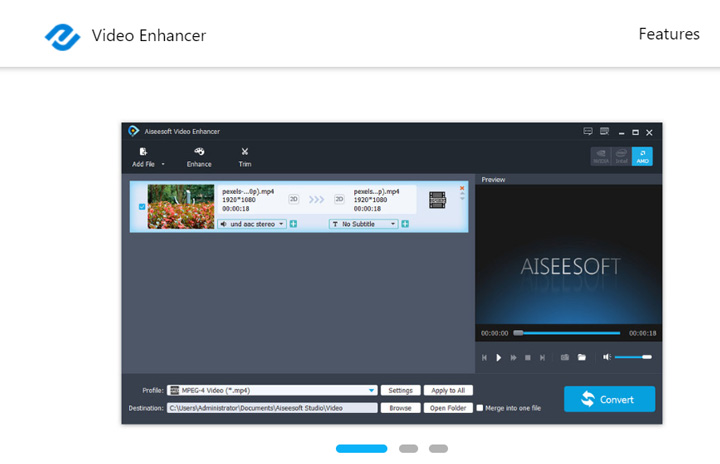
Aiseesoft Video Enhancer Quick Facts
Official site |
www.aiseesoft.com/video-enhancer/ |
Rating |
|
System Requirements |
Windows 11/10/8.1/7; macOS 10.7 or later |
Supported Input Formats |
MP4, TS, MKV, AVI, FLV, WebM, MOV, MXF |
Core Features |
Upscale video resolution, convert video formats, apply quick edits |
Price |
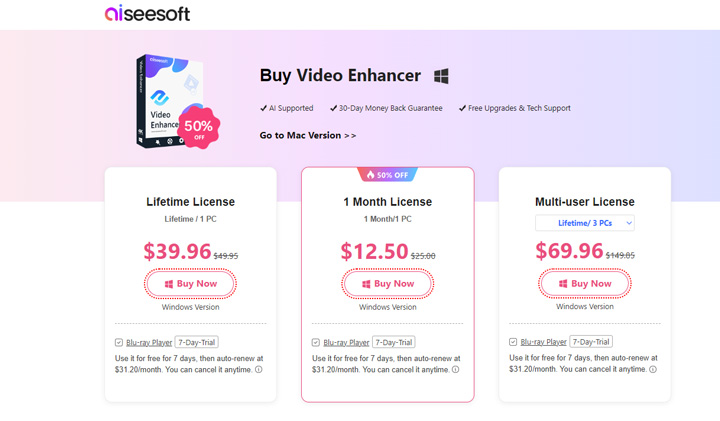
$25/month, $49.95/lifetime (1 PC), $149.95/lifetime (3 PCs) |
Notable Limitations |
|
Best Alternative |
👍 VideoProc Converter AI. It offers bulk processing, real-time preview, and a full suite of AI-driven features to enhance video, image, and audio quality. |


 Use latest AI models
Our Opinion about Aiseesoft Video Enhancer
Things We Like
- It works on both Windows and Mac.
- It supports many output video formats.
Things We Don't Like
- It can cause significant picture quality loss when upscaling resolution.
- The output often appears stretched or distorted, due to aspect ratio limitations.
- Lack of many AI-driven features like deblurring, denoising, and de-JPEG artifacts.
- Lack the support for AI-driven frame interpolation and stabilization.
- Cannot enhance multiple videos in bulk; this must be done one by one.
- Cannot preview the enhancement effect in real-time before exporting the video.
- Relies on more traditional methods for video enhancement.
- The user interface feels quite old-fashioned, described by some as looking like it's from the 80s.
Key Features of Aiseesoft Video Enhancer
Let's break down some of the main things Aiseesoft Video Enhancer can do for your videos. These are the features you'll likely rely on the most:
- Upscale Resolution: Converting video resolution from low to 72p, 1080p or 4K.
- Reduce Video Noise: Clears up video noise, which appears as flickering speckles or grain often caused by low-light recording. (Not powered by AI)
- Improve Video Clarity: Use the 1st generation of AI technology to improve video clarity.
- Video Deshaking: Reduce the shaky footage. It's applied to the whole video.
- Basic Editing Features: Rotate, clip, crop, trim, and watermark your videos.
- Video Format Conversion: Convert video format for playing on popular devices.
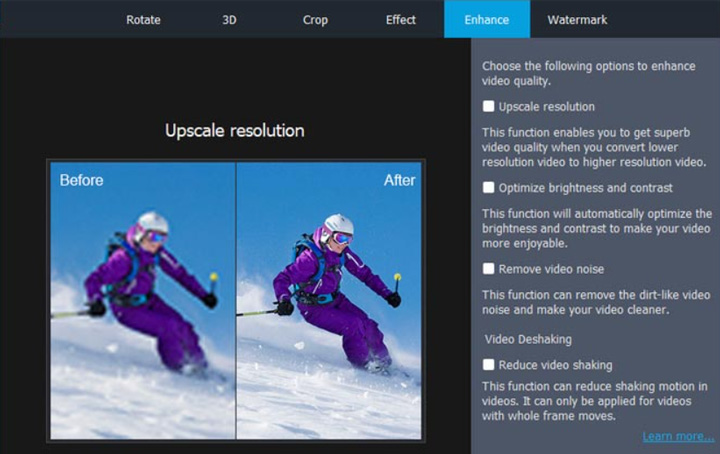
How's Aiseesoft Video Enhancer Performance in Practice
To clarify its capabilities, I tested Aiseesoft Video Enhancer with 3 video clips, focusing primarily on its video enhancement features. While the software promotes its ability to upscale to 4K, my testing showed that the actual enhancement results frequently fell below expectations. It lacks the advanced AI capabilities needed for truly meaningful detail restoration, making it less effective, especially with low-quality source footage. Across all 3 test videos, the results did not show noticeable improvements.
From the perspective of the final output picture quality, the results when upscaling can be quite poor. It often looks less like intelligent enhancement and more like simply stretching the original pixels to a larger size, leading to noticeable quality loss. Side-by-side comparisons of test videos before and after processing highlight this issue.
Test Video 1
The original video for this test was a bit blurry due to its low resolution. We attempted to upscale it to 4K using Aiseesoft. The outcome was disappointing: the file size increased significantly, but there was no noticeable improvement in visual quality.
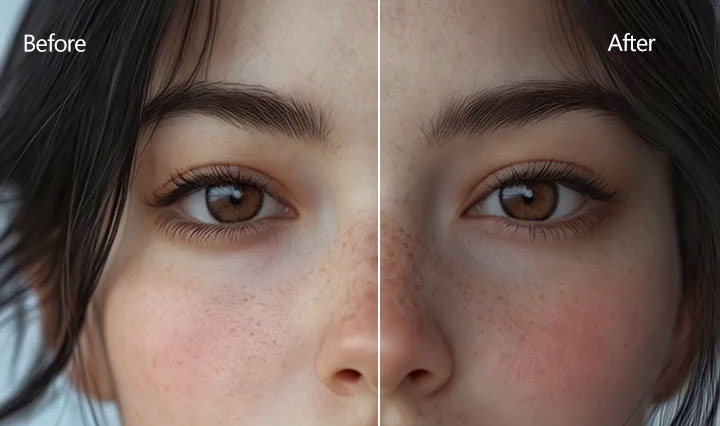
Test Video 2
In this test, we used a video that was noticeably blurry. As the result shows, the video remained blurry even after being processed by Aiseesoft. This outcome is a clear indication of the software's lack of support for a dedicated AI deblur feature.
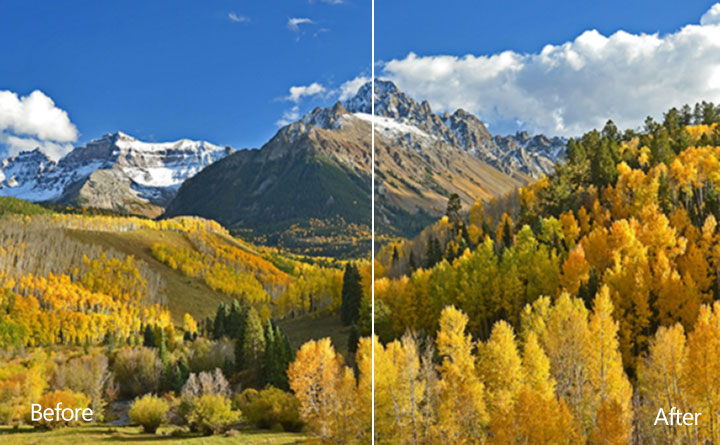
Test Video 3
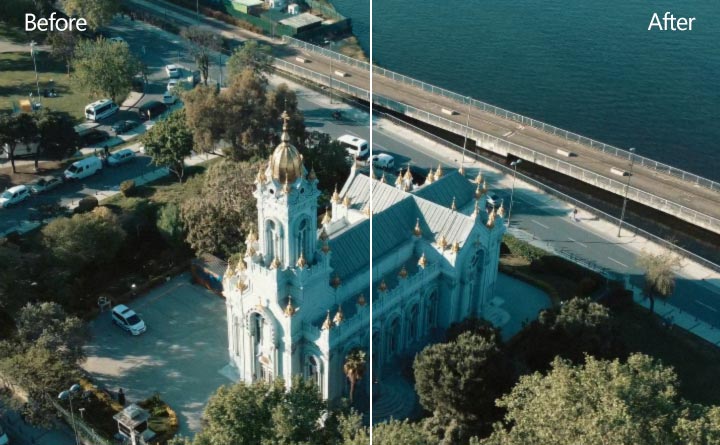
The original video here had noticeable digital noise, particularly visible in the sky, and the building appeared a little blurry. After enhancing it with Aiseesoft, these visual flaws remained. There was no perceivable improvement in quality at all.
Aiseesoft Video Enhancer Free Trial / Affordability
Aiseesoft Video Enhancer is not free software, though a trial version is available with specific limitations.
- For videos over 5 minutes, the trial processes only the first 5 minutes.
- For files under 5 minutes, only half the video length can be processed.
- The trial also disables Intel App Acceleration, which affects processing speed.
For full functionality, paid plans are offered. These typically include monthly and lifetime licenses, each valid for one PC. A business plan is available for users needing access to multiple computers, providing a license for up to three PCs. Evaluate the cost based on your expected usage and the software's features. You can check the pricing details on the official Aiseesoft purchase page.
Is Aiseesoft Video Upscaling Really User-Friendly
When it comes to upscaling videos, Aiseesoft's process often feels outdated and frustrating compared to modern alternatives. Here's why:
1. Lack of Real-Time Preview
For video upscaling, a real-time preview is invaluable - it lets you see setting changes instantly. Aiseesoft, however, offers no such preview. You must export the entire video just to check the outcome. If the results aren't right, this wastes considerable time.
2. Rigid Output Aspect Ratios
Aiseesoft severely limits output to just two aspect ratios: 16:9 or 4:3. This is a major drawback for videos outside these dimensions. Non-standard videos (like square or vertical) won't fit correctly; they'll be distorted or get black bars.
3. Lack of Batch Video Enhancement
Aiseesoft doesn't support bulk-enhancing video files. This becomes particularly inconvenient if you have a large collection of low-resolution videos that you need to enhance, forcing you to process each file individually.
Try the Best Alternative to Aiseesoft Video Enhancer
Despite claims of being a top AI video enhancer, Aiseesoft Video Enhancer often proves quite basic in practice. Its improvement in picture quality is frequently unnoticeable. This is largely because it relies on only the first generation of AI technology. (For context, their newer product, Filmai, uses the said "10th Gen AI," but comes with an high cost of $199.00/month).
For users seeking an AI video enhancer that is more user-friendly, delivers truly impressive improvements in video quality using the latest AI technology, and is significantly more affordable, we strongly recommend VideoProc Converter AI. It offers a lifetime license for just $65.95.
Why Is VideoProc the Best Aiseesoft Video Enhancer Alternative
- Upscale video by up to 400% to reach 4K resolution with significantly improved details.
- Fix noise, blur, pixelation, and other imperfections without introducing artifacts.
- AI-driven frame interpolation and stabilization to further elevate your videos.
- Extra AI capabilities like face restoration and coloration for images, noise removal, etc.
- A one-stop media solution: convert, compress, edit, record, and download media.

VideoProc Convert AI vs Aiseesoft Video Enhancer (with Test Results)
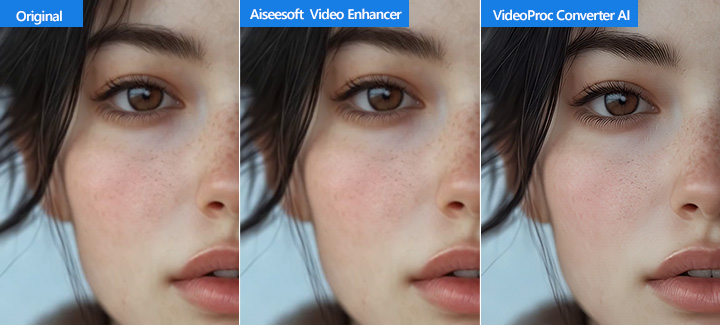
Let's test VideoProc Converter AI with the same three videos, and then compare its results to those from Aiseesoft Video Enhancer.
Test 1 Comparison
Test 2 Comparison
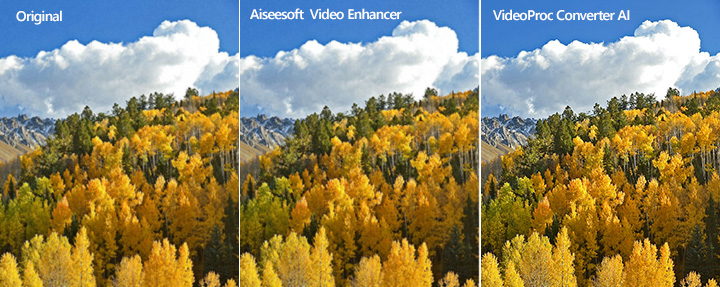
Test 3 Comparison
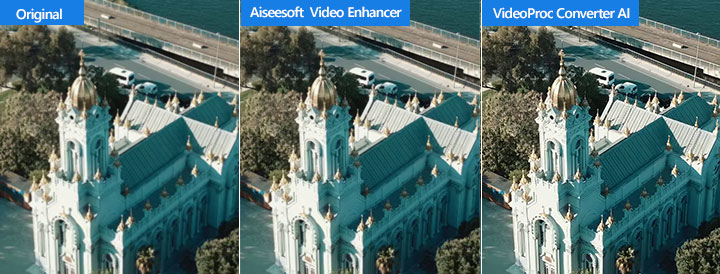
Comparing the enhancement of the same videos revealed VideoProc Converter AI's significant advantage in enhancing picture quality and preserving intricate details far more effectively than Aiseesoft.
Final Thoughts – Is Aiseesoft Video Enhancer Worth It
Unfortunately, based on our testing, Aiseesoft Video Enhancer is not a worthwhile investment. It suffers from fundamental limitations. Basic features expected in a modern tool, like batch processing, real-time preview, and support for common aspect ratios (such as 9:16 vertical video), are simply missing. But the most significant issue lies in its core promise: actual quality improvement. Its AI algorithm is outdated. Upscaling videos to 4K, for instance, often appears to merely 'blow up' existing pixels rather than genuinely adding detail or clarity. It simply fails to deliver true picture quality enhancement in practice.
Given Aiseesoft's significant drawbacks, we cannot recommend it. If you're looking for a tool capable of a significant improvement in video quality, VideoProc Converter AI is the best alternative to consider. It supports batch processing, offers a crucial real-time preview, and provides the flexibility needed for various aspect ratios. More importantly, it leverages advanced AI technology to deliver genuine quality enhancement. And despite these superior capabilities, VideoProc Converter AI is significantly more affordable, available for a lifetime license at just $65.95.
Ready for the best alternative to Aiseesoft Video Enhancer? Download and install VideoProc Converter AI free.