Upgraded AI Performance in V8
 Listed in Shutter Encoder
If you've done some research on video converters, you've likely heard of Shutter Encoder, a free media conversion tool. Before installing it on your system, you might want to know something about the software.
So, is Shutter Encoder safe to use? This article will look at this question. We'll explain its security, review virus-scan results and community feedback, and provide tips for safely downloading and using Shutter Encoder.
What Is Shutter Encoder
Shutter Encoder is a versatile media conversion tool created by French developer Paul Pacifico. The official website describes it as a converter designed by video editors. Shutter Encoder relies on FFmpeg, a widely used open-source library, to support nearly every audio and video codec. In addition to converting files, the program can trim without re-encoding, replace audio tracks, crop images, embed subtitles, add logos or watermarks and handle batch processing tasks.
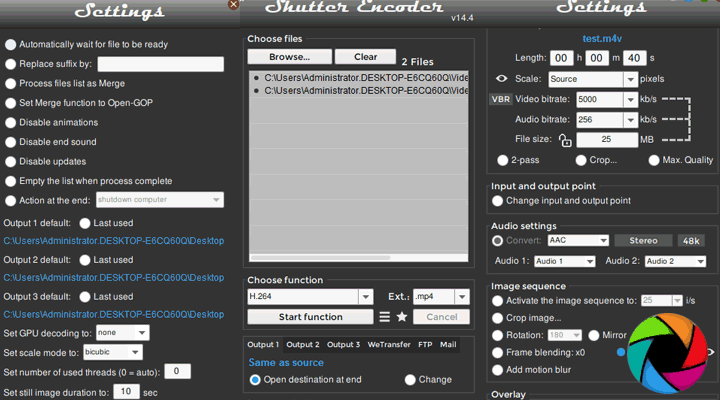
The software is open-source and the source code is available on GitHub. Because the code is public, anyone can inspect it for malicious activity, reinforcing its reliance on well-known, trustworthy software.
Is Shutter Encoder Safe
Virus-Scan and Security Testing
Shutter Encoder has consistently been found free of malware, viruses, and other malicious software in independent security scans. Multiple antivirus engines have flagged no threats, and the software is widely considered clean.
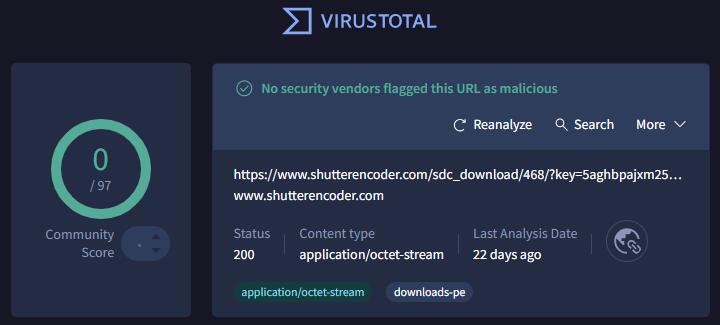
Although no scan can ever guarantee absolute security, these third-party results suggest that the program is clean when downloaded from reputable sources.
Community Feedback
Being an open-source program, its code is publicly available for inspection on GitHub, which means any hidden backdoors or malicious components would likely be quickly spotted by the community.
In fact, community reviews also confirm it contains no adware or malicious code and is safe to install and use.
Why Antivirus Alerts May Occur
Occasionally, Windows Defender or other antivirus software may flag the Shutter Encoder installer as suspicious.
This does not mean the program is malicious; it is usually a false positive. False positives occur because antivirus programs rely on heuristic signatures. Because Shutter Encoder is free and open source, the developer does not pay for official signatures from Apple and Microsoft, which come with expensive annual subscription fees. That might cause these systems to flag it as potentially unsafe.
In addition, Shutter Encoder bundles several tools and uses compression to keep the installer small. These compressed installers or self-extracting archives can resemble malware patterns, which can trigger security warnings.
Looking for More Features?
Shutter Encoder's free and open-source nature makes it ideal for most workflows, but some creators may want AI-assisted enhancements or hardware-accelerated performance that go beyond what Shutter Encoder offers.
VideoProc Converter AI is a commercial alternative that blends traditional conversion tools with advanced artificial-intelligence features. Its converter module supports lossless remuxing or high-quality conversion to more than 420 codecs and formats. Besides, there are optimized presets for devices ranging from iPhones to game consoles. VideoProc Converter AI uses Level-3 hardware acceleration to deliver up to 47 times faster than software-only encoders. Batch conversions are supported.
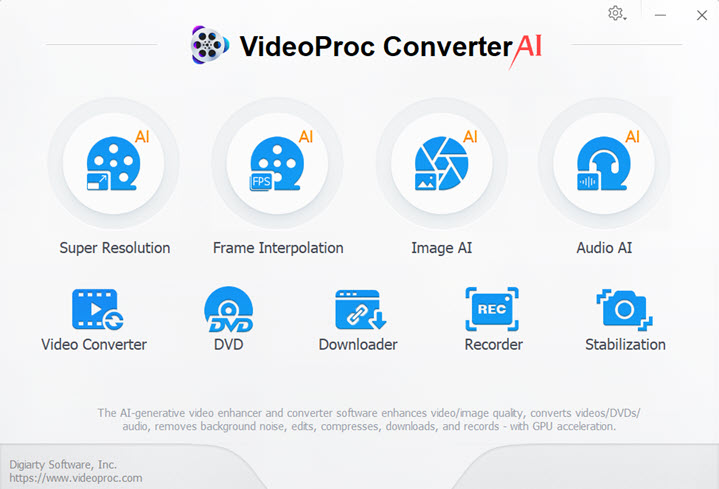

Beyond basic transcoding, VideoProc Converter AI comes with an AI toolkit for video, audio, and image files. Video AI tools can upscale resolution, automatically denoise and deblur, increase frame rate, stabilize footage, and more. Audio AI tools can remove background noise and isolate vocals. Image AI features Super Resolution, colorizing, and face restoration for images.
VideoProc Converter AI doubles as a video downloader, screen recorder, DVD ripper and quick editor. If you need AI features, faster batch conversion or integrated DVD ripping that Shutter Encoder doesn't provide, VideoProc Converter AI is a worthwhile companion to your toolkit.
Best Practices
Download only from the official site or trusted mirrors. Avoid third-party download sites that might bundle unwanted software. The official site provides installers for Windows and macOS, and Softonic's report shows the file is genuine.
Verify the file's checksum. Softonic publishes SHA-1 and SHA-256 hashes for the Windows installer. After downloading, compute the hash on your computer and compare it with the published values to ensure integrity.
User permissions. Install the software using a standard user account rather than an administrator account when possible. This limits the impact of any unexpected behaviour.
Update your antivirus software. Virus definitions change frequently; an outdated antivirus may falsely flag new programs. If your antivirus still blocks Shutter Encoder, submit the file to the vendor for analysis.
Conclusion
Is Shutter Encoder safe? Based on multiple lines of evidence, Shutter Encoder is considered safe when obtained from its official website. While antivirus alerts may occur, these are typically false positives. By downloading from trusted sources and verifying checksums, users can safely use Shutter Encoder's powerful media conversion and editing features.