
Tubi has become a goldmine for movie and TV lovers, offering thousands of titles for free. There's just one catch: what if you want to watch on a plane, on the subway, or anywhere without a stable internet connection? Unfortunately, Tubi doesn't offer an official download option for offline viewing on a laptop. That's where Tubi downloaders come in. These powerful tools allow you to save your favorite content from Tubi directly to your computer for offline access anytime, anywhere. But with so many options out there, which Tubi Downloaders are safe, reliable, and actually work?
We've done the hard work for you. This guide provides a definitive review of the best Tubi downloaders on the market, personally tested and verified by our team of tech experts.
Our Review Guarantee: How We Tested the Best Tubi Downloaders
In a sea of paid promotions and fake reviews, finding honest advice is tough. That's why we're transparent about our testing process. We don't just list features from a press release; we conduct a comprehensive, hands-on evaluation of every Tubi downloaders. To find the best Tubi downloader, we ran each application through a rigorous testing gauntlet on a Windows 10 PC (Intel Core i5, 16B RAM). Each Tubi downloader was scored on the following criteria:
Download Performance: We tested with a feature-length movie, a full season of a TV show to test batch functionality, and a new Tubi Original to check for compatibility with recent content.
Quality & Speed: What was the maximum resolution achieved (1080p, 720p)? How quickly did it download a 2-hour file, and did it utilize hardware acceleration?
Ease of Use: We evaluated the user interface for both beginners and power users. For command-line tools like YT-DLP, we assessed the clarity of documentation.
Safety & Security: We scanned all installers for malware and noted any intrusive ads, pop-ups, or bundled bloatware.
Features & Value: We tested extra features like subtitle downloads, conversion options, and overall value for the price.
Is It Legal and Safe to Use a Tubi Downloader
This is a crucial question. Legally, Tubi's Terms of Service state that content is for streaming purposes only. Downloading content could be a violation of these terms. We advise that any content downloaded should be strictly for personal, private viewing. Distributing or sharing the content is illegal.
From a safety perspective, you must be cautious. The internet is littered with "free online Tubi downloader" sites that are often loaded with malware, aggressive pop-ups, and spyware. The tools recommended in this guide have been vetted for safety, but we always advise using reputable software and having antivirus protection active.
The 5 Best Tubi Downloaders (In-Depth Reviews)
After extensive testing, we've narrowed the field to five outstanding options. Each Tubi downloader has its own strengths, catering to different needs and budgets.
1. VideoProc Converter AI: Best Overall Tubi Downloader
Who is it for: the premium, feature-rich choice for users who want the best quality, speed, and reliability.
VideoProc Converter AI consistently came out on top in our testing. It's more than just a streaming video downloader; it's a complete video toolkit. When it comes to downloading from Tubi, it excels with a clean interface, fast speeds powered by full hardware acceleration, and support for up to 4K quality where available. It strikes the perfect balance between power and ease of use, making it our #1 recommendation.
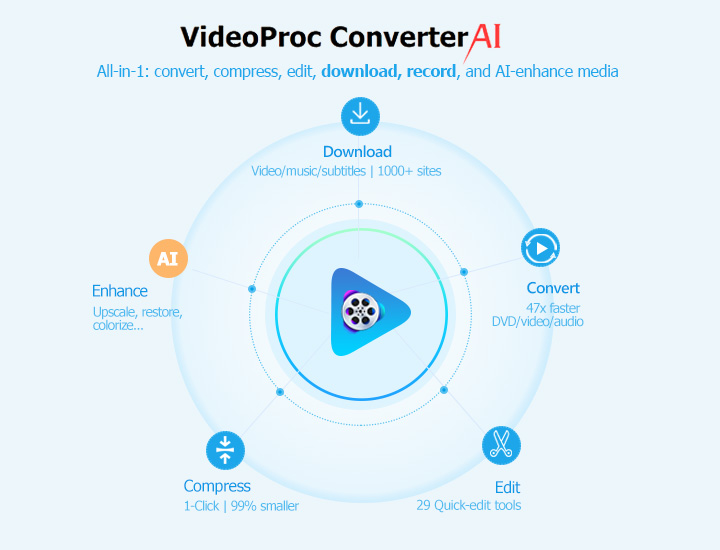
Hands-on test: The experience was seamless. The downloader module is intuitive: you paste the link, it analyzes, and you click download. In our tests, it successfully grabbed a 2-hour movie in under 10 minutes, a testament to its efficient engine. The batch download feature for TV show seasons also worked flawlessly, queueing up all episodes without a hitch.
How to Download Tubi TV in VideoProc Converter AI
Step 1. Download, install, and run VideoProc Converter AI. Click Downloader.
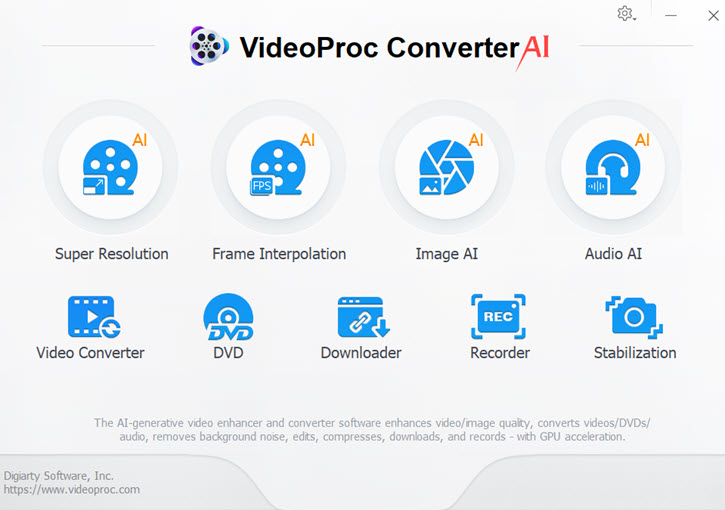
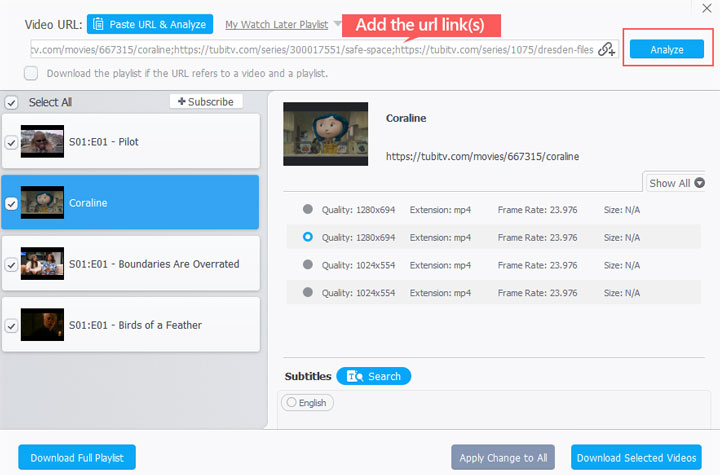
Step 2. Navigate to the movie or show you want on Tubi and copy the URL from your browser's address bar. Go back to VideoProc Converter AI, Click Add Video, paste the Tubi URL, and click Analyze. This capable Tubi Downloader will quickly fetch the video details.
Tips:
- Bypass Regional Blocks: If URL analysis fails, then Tubi might be blocking your region. VideoProc has a built-in fix. Go to Settings > Downloader, enable the proxy feature, and enter your details to get around the block.
- VideoProc is actively updated to keep up with changes on streaming sites. For uninterrupted service, simply enable auto-updates in the settings to ensure your downloader is always ready.
- For TV shows, you can easily download all episodes. Just select the 'Download the playlist if the URL...' feature, and it will automatically save the entire season for you.
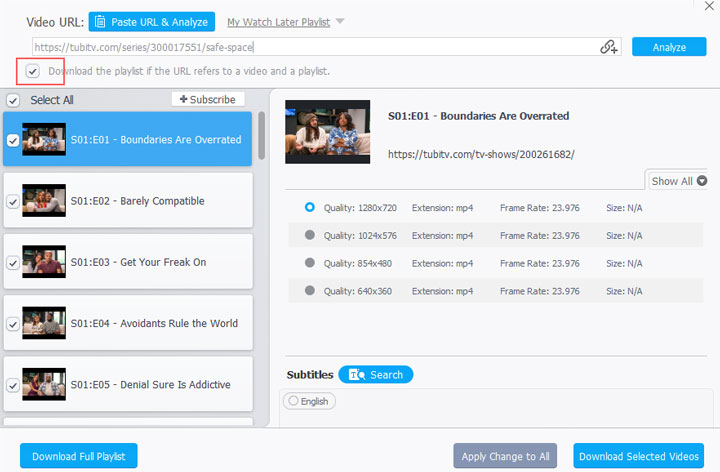
Step 3. Select your desired resolution (e.g., 1920x1080) and click the Download Selected Videos button. Hit Download now to start the Tubi video downloading process.
Pros:
- Downloads videos from Tubi, YouTube, and 1000+ other sites.
- Lets you choose from multiple resolutions, formats, and subtitle/audio tracks.
- Supports batch downloads for entire playlists or seasons.
- Stable, regularly updated, with an easy interface and no bundled software.
- Includes a full suite of tools: video converter, compressor, editor, and more.
- Built-in screen recorder can capture DRM-protected content in original quality.
Cons:
- The free trial has download limitations.
2. YT-DLP: Best Free & Open-Source Tool for Power Users
Who is it for: tech-savvy users comfortable with the command line.
YT-DLP is the gold standard for free, open-source video downloading. It's not a typical application with a graphical interface; it's a command-line program. While this may intimidate beginners, it offers unparalleled power and flexibility for those willing to learn. It's completely free, ad-free, and can download from hundreds of websites, including Tubi.
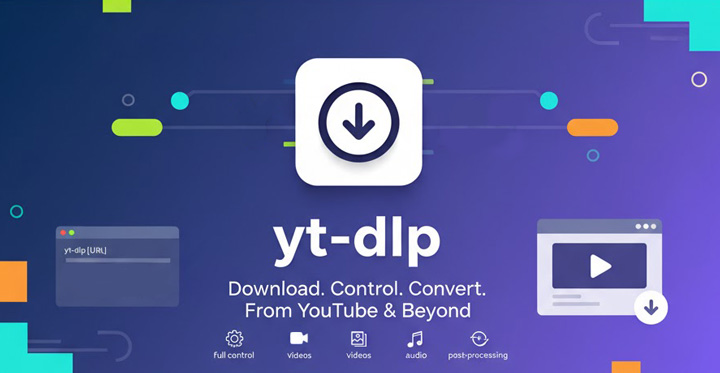
Hands-on test: For a user familiar with the command line, YT-DLP is incredibly efficient. A simple command is all it takes to download a video in the highest available quality. It successfully downloaded all our test videos, including the full TV season. The learning curve is its biggest hurdle; you'll need to read the documentation to understand how to select specific formats or download subtitles.
How to Download Videos from TuBi
Step 1. Follow the official installation instructions for your operating system (Windows, macOS, or Linux).
Step 2. Open Command Prompt or Terminal: Navigate to the folder where your video will be saved.
Step 3. Run the Download Command by typing yt-dlp "YOUR_TUBI_URL" and pressing Enter.
Step 4. Tubi Downloader will automatically select the best quality and save the file to the current folder.
Pros:
- 100% free and open-source.
- Extremely powerful and customizable.
- No ads, no malware, no tracking.
- Can handle virtually any video streaming site.
Cons:
- Requires using the command line; no graphical interface.
- Steep learning curve for beginners.
3. StreamFab Downloader: Best for Handling Multiple Streaming Services
Who is it for: users who need to download from Tubi and other streaming services like Netflix or Hulu.
StreamFab's main selling point is its incredible versatility. While it handles Tubi with ease, its real strength lies in its support for dozens of other streaming platforms, including subscription-based ones like Netflix, Disney+, and Max. It features a built-in browser that makes navigating to and downloading content simple.
Hands-on test: Using StreamFab feels like using a web browser dedicated to downloading. We navigated to Tubi, found our movie or TV series, and a download button appeared automatically, which was very convenient. The download speed is fast, and it successfully captured our test videos in crisp 1080p. However, we noticed it is quite resource-intensive, taking up a lot of disk and CPU usage during downloads, which caused our computer to lag a little.
How to Download Videos from TuBi
Step 1. Download StreamFab Downloader from its official website and install it on your computer. Note: While the initial download is fast, the full installation process may take several minutes, as the software needs to download additional files and components.
Step 2. Launch this Tubi downloader and look for the VIP Services section in the left-hand menu. Scroll down through the list of supported platforms and click the Tubi icon.
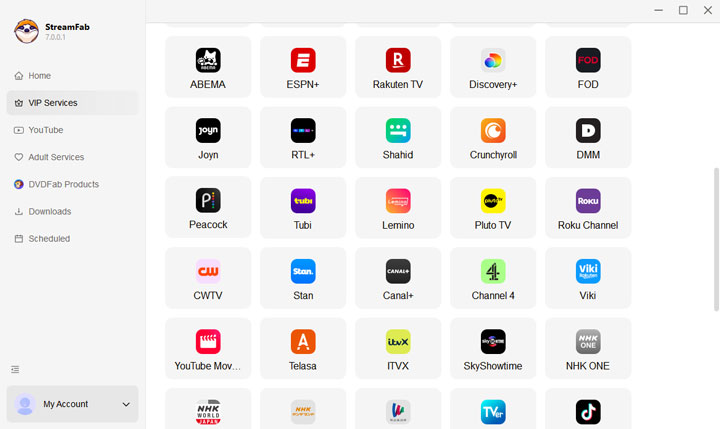
Step 3. StreamFab's built-in browser will open the Tubi website. Find the movie or TV series you want to download and begin playing it as you normally would.
Step 4. As the video starts playing, StreamFab automatically analyzes the content in the background. After a moment, a download settings panel will pop up on your screen.
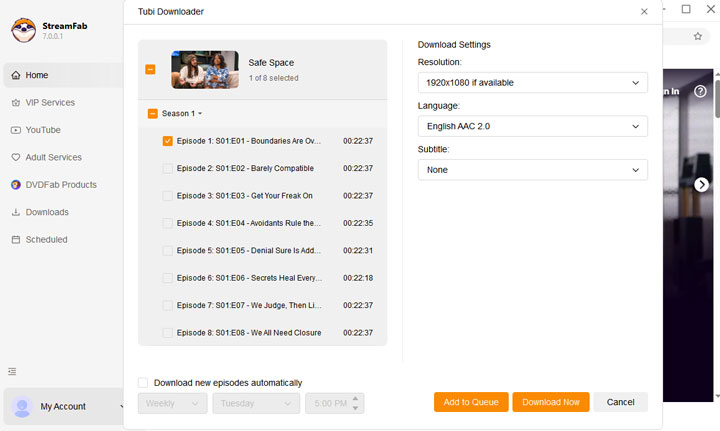
Step 5. In this pop-up window, you can customize the download. Select your desired video resolution, audio track, and whether to include subtitles.
Step 6. Click the Download Now button. The Tubi video(s) will be added to your download queue and saved directly to your computer for offline viewing.
Pros:
- Supports Tubi and a huge number of other streaming sites.
- Intuitive browser-based interface with auto-download prompts.
- Fast download speeds and high-quality 1080p output.
Cons:
- High CPU and disk usage can slow down your computer.
- Expensive subscription model.
- Lacks extra features like video conversion or editing.
4. MediaHuman: Best for Lightweight and Simplicity
MediaHuman excels at one thing: making video downloading as simple as possible. Its interface is minimalist and incredibly intuitive. You copy a link, the app automatically adds it, and you click the download button. It's the perfect "it just works" solution for users who don't want to get bogged down in complex settings.
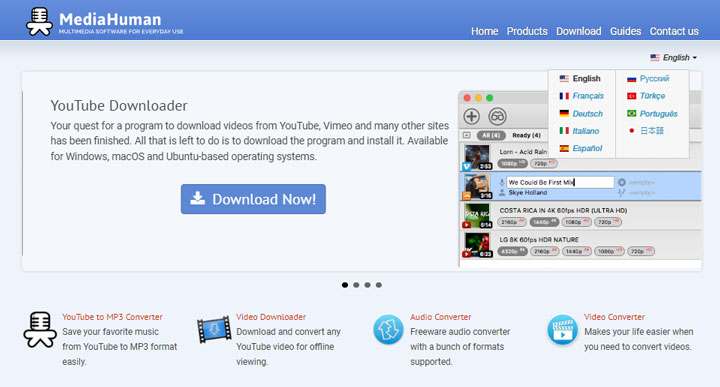
Hands-on test: This was one of the most straightforward tools we tested. As soon as you copy a Tubi link, the application automatically detects and pastes it into the queue, which is a fantastic feature for grabbing multiple videos quickly. However, this simplicity comes with trade-offs. We found that it lacks some custom options available in other Tubi downloaders. For example, it doesn't let you choose specific subtitle or audio tracks, and it was unable to download some newer, DRM-protected content from Tubi during our tests.
How to Download Tubi Videos via MediaHuman
Step 1. Download the application from its official site: https://www.mediahuman.com/youtube-video-downloader/
Step 2. Follow the on-screen instructions to install the program on your Windows or Mac computer.
Step 3. Copy the URL of the video you want from the Tubi website. Go back to the MediaHuman application and click the "Paste Link" button. The app will automatically read the link from your clipboard and begin the analysis process.
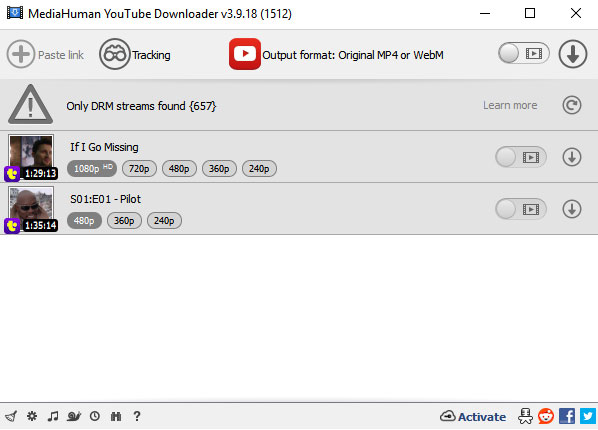
Step 4. Choose your preferred resolution. Then, click the Start Download button (which appears as a downward arrow icon) to begin saving the video to your computer.
Pros:
- Clean, uncluttered interface.
- Automatically pastes links from your clipboard.
- Automatically skips duplicates if you re-paste a link.
Cons:
- Lacks advanced features like built-in video conversion.
- Cannot select specific audio or subtitle tracks.
- Unable to download DRM-protected content.
- The user interface has a dated aesthetic.
- The free version has download limits.
5. Savethevideo.net: Best for Quick, One-Off Downloads
Who is it for: A browser-based Tubi Downloader for a single, quick download without installing software.
Sometimes you just need to download a single video from Tubi and don't want to install any software. That's where an online Tubi downloader like Savethevideo.net comes in. You simply paste the Tubi URL into the website, and it provides you with download links.
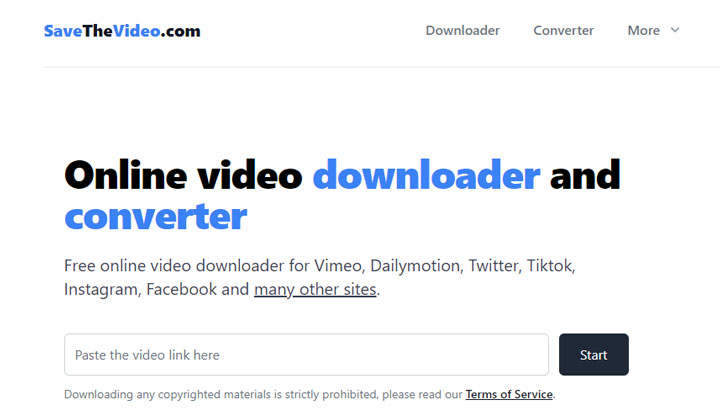
Hands-on test: Convenience is the main appeal here. The site successfully generated a download link for our test movie. However, the user experience was hampered by numerous pop-up ads and redirects, some of which were flagged by our browser's security. The maximum quality was limited to 720p, and download speeds were noticeably slower than with dedicated software.
How to Download Videos from Tubi via Online Tubi Downloader
Step 1. Open the movie or TV show you want on the Tubi website. Copy the full URL from your browser's address bar.
Step 2. Go to the Savethevideo.net website and paste the Tubi link into the input field. Click the Start button to allow the online tool to analyze the video. Be prepared to close any pop-up ads that may appear during this process.
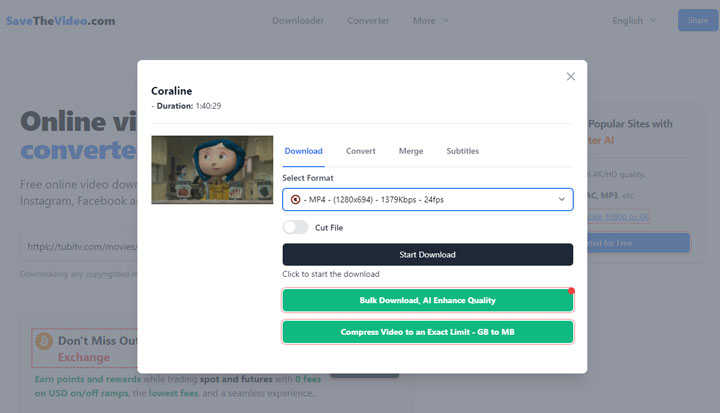
Step 3. After a few moments, a list of available download options will appear. You can typically choose different formats and quality levels, such as MP4 720p. If you need a different file type, you can also use the Convert option to change the video or audio codec.
Step 4. Hit Start Download. Your video will then begin downloading directly to your computer through your web browser.
Pros:
- No software installation required.
- Quick and easy for a single download.
Cons:
- Aggressive and potentially malicious ads.
- Not support downloading multiple videos at a time.
- Lower maximum resolution (720p in our tests).
- Unreliable for playlists or very large files.
- Slower download speeds.
Comparison Table: Which Tubi Downloader Should You Choose
| Feature | VideoProc Converter AI | YT-DLP | StreamFab Downloader | MediaHuman | Savethevideo.net |
|---|---|---|---|---|---|
Best For |
Overall Quality & Features |
Power Users & Customization |
Multiple Services |
Simplicity & Beginners |
Quick, No-Install Use |
Ease of Use |
Very Easy |
Difficult |
Easy |
Easiest |
Easy |
4K Support |
Yes |
Yes |
Yes |
Yes |
Yes |
Batch Download |
Yes |
Yes |
Yes |
Yes |
No |
Price |
Paid (Free Trial) |
Free |
Subscription |
Paid (Free Version) |
Free (Ad-Supported) |
Our Rating |
4.8/5 |
4.5/5 |
4.2/5 |
4.5/5 |
2.0/5 |
Final Verdict: The Best Way to Watch Tubi Offline
While it's tempting to use a free online tool, the security risks and poor performance are not worth the convenience. For a safe, fast, and high-quality experience, dedicated software is the only way to go. After rigorous testing, VideoProc Converter AI is our clear top recommendation for a Tubi downloader. It offers the best combination of speed, quality, and user-friendly features, making it a reliable tool for any user. If you're on a tight budget and comfortable with a bit of a technical challenge, YT-DLP is an incredibly powerful free alternative.
FAQs
Can I download Tubi movies on my phone (Android/iPhone)?
The desktop tools listed here are for PC and Mac. For mobile, you would typically need to download the video to your computer first and then transfer the file to your phone or tablet.
What video quality can I expect from a Tubi downloader?
This depends on the tool and the source video. High-quality software like VideoProc Converter AI can download Tubi content in 1080p Full HD. Free online tools are often limited to 720p.
Do these downloaders work for other sites besides Tubi?
Yes! All the desktop video downloaders listed support a wide range of other video sites, including YouTube, Vimeo, and Facebook, making them very versatile.