
Restore & Enhance Old Videos with VideoProc Converter AI
Powered by advanced AI models, VideoProc Converter AI brings new life to your precious old but outdated videos, whether they're from DVDs, VHS tapes, archival footage, early phones, or old cameras like GoPro, Canon, and Sony. Instantly restore, enhance, and upscale videos from 360p/480p/720p to crisp HD or even stunning 4K. Fix noise, sharpen blurry details, smooth shaky footage, boost frame rates, remove audio noise, and fix formats — all with a few clicks. Beyond videos, it also enhances and restores photos/images up to 4K/8K/10K quality — bringing every detail back to life.


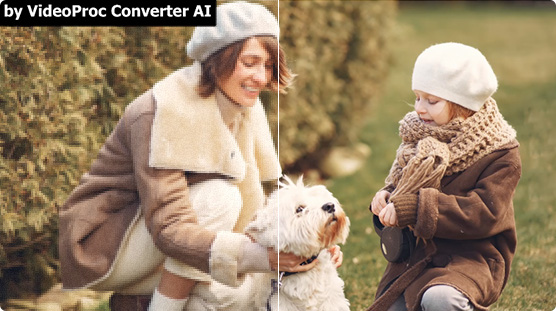
Effectively Restore & Upscale Old Footages to HD/4K
Old videos often look blurry, noisy, or low-res, and miss details, but they hold some of life's most precious moments. Whether you're reliving family moments or restoring vintage footage for a project, AI Super Resolution in VideoProc Converter AI upgrades every frame with more clarity, detail, and realism.
- Family Memories
- Milestone Events
- Classic Films/Archive
- Old Social Media Clip
Revive family moments, travel and pet videos. Perfect for upscaling VHS, DVD, 8mm tape, MiniDV, and early phone/camera footage.
From child's first steps to weddings and graduations, restore special moments with the quality they deserve.
Restore and modernize your collections of old movies, documentaries, or rare tapes.
Give your old YouTube or Facebook uploads a second life. Great for FLV, 3GP, low-bit MP4, and other compressed formats.


-
VideoProc Converter AI
Upscale 240p/360p/480p/720p to HD/4K, by 2X/3X/4X with natural texture.
Remove noise, grain, blur for clearer visuals. Generate realistic details.
Digitize DVD to MP4. Deinterlace to eliminate jagged lines and motion blur.
40%-80% faster video upscaling speed with latest V3 models. No artifacts.
-
VideoProc Converter AI
Denoise, deblur, sharpen and recover blurry details for clearer visuals.
Upscale 360p/480p/720p to HD, 720p/HD to 4K, perfect for big-screen.
Enhance low-light videos: fix grainy footage and restore missing details.
Save time with batch processing, enhance multiple videos in one go.
-
VideoProc Converter AI
Digitize DVDs into MP4 with Converter, upscale even 480p to HD/4K.
Remove blocky artifacts, flickering, and scratches. Enhance clarity.
Auto-sync audio and video for better playback with Converter.
Ideal for digitizing, restoring, and preserving collections.
-
VideoProc Converter AI
Remove compression artifacts and recover visual detail.
Remove noise, grain, and blur with better details.
Upscale 320p/720p to HD/4K for modern screens and platforms.
Bath process. Export in modern formats for reposting or reuse.
More Tools to Improve Old Video Quality Overall
Old videos often look choppy, shaky, or won't play right on today's devices. VideoProc uses AI to smooth motion, reduce shakes, clean up frames, remove audio noise, and convert your DVDs/ videos to work anywhere—fast and easy.
-


 Deinterlaced
Convert Interlaced Videos to Modern Quality
with Deinterlace in AI Super ResolutionFrustrated by flickering lines in your old DVDs, Blu-rays, or 1080i videos? That's interlacing, and it ruins the viewing experience on modern screens. With VideoProc, you can remove those lines with a single click, restoring a clean, modern look while upscaling to 4K quality.
-


 30 fps120 fps
Boost Low-FPS Videos for Smooth Playback
with AI Frame InterpolationOld videos from DVDs, VHS, or old camcorder, often run at 17, 24, 30, or 60 FPS, making motion appear stuttery. VideoProc boosts frame rates up to 120/240/300/480 FPS or higher, delivering fluid, cinematic movement with no quality loss. You can also create stunning 20x slow-motion clips with no glitches or artifacts.
-


 Stabilized
Fix Shaky Old Videos or Footages
with AI StabilizationEasily fix shaky old videos from phones, camcorders, GoPro, DJI, and more. Unlike traditional methods, you don’t need to tweak settings like Smoothness or Perspective. It simplifies everything, giving you control over shake intensity, crop size, and options like Stabilization Modes, Presets, Border Color, and Crop Type to perfect your footage effortlessly.
-

 Remove Noise
Clear Audio Noise or Fix Format Issues in Old Videos
with Audio AI or ConverterOld video soundtracks are often ruined by hiss, static, wind, or muffled voices. VideoProc's AI audio denoising clears unwanted background noise so your videos sound as good as they look. At the same time, you can convert outdated formats like AVI, VOB, 3GP, MPEG, DVD, or ISO files into modern MP4, MOV, or MKV for flawless playback, editing, and sharing across all your devices and platforms.
The Trusted Solution for All Purposes
-

Personal Collections
For people of all ages with cherished collections of movies, home videos, or old family DVDs — VideoProc Converter AI helps you convert DVDs to digital formats like MP4 or MKV (420+ supported formats), and upscale them to stunning 4K. It’s the perfect way to preserve your memories and enjoy them on modern devices with crystal clarity.
-

Business Needs
For influencers, marketers, photographers, designers, YouTubers, and freelancers, VideoProc AI helps you create high-quality visuals to boost brand presence, refine product presentations, and enhance customer engagement. Upscale low-res footage to crisp 4K, boost low FPS, reduce noise, stabilize shaky clips, and convert old formats with ease.
-

Interests and Hobbies
For fans of singers, actors, dancers, athletes, K-pop idols, or bands — VideoProc Converter can enhance and upscale classic performances, concerts, fan cams, or highlight reels to 4K, reduce noise, and smooth out motion. Turn low-quality clips into treasured keepsakes or create standout fan-made content that truly does your favorites justice.
- "I had some old videos my mom filmed as a kid in the early '60s that we’d put on DVD years ago. I saved them to my PC, and this Christmas, I used VideoProc to smooth them out (they were 17fps, so I doubled it to 34fps) and upscaled them to 4K. Gave them to my mom as a gift—she loved it"
- "I love the interpolation feature in this software. It's GREAT for older videos. I mentioned below that I took some footage from the early 1960's and brought that footage from 17fps to 34fps. That was the 2x option and there's also a 3x and 4x option but in this case, I just used 2x. It's great. Then I upscaled them. It's really neat."
- "I was excited to see the Mac update to v7 with AI support today! I tried it quickly on my M4 Mac mini with a 3-minute black & white 1960s video (1440x900) and got 7fps using the AI upscale. It might run faster with tweaks, but I just wanted to say thanks—I didn’t expect the AI update so soon, and I’m really happy!"
How to Restore and Upscale Old Videos to 4K with VideoProc
-
Step 1Download VideoProc Converter AI
-
Step 2Restore and upscale your old videos
Go to Super Resolution and import footage by dragging or clicking the +/Add Media icon. Choose AI Model according to your video type, and Model Setting or Deinterlacing option.
-
Step 3Export in high-quality
Change the default output format and folder, hit RUN to start exporting.
VideoProc Converter AI Main Features
- Upscale

- Smoothen

- Stabilize

- Convert

- Quick Edit

- Download

- Record

- Compress

VideoProc Converter AI
One-click to upscale old photos/images to even 4K/8K/10K resolution, revive classic MVs, vintage DVD/VHS/DV recordings, antiquated camera footage, and archival documentaries to up to 4K with a contemporary aesthetic.
 Free Download