VideoProc Converter AI
 New AI features are available



 Listed in
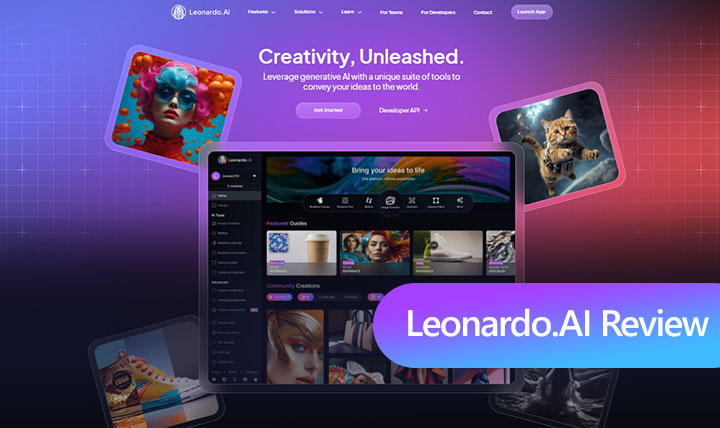
 Think back to when Leonardo AI first emerged around 2022. Right from the start, it was widely touted as one of the best free alternatives to Midjourney – and for good reason. Its intuitive interface and genuinely powerful features, especially that key ability to train custom AI models, really helped it leap ahead, driving rapid user adoption and pushing feature development forward.
However, the AI image generation landscape is a hyper-competitive arena. The past year and a half have witnessed an explosion of innovation from tech behemoths, with OpenAI's GPT-4o and its integrated DALL-E 3, Google's advanced Imagen models, and Midjourney's continuous evolution pushing the boundaries of realism, coherence, and multimodal capabilities. As a result, Leonardo AI sometimes feels less frequently mentioned in the daily discourse, leading many to wonder: Does Leonardo AI still hold its ground in 2025, and is it still a leader in the AI image generator field, warranting your investment? This in-depth Leonardo AI review will help you find the answer.
⏰ Leonardo AI at a Glance: 20-Second Summary
| Feature | Detail |
|---|---|
Core Function |
Generates high-quality digital art and images from text descriptions using AI. |
Ideal Users |
Digital artists, graphic designers, VFX artists, game developers, marketers. |
Top Features |
|
Pricing |
Free plan (150 credits/day); Paid plans starting at $12/month. |
Upscaling |
Built-in 2x upscaler (Premium only). External 4K upscaling recommended for print/large displays. |
User Feedback |
Generally positive ( |
Watch Out For |
❗ Quick credit consumption. ❗ Occasional distorted outputs. ❗ Many features behind paywall. ❗ Resolution limits 💡 Suggested to upscale your Leonardo.AI images via VideoProc (10K | Keep intricate details). |
 Flux Kontext Model: Exceptional in-context image editing.
 4.4/5 on Trustpilot), with praise for customer service.
What Is Leonardo AI
Leonardo AI is an advanced AI image generation platform designed with creative professionals in mind. Utilizing sophisticated machine learning, it transforms text prompts into high-quality, realistic images. Its standout feature is the ability to train custom AI models. This means you can feed it your own artwork or preferred styles, ensuring that every creation aligns perfectly with your unique visual identity.
Beyond digital art and concept design, Leonardo AI proves invaluable for game developers in designing character elements, UI, and gaming environments. Marketing teams can also leverage it to generate creative content and ad assets efficiently. Essentially, it's an AI-driven powerhouse for generating diverse visual assets from simple text descriptions, enhancing workflows across various creative fields.
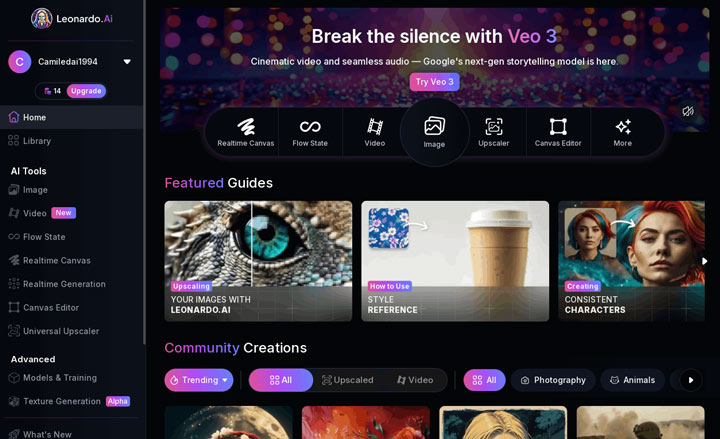
Key Features of Leonardo.ai
Leonardo AI boasts a rich feature set that caters to both beginners and seasoned professionals:
- Intelligent Prompt Rewriting: Don't have a perfect prompt? Leonardo AI can take a basic idea and expand it into a detailed description, complete with lighting and texture suggestions.
- AI Image Generation: Generate stunning artwork, illustrations, and photorealistic visuals from text prompts with remarkable ease.
- Extensive Customization: Fine-tune your image generations with options for aspect ratios, art styles, and a vast library of pre-set models. The ability to train a model with your own images allows for truly personalized asset creation.
- Diverse AI Models: Access specialized AI models optimized for various purposes, including anime, graphic design, and photorealistic images.
- Additional Creative Tools: Beyond core image generation, Leonardo AI provides handy tools like an AI upscaler for enhancing image resolution, a Realtime Canvas for interactive creation, and Motion for animating static images.
- User-Friendly Interface: The platform's web-based interface is designed to be intuitive and accessible, welcoming users of all skill levels.
- Flexible Plans: Leonardo AI offers a free plan with daily token refreshes and paid subscriptions for power users who need more tokens and advanced features.
Hands-On Testing: Putting Leonardo AI to the Test
I put Leonardo AI through its paces across several key functionalities:
1. Image Generation with Different AI Models
I focused on how Leonardo AI's specialized models handle different creative challenges.
1) Phoenix Model
Goal: To test Phoenix's core claim of unwavering prompt adherence and its ability to generate clear, accurate text within images, which is crucial for applications like advertisements, posters, and logos where precise instructions and legible text are essential.
Prompt: A photorealistic, award-winning advertisement poster. In the top center, the bold, capitalized headline text "A TASTE OF TOMORROW". Below the headline, a sleek, minimalist glass bottle of juice is the main subject. The juice is a vibrant green color. On the bottle's label, the brand name "Phoenix Elixir" is written in an elegant, clean font. At the very bottom of the poster, in smaller text, is the slogan: "Freshly Squeezed Future." The background is a soft, out-of-focus image of a sun-drenched orchard.
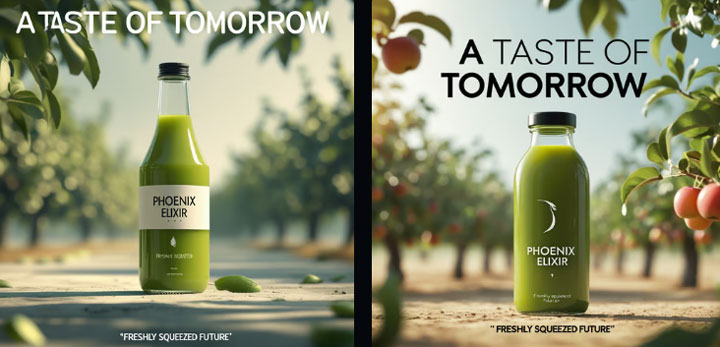
What I Found: Phoenix performed exceptionally well. It generated all text correctly and followed the specified layout perfectly, a notable feat for AI image generators.
2) Flux Kontext Model
Goal: To evaluate Flux Kontext's advertised strength in making precise edits to specific elements within an existing image while seamlessly blending those changes and preserving all other details. This is a powerful capability for iterative design and refining visuals without starting from scratch.
Prompt: change the color of her hair and her clothes from gold to pink. Turn the background dreamy pink. Keep the rest detail unchanged.

What I Found: Flux Kontext delivered an amazing job. It precisely altered requested elements, seamlessly blending changes while perfectly retaining and integrating untouched details.
2. Image Generation with Different AI Preset
Leonardo's presets offer quick stylistic changes. I used a single core prompt and applied it to three different presets to see their unique interpretations.
Prompt: A young woman with sparkling eyes is blowing colorful bubbles, surrounded by soft sunlight and flowers
1) Portrait Perfect Preset
Goal: To assess its focus on generating flattering and detailed human figures, evaluating its ability to render realistic and aesthetically pleasing portraits within a broader scene.

What I Found: Results often looked strange, with poor semantic understanding. The woman appeared surrounded by bubbles, not blowing them, and images frequently contained distorted details like misshapen fingers and eyes.
2) Stock Photography Preset
Goal: To evaluate its ability to generate clean, commercially viable images suitable for common stock photo needs, often characterized by clear subjects, good lighting, and broad appeal.
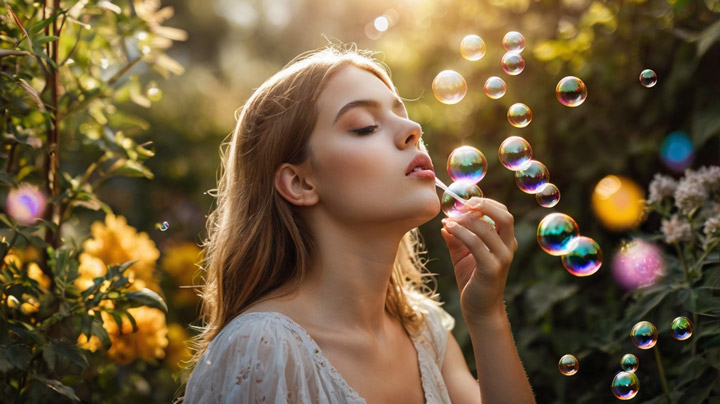
What I Found: Similar to Portrait Perfect, this preset often produced weird compositions, incorrect gestures, messy details, and distorted facial features, suggesting struggles with complex scene interpretation.
3) Anime Preset
Goal: To see how effectively this preset translates a general scene into a characteristic anime style, observing its use of typical visual tropes, color palettes, and character aesthetics.
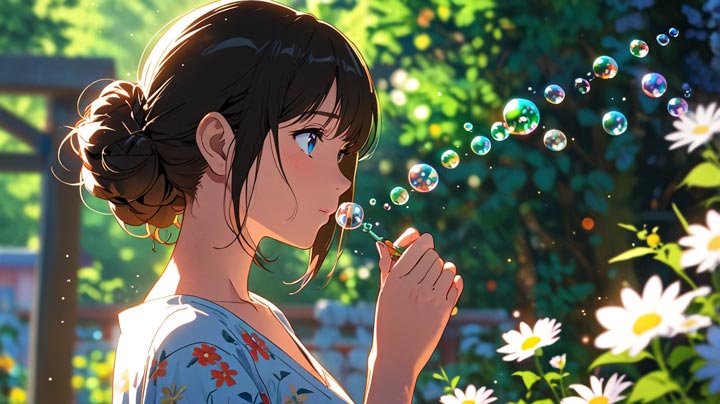
What I Found: While overall color was often good, detail quality was messy. Figures frequently had distorted fingers, and the action (blowing bubbles) was sometimes misinterpreted (e.g., eating a lollipop).
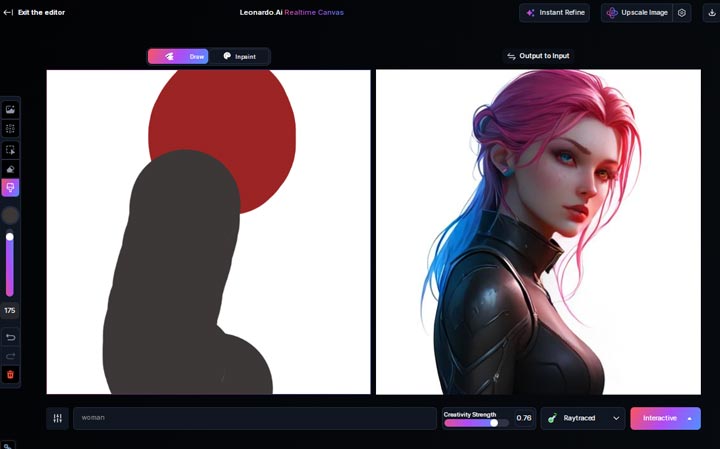
3. Real-Time Canva
This is a feature I've really come to appreciate after using it. It lets you sketch out an idea directly within the interface, and then watch the AI generate results based on your drawing in real-time. What I realized quickly was how incredibly handy it is for brainstorming concepts, exploring different styles, or quickly refining a rough, hand-drawn idea. It's a highly interactive and creative tool.
4. Flow State
Flow State is designed for rapid iteration, continuously generating a stream of images from a single prompt. The idea is to allow you to quickly explore variations and refine your vision without manually hitting 'generate' each time.
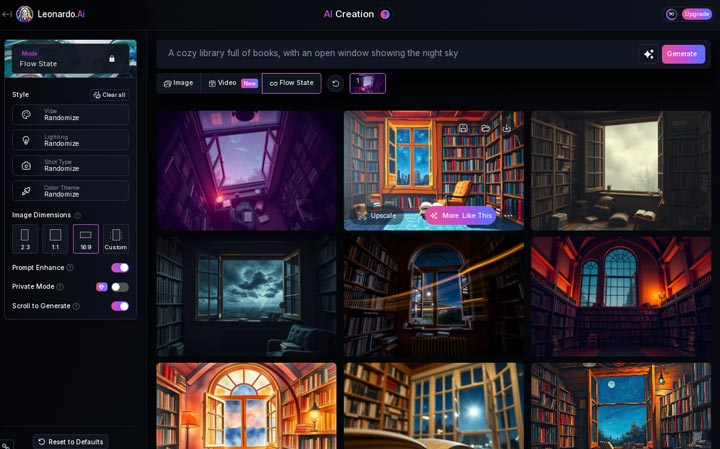
My key takeaway here, however, was the credit consumption. It keeps generating automatically until you manually stop it by clicking on an image you like. Each generation costs one credit. I quickly learned that if you let it run for a while, those credits can add up surprisingly fast. You really need to be mindful and stop the process once you see something promising to avoid burning through your tokens.
5. Universal Upscaler
I put this feature to the test with a couple of different images to see how it handled enhancing existing artwork. One key aspect of this upscaler is its 'Creative Strength' setting, which ranges up to 10. This setting essentially controls how much the AI is allowed to invent or alter details during the upscaling process.
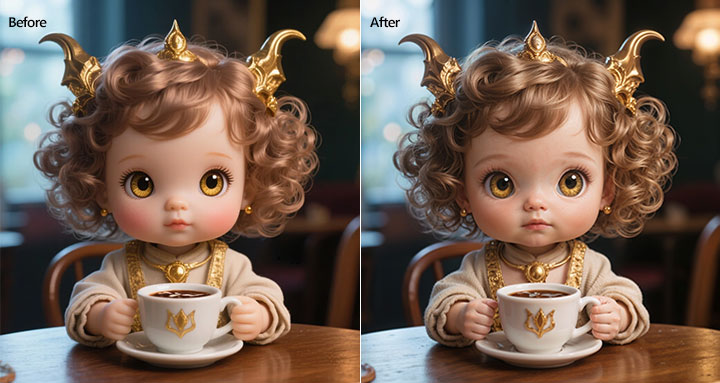
1) Upscale with 5/10 Creative Strength
The process felt a bit longer than expected at this level, but the results were quite impressive, I thought. I noticed it added significant detail, particularly in areas like finger joints and subtle facial shadows. Overall, I was quite satisfied with the outcome at this creative strength after seeing the final image.
2) Upscale with 0/10 Creative Strength
My goal here was a true 1:1 upscale – preserving the original details without adding anything new. Thus, I set the creative strength to 0.
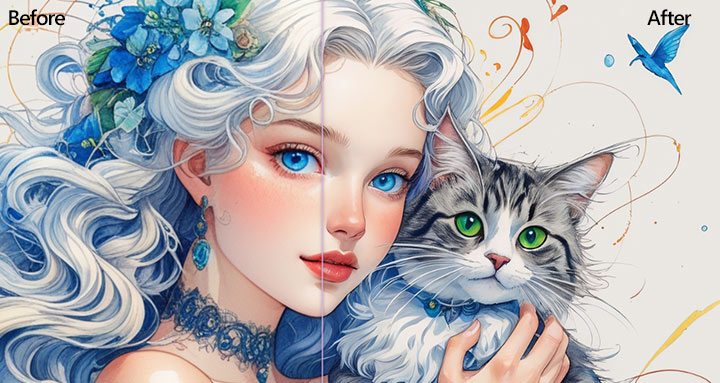
Unfortunately, what I found was this didn't work as intended. Instead of a faithful reproduction, the outcome looked noticeably altered. I observed details lost, like freckles on the face and the fine lower eyelashes. What's more, the lips in the upscaled image looked quite strange, even a little unsettling.
This experience really highlighted for me a common challenge with some AI upscalers – they struggle to maintain the original image's integrity when you want a simple, non-creative enlargement. It made me appreciate tools like VideoProc Converter AI, which I've found excels at upscaling and enhancing media while genuinely preserving those crucial original details you want to keep.
VideoProc - Upscale Your Leonardo AI Generations to 10K Clarity
- Bulk upscale images (to 8k/10k) and videos (to UHD 4K)
- Enhance videos/images with the original details kept and improved.
- Automatically address the visual flaws like blurry, pixelation, and grainy
- Rich AI features: restore face(s) in images, colorize faded photos, etc.
- All-in-one: convert, compress, edit, download videos, screen record
 Excellent

What Others Are Saying: User Feedback on Leonardo AI
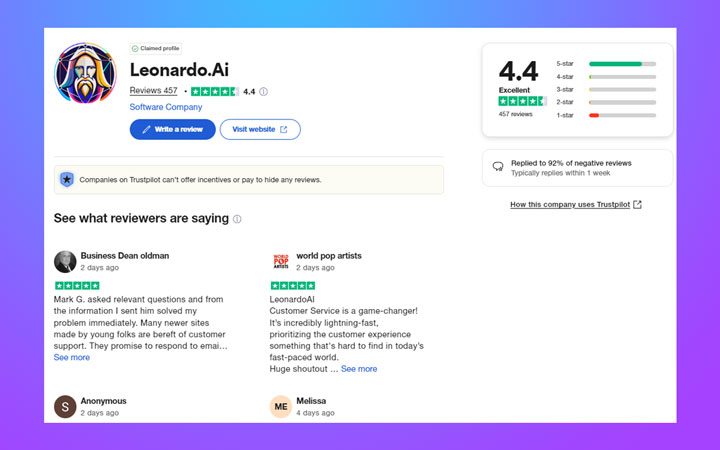
Moving beyond my own testing, it's always insightful to see what the wider user base thinks. Looking at platforms like Trustpilot, Leonardo AI holds a respectable 4.4 out of 5 stars based on numerous reviews, reflecting a generally positive sentiment among users.
Digging into the reviews, a consistent theme emerges: users are largely satisfied with the customer service and support team. This seems to be a significant strength for the platform, offering reassurance when issues arise. The most frequent criticism seems to revolve around image quality and consistency, particularly when compared to some competitors on certain types of prompts, and the speed at which credits are consumed.
Leonardo AI: Pros and Cons
Based on our testing and user feedback, here's a summary of Leonardo AI's strengths and weaknesses:
Pros:
- User-friendly interface makes it accessible for beginners.
- Automatically turns your basic prompts into detailed, effective text.
- Offers a vast selection of base AI models, including the ability to train your own custom models.
- Style switching feature is efficient and saves time.
- Output quality of Phoenix 1 and Flux Kontext are amazingly good.
- Real-Time Canvas is a highly creative and useful brainstorming tool.
Cons:
- Free plan limits run out very quickly; generating images with advanced models like Lucid Realism can be credit-intensive (e.g., 66 credits per image with the Lucid Realism model).
- Most Presets like Anime and Stock Photography produces distorted/odd-looking images.
- Can miss details or "hallucinate" when given very complex initial prompts.
- Many useful features (inpainting, generating single image, deleting generated images from the gallery) are locked behind a paywall.
- Free members cannot output images with a resolution larger than 1536x1024, and premium initial resolution is still limited to up to 2x upscale ratio.
- The built-in upscaler alters original image details.
Verdict: Is Leonardo AI Still Worth Using in 2025
After extensive testing and reviewing user feedback, it's clear that Leonardo AI remains a powerful and valuable AI image generation tool in 2025. Although it may not always produce the absolute highest fidelity photorealistic images compared to the very latest competitors like GPT4-o and the free credit system is quite restrictive, its unique features, focus on creative control, and generally positive user experience make it a strong contender. For many users, particularly those leveraging its specific strengths for consistent styles, text generation, or precise editing, or operating on a budget, Leonardo AI is absolutely still worth using, though managing credit consumption and considering external tools for maximum resolution needs are advisable.