VideoProc Converter
 New AI features are available

 Listed in
 The past year has seen an explosion of AI video generators, but few have garnered as much buzz as Hailuo AI. On June 18, 2025, MiniMax (the company behind Hailuo AI) introduced the Hailuo 02 video model, boasting "World-Class Quality, Record-Breaking Cost Efficiency." So, I put Hailuo through its paces. In this Hailuo AI review, you'll see how its generations are and if it lives up to the hype.
Introducing Hailuo AI
Hailuo AI is a multimodal generative AI platform created by the Chinese company MiniMax. It shot to popularity as one of the first AI video generators that could transform simple text or image inputs into short, cinematic video clips with remarkable ease. Featuring a menu bar, a prompt box, and an Explore page, its interface design emphasizes simplicity and ease of use. When signing up, you will get 500 free credits for basic trials.
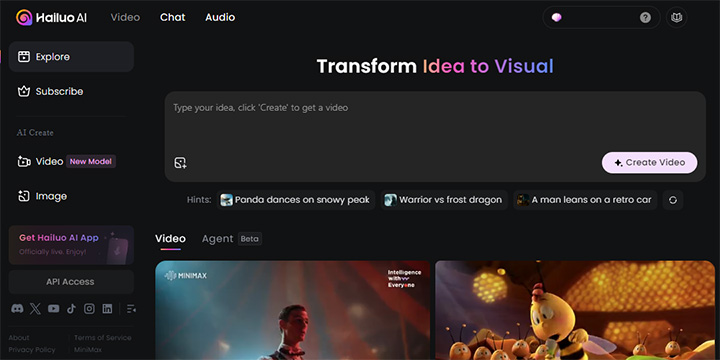
While Hailuo AI does include an AI image generation tool, its standout feature is the AI video generator, which is our focus in this review.
Key Features Test & Review
In our hands-on testing, we concentrated on Hailuo AI's video generation features. Below we break down the key video features and share what we found when putting them to the test.
Text-to-Video
Hailuo AI's text-to-video (T2V) feature lets you turn a written prompt into a short animated video clip. You simply describe a scene or action, and the AI attempts to bring your words to life visually. We found this feature to be impressively effective.
I started with a simple prompt, "Generate Caesar with shrimp," as in the first example below. Hailuo generated exactly that. It understands Caesar correctly, and the human hands are not deformed either. The whole thing looks like what you would see in a food vlog.
Prompt: Generate Caesar with shrimp
The second example used a more complex prompt, and here's the result.
Prompt: Cinematic sci-fi close-up of a powerful female protagonist standing alone in a neon-lit cyberpunk alley. She wears a sleek, form-fitting armored exo-suit with glowing violet energy lines tracing her silhouette. Her helmet is off, revealing a sharp, focused gaze and short, wind-blown hair. Rain trickles down her face, mixing with the soft glow of the holographic lights reflecting off the wet pavement. The camera moves slowly around her, capturing every detail — from her battle-worn armor to the flickering digital ads behind her. Steam rises from the ground as distant hovercars fly past. Moody lighting, shallow depth of field, cinematic color grading, 35mm film look.
The video includes almost all the elements in the prompt, for example, the armored exo-suit, violet energy lines, and flickering digital ads. Hailuo even got the cyberpunk vibe with precision: the lighting, depth of field, color grading, and even the reflections on the ground seem authentic. Except for missing the hover cars, all of these demonstrate its excellent instruction following.
Image-to-Video
I then tested the image-to-video (I2V) generation capabilities of Hailuo AI. It's easy to use. You feed in a static image, and Hailuo will animate it or use it to generate a new video scene. Here's the input image.
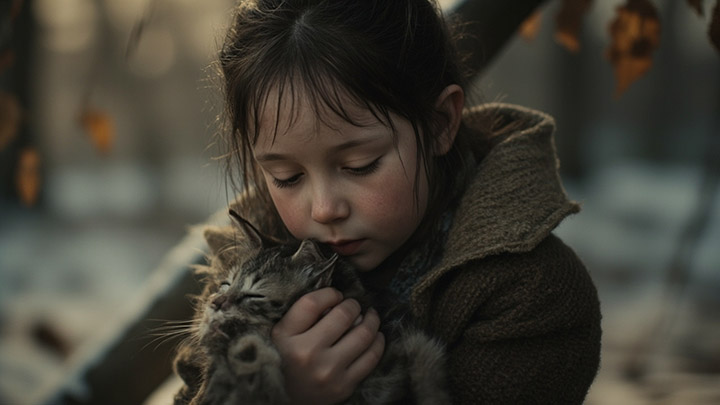
Prompt: One cold gray winter afternoon, Elara – a little brown-haired girl, wearing an old sweater, knelt under a poplar tree, gently holding an injured kitten. Elara's face was worried and gentle. A light snowfall, surrounded by dry leaves and the faint light of dusk.
Here's the result:
The result closely matched the prompt and exceeded my expectations in visual quality. The kitten was good. The clip was coherent. On a more impressive note, the girl's facial expression is very vivid, just as the prompt requires, worried and gentle. The transition from holding the kitten and then tilting her head is so smooth and natural. That is exactly what a little girl would do.
Subject Reference
The Subject Reference model is all about maintaining consistency for characters or objects across multiple scenes or shots, just as Runway Gen-4 claims it excels at. Think of it as giving the AI a subject to remember. You provide a reference image of a character (or any subject), and when generating videos, Hailuo will try to keep that character's appearance the same throughout, even if the scenes change.
As for now, you can only use it with the Hailuo 01 video model and human faces. When you upload the image, Hailuo will start identifying the facial features of your character. After entering the prompt, Hailuo will create video scenes featuring that character.
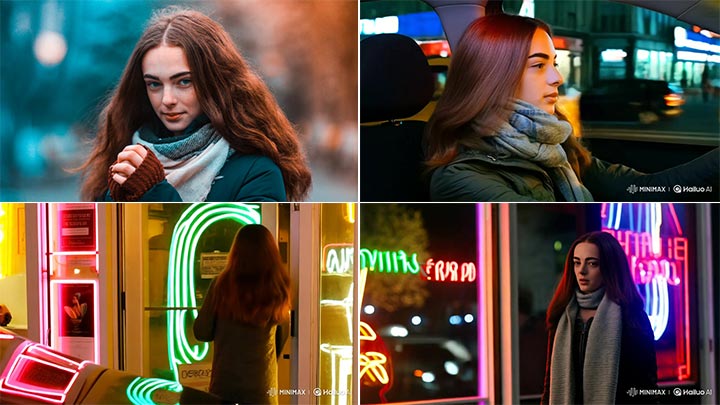
In my trials, using Subject Reference did help preserve the key visual traits of the subject. This feature, combined with camera control, means Hailuo AI isn't just generating one-off videos, but inching toward true storytelling capabilities where you can have recurring characters and deliberate cinematography.
Camera Movement
Hailuo AI understands and allows you to apply camera movement controls. Rather than a static or random viewpoint, you can specify how the camera should behave in video generation, for instance, a close-up shot, a panning movement, or zoom during the scene. If you are unfamiliar with all this stuff, the Director model provides preset options for camera moves, which makes it easy to experiment without deep technical knowledge.
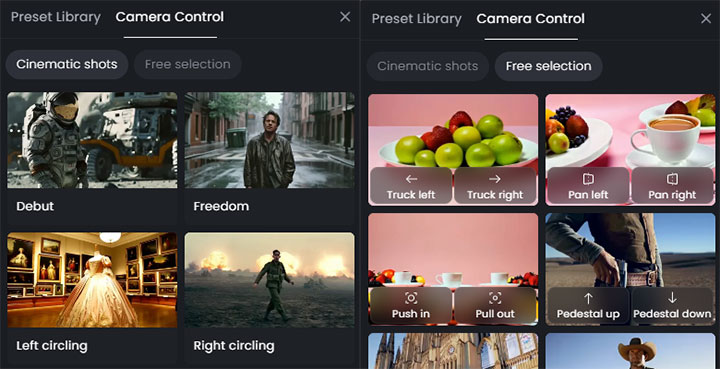
In practice, I find these controls add a lot of cinematic feel. However, it's better to start with simple movements. Elaborate camera instructions or very complex shots might confuse the AI. As you can see from the example below:
Prompt: [Truck left,Push in,Pan right]a panicked sorceror rumages through antiques
[Pedestal down,Tilt up]The sorcerer finds a skull chalices
[Push out,Pedestal up,Tilt down]The man rubs the chalice
[Truck left,Pan right,Tracking shot]a demon appears out of the chalice
The output clip with camera movement looks somewhat like the Harry Potter vibe, especially in the first few seconds. In the later scene about rubbing the chalice and the demon's appearance, Hailuo failed to follow the prompts strictly. But overall, Hailuo does a good job of the camera control it promised.
Assessing Hailuo's Output
Now, let's talk about the output. The output videos are good in most cases, but not all results are free of obvious visible errors. In addition to the outputs in the previous section, here's another example to give you an idea.
You'll get the result from Hailuo after a brief wait. Compared to paid fast-track generations, it would take longer if you are not subscribed. There's a non-member waiting queue of several minutes or even hours at peak times.
Hailuo's outputs are short by design: typically a 6-second H.264 MP4 clip at 24fps on the default settings. Subscribers get an option of 10 seconds. This duration is enough for a quick scene or a GIF-like snippet, but it's not suited for longer storytelling without stitching multiple clips together. If you are hoping to create a full minute-long video, Hailuo isn't there yet.
In terms of resolution, paying users can access native 1080p resolution with no watermarks. If you are on the free plan, which looks like it's going to be dropped with Hailuo 02, you can only get around 720p (768p) videos with watermarks.
Pros & Cons from Real-World Use
After the thorough tests, here's a summary of the pros and cons of Hailuo AI, grounded in my experience and other users' feedback.
Pros
- Good Prompt Adherence: Although overly complex prompts can confuse the AI, Hailuo nails your prompt perfectly most of the time. You'll see almost all elements of your prompts in the generated video.
- High Visual Quality: By most accounts, Hailuo's videos look impressively realistic and film-like. It often delivers natural motions and visuals that exceed expectations for AI-generated content.
- Ease of Use: The interface is intuitive and beginner-friendly. No coding or complex setup, you can start creating in a few clicks. It really lives up to its claim of being "a Hollywood studio in your pocket."
- Creative Features: Despite being easy to use, Hailuo offers powerful features for those who want them, such as camera controls, subject reference, and even more.
Cons
- Occasional AI Quirks: Anatomical challenges (like the example of the man doing backflips) are the most obvious ones. You may see the uncanny valley effect in human outputs, particularly faces and limbs. Movements might jerk or accelerate unnaturally due to the AI's current limitations.
- Limited Output Settings: The 5–6 second limit on video duration is the most common complaint. While fine for quick visuals, it's frustrating if you want anything longer or a complete narrative. And you can't change the aspect ratio, resolution, etc.
- Evolving Credit System: Early adopters of Hailuo enjoyed an unlimited free ride before the credit system was introduced. Now, the official release video for Hailuo 02 is full of comments about the unforeseen cancellation of free daily credits.
Upscale Hailuo Videos
Hailuo's strength lies in content and creativity, but if you want to display your video on a large screen or just want that extra sharpness, AI upscaling is the way to go. In this case, VideoProc Converter AI is a handy companion tool to upscale and enhance videos after you've generated them with Hailuo.
VideoProc Converter AI is an AI video enhancer that can increase resolution, sharpen details, and reduce noise in videos and images. With its advanced Super Resolution model, you can scale up a video by up to 4 times its original resolution and make it look much crisper in just a few clicks. If you've got a Hailuo-generated video that's, say, 720p or has some blur on a modern display, you can run it through VideoProc and get a noticeably clearer result without needing to be an expert in editing.
Key Features of VideoProc Converter AI for Video Enhancement
- AI Super Resolution: Upscale and enhance your Hailuo videos up to 4K and images up to 10K without introducing artifacts.
- Frame Interpolation: Increase the frame rate of Hailuo videos to up to 5 times, creating ultra-smooth slow-motion effects or enhancing the fluidity of motion.
- Batch Processing: Efficiently upscale multiple Hailuo videos or images at once.
- Hardware Acceleration: Lightning-fast processing with dynamic memory adjustment to ensure smooth operation even on modest hardware.
- All-in-one video toolkit: Format conversion, compression, downloader, basic edits, etc.

In summary, VideoProc Converter AI complements Hailuo AI perfectly. It's easy to use with an intuitive interface. Just import the clip, set a resolution you want, and start the process. Generate your creative idea with Hailuo, then run the result through VideoProc to upscale and polish it.
Verdict
All in all, Hailuo AI stands out as a top-tier AI video generator from text prompts or image inputs. The experience of using Hailuo AI feels innovative and fun. Its instruction following and camera controls are far better than peers like Sora. It's not without caveats. It's not yet a platform for making lengthy or highly polished final-cut videos. The limitations in duration and occasional AI hiccups mean it currently serves best for ideation or prototyping. However, considering the speed of AI advancement, I believe these are likely to be smoothed out soon.
Hailuo is an awesome AI video generator. Pairing it with a good upscaler means the videos are only going to look better as the tech evolves. Feel free to download and give VideoProc Converter AI a try to upscale and enhance your videos from Hailuo or other AI tools.