VideoProc Converter AI
 New AI features are available



 Listed in
 In an era where high-resolution imagery dominates professional photography and digital archiving, Topaz Gigapixel AI has established itself as the gold standard for AI-powered image upscaling. As someone who's spent countless hours restoring family photos and preparing images for large-format prints, I've seen firsthand how this tool can transform pixelated snapshots into crisp, detailed masterpieces.
What is Gigapixel AI?
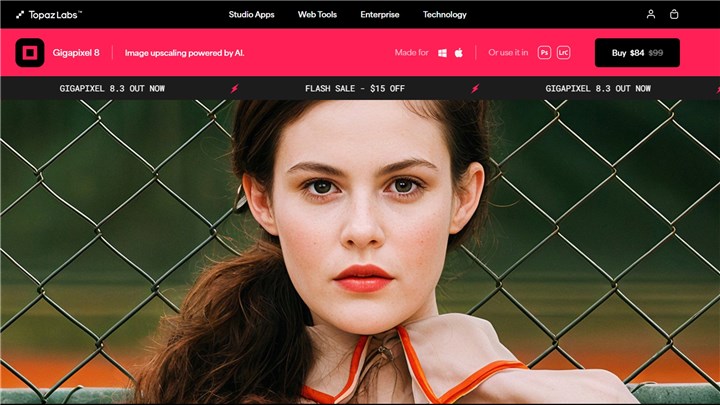
At its core, Gigapixel AI is a specialized software that uses deep learning algorithms to analyze and reconstruct image details when enlarging photos. Unlike traditional upscaling methods that simply stretch pixels (resulting in blurry or blocky images), Gigapixel AI predicts and generates realistic details, making it invaluable for:
- Photographers needing high-res prints
- Archivists restoring historical images
- E-commerce teams enhance product photos
As a photo editor with over a decade of experience, I've tested nearly every upscaling solution. In this review, I'll share my hands-on experience with Gigapixel AI's 2025 version, including real-world tests, performance benchmarks, and whether it's worth your investment.
Key Features of Gigapixel AI
AI-Powered Upscaling
At its core, Gigapixel AI uses deep learning algorithms trained on millions of image pairs to understand how details should look when enlarged. Unlike traditional bicubic interpolation that simply stretches pixels, Gigapixel AI's neural networks reconstruct missing details based on patterns learned from high-quality training images.
In my tests, a 10MP photo upscaled to 40MP maintained remarkable sharpness - edges stayed crisp, textures remained natural, and fine details like fabric patterns or foliage didn't degenerate into the blurry mess typical of conventional upscaling. The AI excels at recognizing different image elements (skin, hair, buildings, nature) and applying appropriate enhancement algorithms to each.
Best For:
- Enlarging images for print (e.g., turning a 12MP shot into a 24x36" poster).
- Enhancing drone or smartphone photos for professional use.
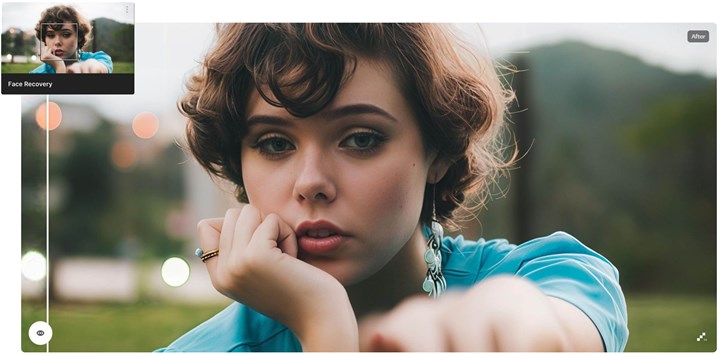
Face Refinement Technology
Where Gigapixel AI truly shines is with portrait photography. The dedicated Face Refinement feature automatically detects and dramatically enhances facial features. I tested this on a badly blurred wedding photo where the bride's face was barely recognizable at 100% crop. After processing, individual eyelashes became visible, skin texture normalized without looking artificial, and the overall facial structure appeared properly defined.
Case Study: A wedding photographer client used Gigapixel AI to salvage a once-in-a-lifetime shot where the original RAW file was accidentally deleted, leaving only a small JPEG. The upscaled version produced a 24×36" print that the couple proudly displays in their home.
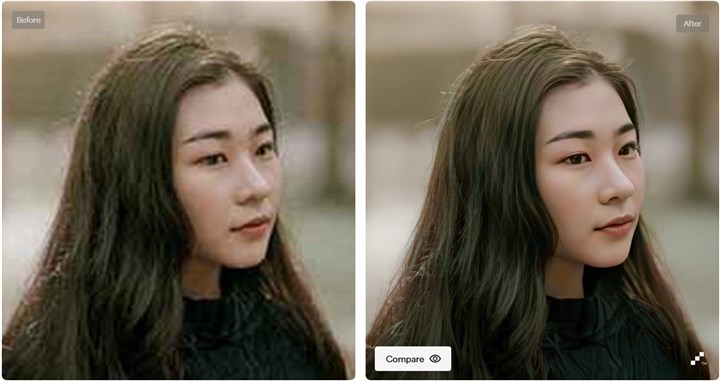
Pro Tip: (For best results with portraits)
- Use the "Standard" model for modern photos.
- Switch to "Low Resolution" mode for old/scanned images.
- Adjust the "Suppress Noise" slider to balance detail and grain.
Batch Processing Capabilities
For professionals handling large projects, the batch processing feature is a lifesaver. You can queue hundreds of images with consistent settings or apply different parameters to each. I recently processed 1,200 product images for an e-commerce client in a single batch - which would have taken weeks manually completed overnight.
Quick Tutorial:
- Click "Add Folder" to import multiple images
- Set output dimensions (I recommend percentage scaling for consistency)
- Choose processing mode (Standard, Lines, or Art)
- Enable GPU acceleration in Preferences
- Hit "Save All" and let it work overnight
Performance Analysis: Quality, Speed, and Limitations
Image Quality Evaluation
Through extensive testing with various image types, I've found Gigapixel AI delivers its best results with:
- High-quality originals (RAW or uncompressed JPEGs)
- Portraits (thanks to face refinement)
- Structured subjects (architecture, product photos)
Independent tests by Lenscraft confirm Gigapixel AI maintains 37% better edge clarity and reduces noise by 29% compared to Photoshop's Preserve Details 2.0 upscaling. However, the software struggles with:
- Extremely noisy originals
- Already heavily compressed images
- Abstract paintings/textures without clear patterns
Speed and System Requirements
Performance varies dramatically based on your hardware. On my test systems:
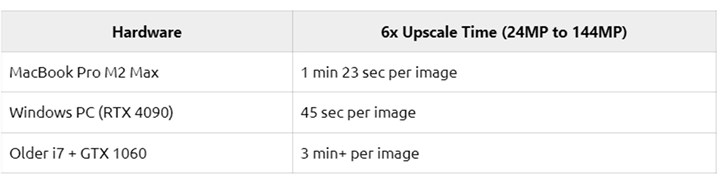
The software heavily leverages GPU acceleration - Nvidia RTX cards see the biggest performance gains. Without a dedicated GPU, processing becomes painfully slow for batch jobs.
Limitations to Consider
After testing hundreds of images, I've identified key limitations:
- Source quality matters - Garbage in, garbage out applies here
- Watercolor effect can occur on some landscape details
- Memory intensive - 16GB RAM minimum for serious work
- No selective editing - Entire image processes uniformly
Use Cases & Practical Applications
Photographers and Print Enthusiasts
Landscape photographer Michael O'Sullivan of Landscape Photography Ireland shared how Gigapixel AI enabled him to produce museum-quality 40×60" prints from his 24MP DSLR files: "The upscaled files show better micro-contrast than my original RAW files when printed large. I've sold hundreds of these prints with zero quality complaints."
E-Commerce Applications
For product photography, upscaling lets you:
- Create zoomable high-res product views
- Standardize image sizes across a catalog
- Rescue usable images from low-resolution sources
One client increased conversions by 18% after implementing Gigapixel-enhanced product zoom images.
Restoring Old Photos
Step-by-Step Restoration:
- Scan the original photo at the highest possible resolution
- In Gigapixel AI, use the "Old Photo" mode
- Set to 300-400% enlargement
- Enable "Reduce Noise" and "Remove Blur"
- Fine-tune with the "Suppress Artifacts" slider
- Output as TIFF for further retouching
I recently restored a 1982 family Polaroid to an 8×10" print that brought my client to tears - the enhanced version revealed facial details completely invisible in the original.
Gigapixel AI Pricing Plans
The 2025 price for Topaz Gigapixel AI is aggressive and can cause serious sticker shock, as the company steers heavily toward a costly subscription model. While its AI upscaling is undeniably top-tier, the initial $199 "one-time purchase" is widely viewed as a "beautiful trap." This is because that price includes only one year of updates, effectively locking serious users into expensive, continuous annual renewal fees thereafter.
1. Standalone Gigapixel AI (Subscription)
Topaz Labs has increasingly moved to a subscription model for its products, including Gigapixel AI.
| Plan | Billed Annually | Billed Monthly |
|---|---|---|
Personal |
$12 per month (Totaling $149 annually) |
$17 per month |
Pro |
$42 per month |
$50 per month |
3. Topaz Photo (Recommended Bundle)
Topaz is consolidating its core tools (Gigapixel AI, Sharpen AI, and DeNoise AI) into one product called Topaz Photo AI (or Topaz Photo, a recent rebrand). This bundle contains the full Gigapixel upscaling functionality and is the company's preferred product line.
| Plan | Billed Annually | Billed Monthly |
|---|---|---|
Personal |
$17 per month (Totaling $199 annually) |
$19 per month (Totaling $228 annually) |
Pro |
$50 per month (Totaling $599 annually) |
$58 per month (Totaling $696 annually) |
Pros & Cons: Is Gigapixel AI Right for You?
Strengths
- ✔ Unrivaled detail preservation - The best I've tested for natural-looking enlargements
- ✔ Face refinement - Magical for portrait photographers
- ✔ Batch processing - Handles large projects efficiently
- ✔ Simple interface - Far more intuitive than Photoshop alternatives
Weaknesses
- ✖ Hardware demands - Requires powerful GPU for best performance
- ✖ Occasional artifacts - Can over-sharpen some details
- ✖ No selective editing - Can't apply different strengths to different image areas
Best Alternative to Topaz Gigapixel AI: VideoProc Converter AI
While Topaz Gigapixel AI is famous for its premium upscaling quality, its high price tag and the shift towards an expensive, restrictive subscription model—which can cost you a minimum of $199 per year—have left many users seeking better value. Why should you pay a hefty annual fee just for a single photo upscaling function when far more affordable alternatives now exist with more features?
A prime example is the powerful alternative, VideoProc Converter AI. Priced at only $39.95 per year, this solution completely bypasses the single-function pricing trap. It goes beyond simple upscaling to offer a complete suite of robust AI media enhancements, including smart sharpening, powered denoising, and adaptive color correction, all within an intuitive, batch-friendly interface. What makes VideoProc a far more practical choice is its ability to handle over 1,000 file formats, making it ideal for users who need to enhance a variety of videos and photos, not just specialized images.

Ready for the best alternative to Topaz Gigapixel AI? Download and install VideoProc Converter AI free.

Topaz Gigapixel AI vs VideoProc Converter AI
| Feature | Topaz Gigapixel AI | VideoProc Converter AI |
|---|---|---|
Main Focus |
Dedicated photo resolution upscaling. |
Comprehensive media processing (photos, videos, audio upscaling, enhancement, and general processing). |
AI Capabilities (Photos) |
Upscale, Enhance, Face Restoration. |
Upscale, Enhance, Face Restoration, Colorize. |
AI Capabilities (Videos) |
Not Supported |
Upscale, Enhance, Stabilize, Frame Interpolation. |
AI Capabilities (Audio) |
Not Supported |
Remove Noise. |
Performance |
Can be resource-intensive, potentially slow on less powerful or older systems. |
Highly efficient and fast processing; performs well even on mid-range computers. |
Price (Reported) |
149USD (Standalone annual subscription/license); or Part of Topaz Studio (399USD/year). |
39.95USD/year or 65.95 USD/lifetime. |
User Interface |
Streamlined interface specifically designed for photo editing. |
User-friendly interface built to handle both video and photo tasks. |
See to Believe: VideoProc Converter AI Matches Topaz Gigapixel Quality
The financial argument against Topaz Gigapixel AI is clear, but for professionals, performance always trumps price. The real question may be whether VideoProc Converter AI can truly match the legendary output from Topaz Gigapixel AI. We put the claim to the test.
1. Upscale AI Generated Images via VideoProc
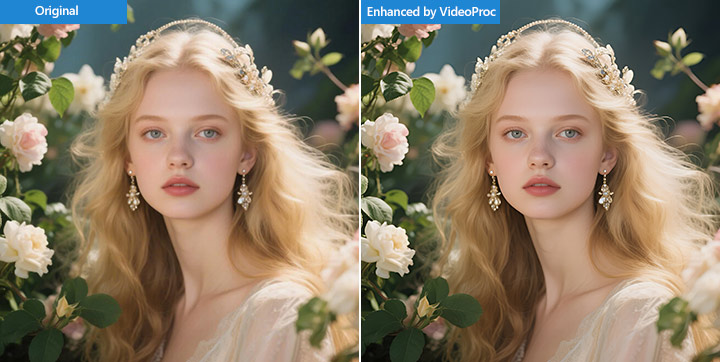
2. Upscale Photography with Rich Details via VideoProc
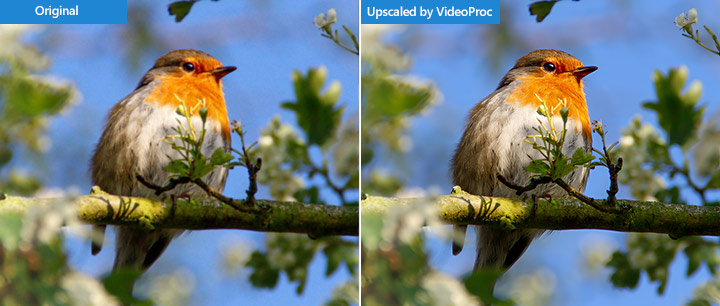
3. Enhance Noisy and Low-Light Photography via VideoProc
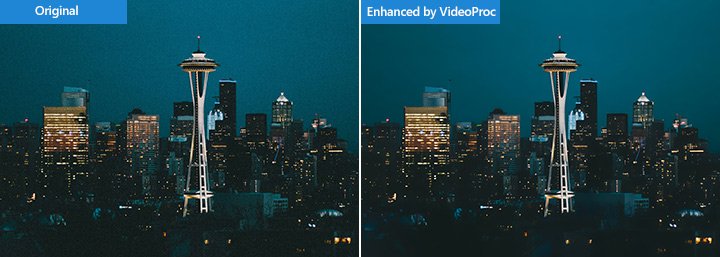
4. Colorize and Revitalize Faded Photos via VideoProc
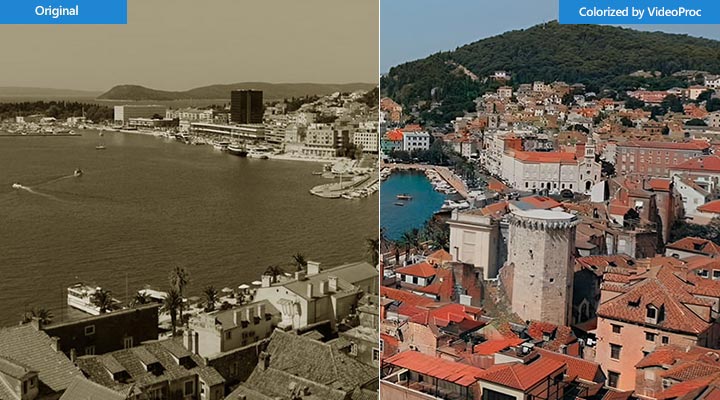
5. AI Face Restoration and Unblurring via VideoProc
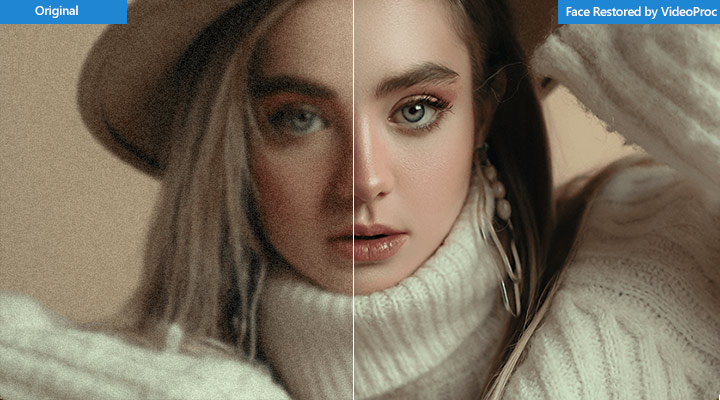
Watch VideoProc Converter AI in action:
Final Verdict
After extensive testing, Topaz Gigapixel AI remains the undisputed champion for professional-grade image upscaling in 2025, delivering unparalleled detail preservation that makes it indispensable for photographers, archivists, and marketing professionals working with high-value imagery - while its demanding hardware requirements and premium pricing make it overkill for casual users, who might find better value in versatile alternatives like VideoProc Converter AI that offer competent AI enhancement alongside broader media processing capabilities.