VideoProc Converter AI
 New AI features are available




 Listed in
 This in-depth Aiarty Video Enhancer review examines its features, real-world performance, and pricing to help you determine if the new AI video upscaler is worth your time and money.
Whether you're trying to revitalize treasured old videos or fix recent clips with issues like low resolution, noise, and blur, Aiarty Video Enhancer promises to deliver clarity and detail. But, does it really live up to its promise? We'll take a close look at its core capabilities, including AI video upscaling, denoising, and deblurring, to find the answer.
What Is Aiarty Video Enhancer
Aiarty Video Enhancer is a dedicated desktop AI solution from Digiarty Software designed specifically for video upscaling and restoration. Unlike traditional upscalers, it utilizes advanced Diffusion and Generative Adversarial Network (GAN) models to not just interpolate pixels, but to generate new, highly realistic detail while increasing resolution up to 4K.
Its key value is providing creators with a simple, high-quality, automatic solution for remastering video, focusing on improving clarity, boosting resolution, and generating better detail, which bypasses the complex, manual process of traditional editing software.
Aiarty Video Enhancer Key Features
AI Video Upscaling
It uses advanced AI models trained on a large video and image dataset to upscale low-resolution footage to4K. It enhances video clarity, detail, and sharpness, making it useful for improving overall visual quality.
3 Specialized AI Models
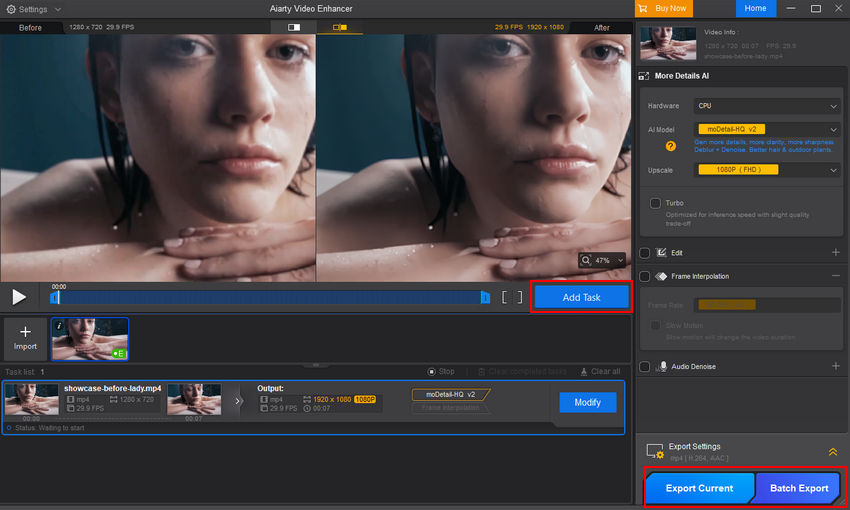
Aiarty Video Enhancer offers three tailored AI models to enhance videos in various scenarios. moDetail-HQ v2 sharpens fine details like textures and skin, Smooth-HQ v2 reduces noise and blur for clearer videos, and superVideo vHQ improves footage shot in challenging conditions like low light or high noise.
AI Frame Interpolation
This feature intelligently generates additional, synthesized frames between existing frames to smooth out motion. This allows you to effectively double or quadruple the frame rate (FPS boost) for creating high-quality slow-motion effects with consistent motion and minimal visual artifacts like distortion.
AI SDR to HDR 10-bit Conversion
Aiarty Video Enhancer 3.0 introduces intelligent SDR to HDR conversion which is capable of transforming standard 8-bit video into 10-bit HDR content. This is particularly useful for revitalizing old home movies or flat phone recordings. It expands the color gamut and dynamic range, bringing us richer colors, smoother gradients, and more lifelike visuals that pop on modern HDR displays.
Granular Control Over AI Intensity
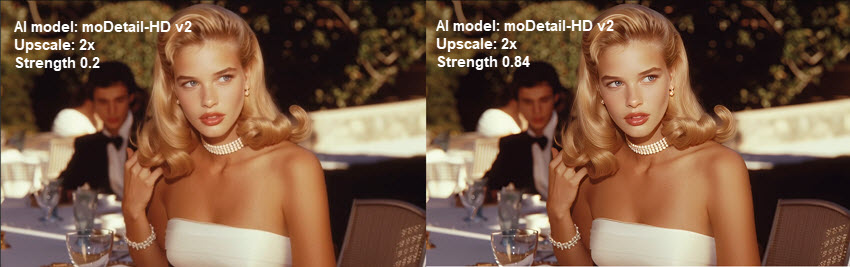
Most AI video enhancers operate as a "black box", you feed in a video, and the AI applies a fixed level of sharpening. This often leads to over-processed, "waxy" looking faces. Aiarty Video Enhancer distinguishes itself by offering a Strength slider. This lets us fine-tune the intensity of the AI enhancement so we can boost clarity while keeping the details looking natural.
Additional Features
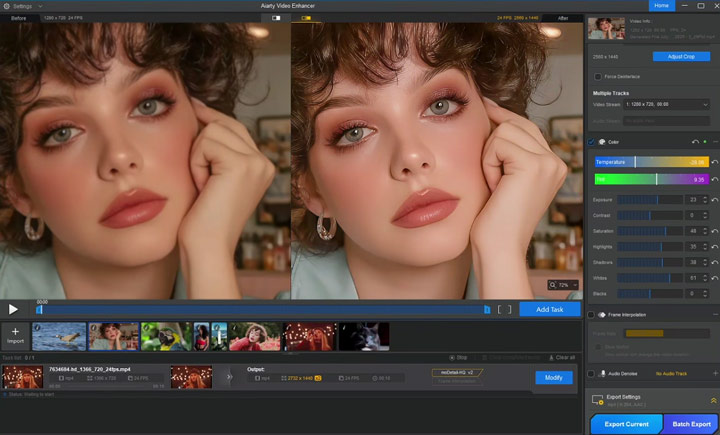
It also provides powerful tools for Audio Noise Removal, effectively eliminating background noise and enhancing vocal clarity in videos like vlogs or podcasts. For Color Correction, it offers manual adjustments for white balance, exposure, contrast, and saturation, giving you precise control over video colors to enhance their visual appeal.
Performance Boost with Turbo and Step Modes
Leveraging its Turbo mode, Aiarty Video Enhancer can upscale videos to 4K at real-time speeds, achieving a processing rate of up to 30 frames per second. This optimization makes the enhancement process up to three times faster than standard, non-accelerated AI tools while maintaining high output quality.
Better yet, Aiarty Video Enhancer 3.0 introduces the Step Mode, which uses tiled AI inference to minimize GPU memory load while maintaining consistent output quality. It runs slightly slower but greatly reduces VRAM usage, making high-resolution upscaling more stable on mid-range graphics cards.
How's Aiarty Video Enhancer's Performance in Practice
To evaluate how well Aiarty Video Enhancer delivers on its core features, I ran several tests using different video clips and settings, focusing on the quality improvements. I uploaded all the clips into Aiarty at once, which made the process much more efficient.
Testing Environment & Methodology
All performance and quality tests were conducted on a system configured for optimal GPU acceleration:
- CPU: Intel(R) Core i5-11400F @ 2.60GHz
- RAM: 16GB
- GPU: NVIDIA GeForce RTX 3060 (Used for all hardware acceleration)
- OS: Windows 11 64-bit
- Software: Aiarty Video Enhancer v3.0
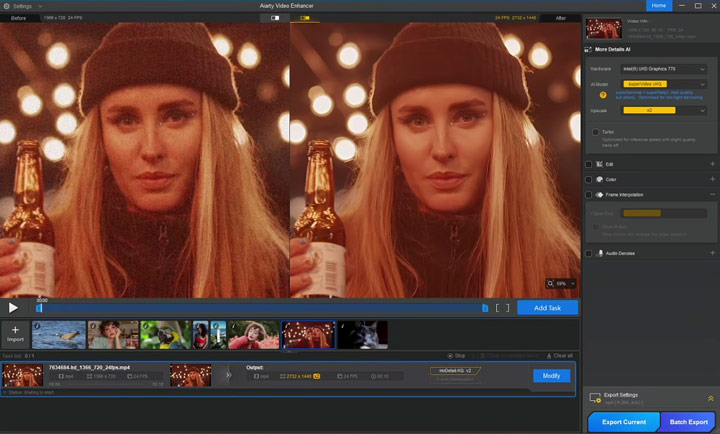
To make the differences easier to notice, I captured the first frame from both the "before" and "after" versions for direct comparison. Now, let's take a closer look at each video and the results.
1. Test 1. 2X Upscale with moDetail-HQ v2
Test Clip: A 5-second, 720p video generated with Google Veo. The original footage looked blurry and lacked fine details.
Result: After enhancement, small features such as eyelashes, lip textures, and jewelry details became clear and natural. The sharpness looked organic rather than artificially over-processed.



2. 4K Upscale with moDetail-HQ v2
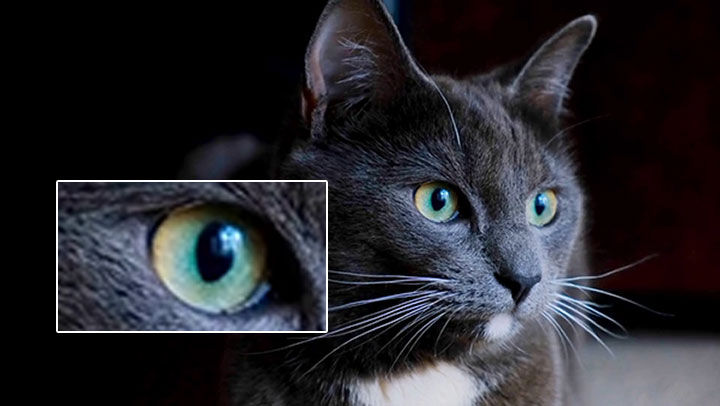
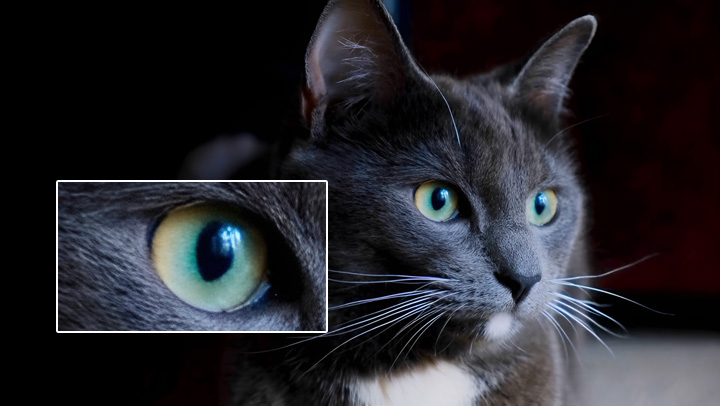
Test Clip: A 980 x 540 video downloaded from Pixabay. At first glance it looked fine, but when scaled up, details like fur and eyes were missing.
Result: The enhanced version appeared cleaner and more refined, with richer details and no noticeable visual artifacts. Everything looked natural without introducing flaws.
3. 2x Upscale with Smooth-HQ v2
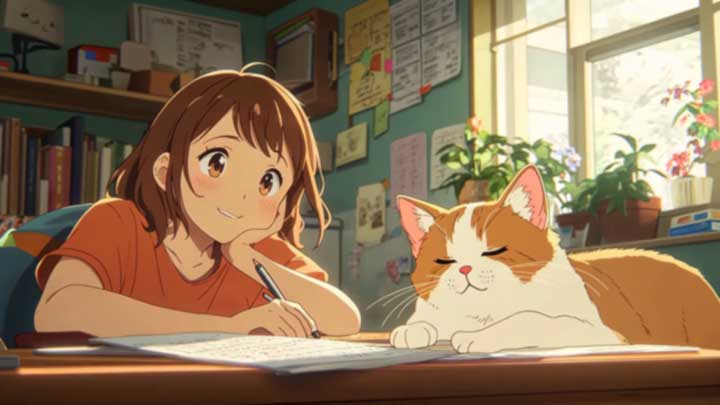
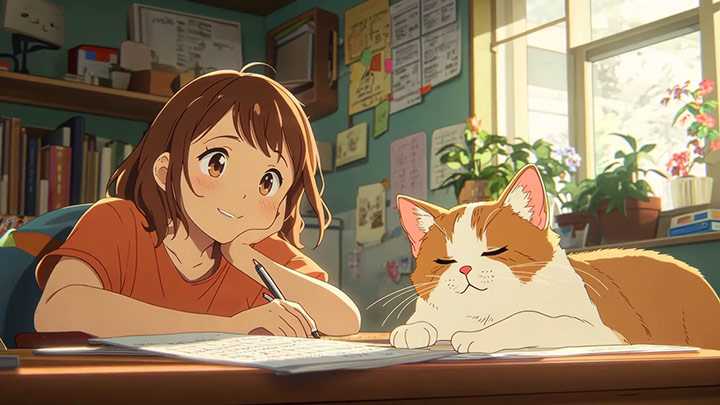
Test Clip: An anime clip downloaded in 1280 x 720. I intentionally added pixelation in Premiere Pro to test whether Aiarty Video Enhancer could restore clarity.
Result: The processed version removed the pixelation effectively while keeping the original colors and textures consistent. The restored frames looked clean and sharp without breaking the anime's natural style.
4. 2x Upscale with superVideo vHQ
Test Clip: Footage intentionally shot in low light which comes with digital noise.
Result: The reduction in noise was very noticeable, and details remained intact. In fact, the footage looked clearer and more natural with the grain effectively removed.

5. Make Quick Edits
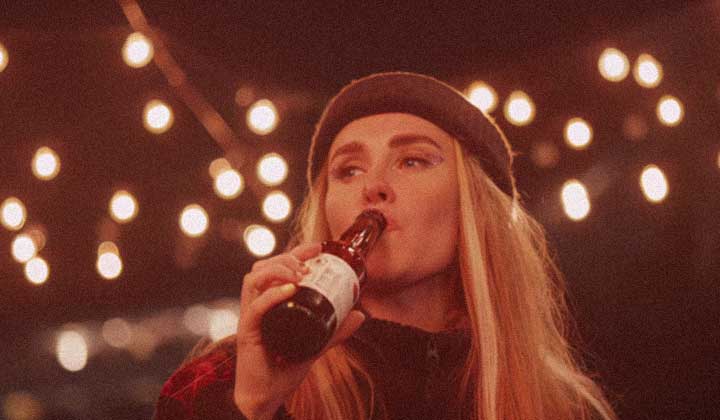
I also tried the quick editing tools like crop, flip, and color correction. They're surprisingly smooth to use and come in handy for small tweaks.
Aiarty Video Enhancer Pricing
When evaluating any software, cost is an important factor alongside features and performance. Aiarty Video Enhancer offers both a free trail and a paid version, each with distinct limitations and capabilities.
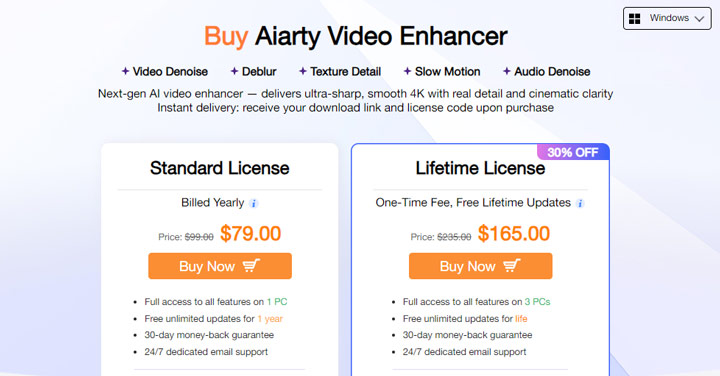
The free version of Aiarty Video Enhancer allows testing of core functions such as upscaling, denoising, deblurring, FPS boost, and audio cleanup without requiring a signup or payment. However, it restricts videos to under two minutes and includes a watermark on output, which can limit its usefulness for larger projects.
The full version ($79/year or $165/lifetime) removes these constraints, supporting longer videos, batch processing, and watermark-free exports. It also includes the latest GPU optimizations and AI models with free updates. While the price is not negligible, the 30-day money-back guarantee and priority support mitigate some of the risk, making it a reasonable choice for users who regularly need high-quality video enhancement.
Aiarty Video Enhancer: Pros and Cons
👍 Pros
- High-Quality Enhancement: Aiarty improves clarity and detail by upscaling, denoising, and deblurring low-resolution or noisy videos.
- User-Friendly Interface: Its core features are easy to access, even for users without advanced technical knowledge.
- Specialized AI Models: Tailored models for different types of videos help deliver natural-looking enhancements across a variety of content.
- Practical Editing Tools: Basic edits like color correction, flip, rotate, trim, frame rate adjustment for smoother motion, and AI audio denoise are all included.
- Focused Design: The software stays dedicated to video enhancement, keeping the interface simple and avoiding unnecessary complexity.
❌Cons
- It runs impressively fast on a GPU, but noticeably slower when relying only on a CPU.
- You need an HDR display to see SDR videos in full HDR10 quality.
User Feedback
Aiarty Video Enhancer is fairly new, so it hasn't accumulated many ratings yet. However, from the reviews available on personal blogs, tech sites, social media, and communities like Reddit, the feedback has been generally positive. For instance, Jim Clyde Monge called it "The Best AI Video Enhancer I've Tested".
Need a Good Alternative to Aiarty Video Enhancer? Try VideoProc
Aiarty Video Enhancer focuses on improving video quality, specializing in upscaling, denoising, and deblurring—well-suited for users looking for professional video enhancement. VideoProc Converter AI provides a broad set of tools for video and media processing, including video enhancement, image upscaling, AI stabilization, and fast conversion across different formats and devices.
Highlight Features of This Aiarty Video Enhancer Alternative
- ✔️Upscale and Enhance Videos: Increase resolution by 200%, 300%, or 400% to achieve crisp 4K quality.
- ✔️Rich AI Tools to stabilize shaky videos, boost frame rates; upscale images to 10K, restore faces in images, colorize old photos; remove vocals, clear background noise, and more.
- ✔️Easy & Efficient: Intuitive interface with easy and effecient batch processing for multiple videos.
- ✔️All-in-One Media Processing: Edit, convert, compress, record, and download videos, etc.

Enhancing Videos with VideoProc – Aiarty Video Enhancer Alternative Test
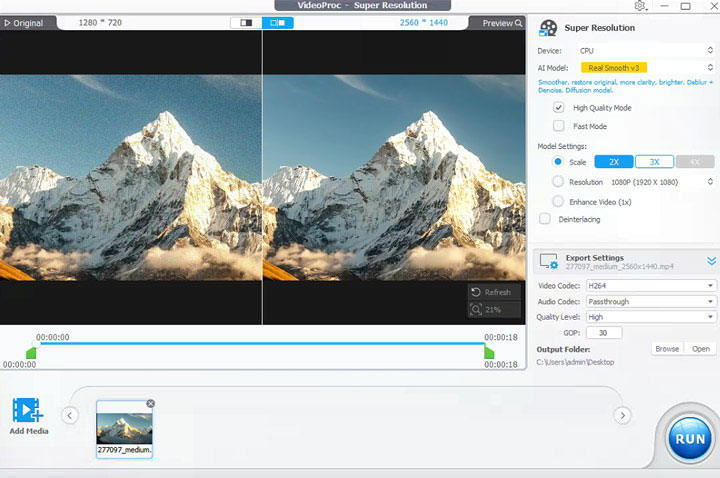
The results speak for themselves. Below is a side-by-side comparison of the original low-quality video and the footage enhanced by VideoProc Converter AI. To make differences easier to spot, I captured the first frame from both the original and the enhanced version.
Test 1. Upscale Video to 4K with Gen Detail v3


Test 2. Remove Video Noise with Real Smooth v3
Conclusion
Aiarty Video Enhancer delivers solid performance in video upscaling, denoising, and deblurring, and it can restore older or lower-quality footage effectively. Its specialized AI video enhancing models handle different types of content with reasonable results, though it requires a relatively powerful GPU for best performance.